
cdekoedbjfnphghkflcedogmamcoocbi
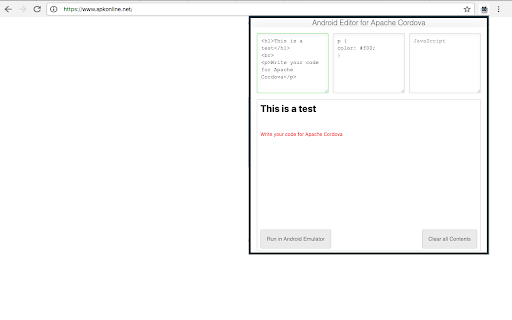


Editor to create Android Cordova app that are run with the ApkOnline android emulator platform This extension is an Android Cordova online editor that allows you to create Android applications online to be run on the android emulator ApkOnline. The extension provides an HTML text area, a CSS text area, and a JavaSCript text area to build your Android Cordova application. These text areas can be edited and any change appear automatically in a preview area that shows the final composition of the application that will be created using HTML, JS and CSS. You must take into account that Cordova Android is an Android application library that allows you to create Cordova-based projects for the Android platform. Cordova-based applications are essentially applications written with web technology: HTML, CSS, and JavaScript. Note that Apache Cordova allows software developers to create hybrid web applications for mobile devices using CSS3, HTML5, and JavaScript, rather than relying on platform-specific APIs such as Android. In fact, it allows you to complete the CSS, HTML and JavaScript code. It extends the functionality of HTML and JavaScript to work with the device. The resulting applications are hybrid, which means that they are neither truly native mobile applications nor purely web-based. They are not native because all design rendering is done through web views rather than the platform's native UI framework. They are not web applications because they are packaged as applications for distribution and have access to native device APIs. With this extension, you do not need to install Android Studio to work due to the fact that Apache Cordova (formerly PhoneGap) is a mobile app development framework that can be used with any Android IDE. Watch our video to know how to use our extension.

DraStic DS Emulator Apk PC [Guide]
DraStic DS Emulator Apk is available in the chrome web store just install it and learn how you use it on pc. DraStic DS Emulator Apk is available in the chrome web store just install it and learn how you use it on pc. DraStic DS Emulator Apk is the ultimate android emulator used for playing the Nintendo games on your android phone. This is the guide extension, if you install it and you learn about its app and also learn how you use it on PC. 1. Firstly click on "Add To Chrome" button. 2. After download, just click on Extension Icon. 3. You see pop-up menu, where you learn about DraStic DS Emulator. 4. Lets Enjoy

PPSSPP Gold
PPSSPP Gold is an emulator for Android users. an emulator is a type of application that could run the application of other formats. Well, an emulator is a type of application that could run the application of other formats. For example, if you want to play game on a PC, you have to install an emulator because Android games are not supported on PCs. Just like that, it is an emulator that is capable of playing PlayStation games on Android phones. The previous version, which is ppsspp blue, has some limitations, and to fulfill that, the owner of ppsspp introduced PPSSPP GOLD. How You Use:- 1. Firstly Click on "Add To Chrome" Button and install it. 2. After Install you need to click Icon on "Bookmark Bar". 3. After Open you see content about How you use. 4. Lets Enjoy :)

Toolbox for Google Play Store™
Enhances the Google Play Store™ with various features. Toolbox for Google Play Store™ (TGPS) has the following features: 1. APKMirror, Android Police, and Appbrain buttons are added to all Play Store app pages. All the buttons are optional and can be toggled from the settings. 2. Beta status button. TGPS will tell you if an app you're looking at offers a beta program and whether you're part of the beta. Just like before, this function is optional and can be disabled in the settings. 3. Screenshot enhancements. TGPS adds a horizontal scrollbar to the screenshot gallery on app pages. 4. Language/region picker. This adds dropdown menus to the Play Store for changing the current display language and country/region, allowing you to check international prices and other information. The extension was developed by the team at AndroidPolice.com and APKMirror.com. 3.0.2 - Fixed extension buttons not appearing due to Google Play website changes. 3.0/3.0.1 - Manifest v3 support to comply with Chrome Web Store requirements. - Extension settings now sync across devices logged into the same Google account. - Quickly open extension settings by clicking the extension button. - Fixed toolbox buttons on the new Play Store layout. - Fixed an elusive bug which sometimes displayed the wrong buttons on the Play Store when using the back/forward buttons. 2.9 - Added support for new Play Store design. - Fixed duplicate language/location dropdowns. - Fixed Firefox for Android support. 2.8 - Added new dropdown menus for changing the current language and Play Store region (helpful for checking international pricing). - Added download count to APKMirror button. - Fixed bug where using arrow key on screenshot gallery would skip screenshots. 2.7/2.7.1 - APKMirror button now shows latest version on hover. - The buttons now show up lower to avoid shifting Google's own buttons ("Install," "Pre-register," etc). - Google changed the Play Store, which broke our buttons. That's fixed now. - Fixed bug where buttons would sometimes not appear on app listings. 2.6 - Fixed a bug where the Play Store Wishlist button would become hidden. - Fixed a bug where buttons sometimes wouldn’t appear on Firefox for Android. - Fixed a bug where Join Beta button wouldn’t work in non-English languages. - Fixed a bug where buttons would sometimes load in the wrong place or would be misaligned. 2.5 - The toolbar settings popup has been removed. Toolbox settings are still available from your browser's extensions/add-ons page. - Fixed a bug where the app page buttons wouldn't display in some circumstances. - Fixed a bug where the screenshot gallery features stopped working. - Fixed a bug where the APKMirror button didn't work properly on newer versions of Chrome (v73.0.3666.0+). - Performance has been improved. 2.3 - Added scrollbar to screenshot gallery on app pages. - Keyboard left/right keys can now be used to scroll through app screenshots in full-screen mode. 2.2 - Added compatibility with new Play Store design. - Updated buttons (specifically, beta info now shows up as a button too). - Beta program info now appears on pre-registration apps. - Behind-the-scenes performance improvements. 2.0: - New design for settings page. - Now works on mobile Play Store site. - APKMirror button now turns gray if the app has not been uploaded. - Improved support for Firefox on Android. - Background process no longer runs when Play Store page is not open (Chrome and Opera only). - Removed Ampersand fix because Google fixed the bug. - Various other bug fixes and minor improvements. 1.1: - Added support for Firefox and Opera (respective extensions are not live yet). - Added various tweaks to improve performance, especially on page load. - Fixed bug for authuser being read as null. - Fixed bug where the content script would run on testing program pages. - Fixed duplicate beta messages on app listings when user is already enrolled in beta program. - Fixed bug where buttons would sometimes cover text on app listings. 1.0.11: - The top entry when right-clicking the extension button no longer links to apkmirror.com. Instead, it now links to the extension page. 1.0.10: - Fixed bug where buttons would randomly not get inserted into Play Store pages. - Fixed bug where the app info layout would break in some languages. 1.0.9: - Fixed beta program spinner for Play Stores with languages other than English.

Fedora free online linux server
Run the Linux Fedora, RedHat, RHEL, CentOS, Oracle Linux, Open SUSE and Mandriva from the OnWorks free servers hosting provider This extension is a file manager integration to import and export your desktop files into the Fedora linux server provided by the OnWorks free hosting provider. It also allows to import files detected as links by Google Chrome. Users should install this extension in order to import and export their files in their OnWorks Fedora linux online workstation.
