
ebbhbklppdcgmlhfckcnpbjnmocdnomp
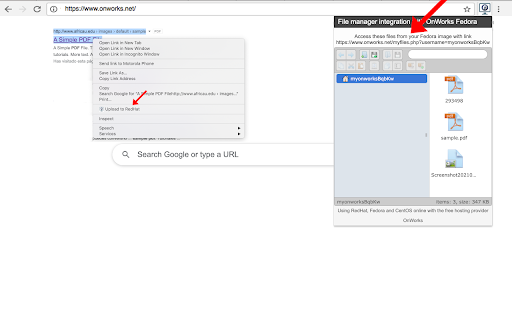
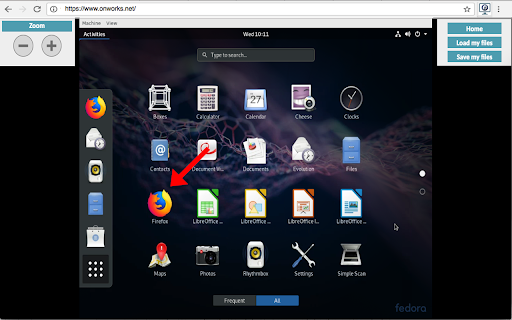

Run the Linux Fedora, RedHat, RHEL, CentOS, Oracle Linux, Open SUSE and Mandriva from the OnWorks free servers hosting provider This extension is a file manager integration to import and export your desktop files into the Fedora linux server provided by the OnWorks free hosting provider. It also allows to import files detected as links by Google Chrome. Users should install this extension in order to import and export their files in their OnWorks Fedora linux online workstation.

StackTab
Increase your dev productivity with access to websites, tools, resources, and shortcuts, including a terminal with easter eggs! StackTab is a 'new tab' chrome extension designed to increase the productivity of developers by ensuring access to websites, tools, resources, and time-saving shortcuts. It includes a command line terminal featuring bookmarks, tab management, custom actions, and Easter Eggs! GET IN TOUCH Email us at help@stacktab.io we would love to hear your suggestions and comments.

WebTerminal
A browser terminal designed for programmers, you can use the command line to control the browser, it is small, and very beautiful. This terminal can help you to do some automated tasks on the page, such as regularly log in to a website, and then do some automated operations, of course, you can also quickly use the search engine, json engine, translation engine, curl, etc., everything is just the beginning, We hope to bring more surprises to you.

GLaunch
GLaunch is a simple tool which provides a popup panel linking to various Google services - Chrome Extension. GLaunch is a simple extension that provide a popup link panel to numerous Google services. Services can be quickly filtered by typing the name of the desired service name. GLaunch can be used as your new tab page, opened as a new tab or standalone window along side the Chrome extension panel. Features: - Improved Material based Design. - Quickly search and find Google Services (+ Quick actions to common functions). - Ability to add custom links. - Filters services as you type. - Links open in a new tab (+ Incognito window support). - Open with Key binding (CTRL + SHIFT + Y) or customise to your own preference. - Discover Google Services you did not know existed! - Right click context menu based quick searches for Google Maps and YouTube. - Select & Search; you can use GLaunch to highlight an address and right click to search Google Maps. - Select & Search; You can also highlight sentences and search Youtube for videos. Please note that the icons used to represent each service are the official icons by Google they were sourced from the service itself. Any of the trademarks, service marks, collective marks, design rights or similar rights that are shown, mentioned or cited on the extension are the property of their respective owners and not of Integrated Brands, its contributors or visitors. The word mark, "Google" and the logo, and any associated service logos are copyright. The copyright is held by Google.

Wine online for Winapps
Run win-application software and win-computer games with a Wine online platform Wine online is an extension that provides a method for running Wine-based applications within the web browser. Our Wine is an open-source compatibility layer that allows users to run Windows applications online. It provides a powerful solution for running Windows software seamlessly on non-Windows platforms, expanding the availability of various applications to a wider user base. In fact, it has some of them preinstalled by default: a file explorer, win console, task manager and notepad. This extension acts as a bridge between Wine and the web browser. By leveraging the capabilities of Q4Wine, a popular management tool for Wine, users can run Windows applications online and effortlessly configure and manage their Wine environments directly from their web browser. Q4Wine is a graphical user interface (GUI) for managing Wine software. It provides a range of features including bottle management, application configuration, and advanced settings for Wine environments. With the integration of Q4Wine into the web browser, users can take advantage of these features without the need to navigate away from their web browser. 1. Seamless Integration: The extension seamlessly integrates Wine software into the web browser, allowing users to run Windows applications online without leaving their preferred browsing environment. 2. Q4Wine Management: Utilizing the capabilities of Q4Wine, users can easily configure and manage Wine environments through a user-friendly interface within the extension. 3. Application Compatibility: The extension enhances compatibility by providing an optimized environment for running various Windows applications online smoothly on supported operating systems. 4. Streamlined Experience: Users no longer need to switch between multiple applications or operating systems. The extension offers a unified platform for both browsing and running Windows applications. 5. Default Win apps installed are File explorer, notepad, win console, … but it also includes a Windows installer application to install any you can download from the Internet. We believe that this extension benefits users who rely on Wine for accessing Windows applications on non-Windows systems. By combining the power of Wine with the convenience of Q4Wine management through a web browser, users can enjoy a seamless experience without compromising on functionality or compatibility.
