
djnneaagmekpmmbmeicecdkgcnkcnhle

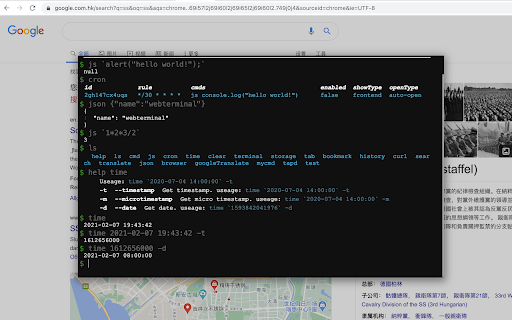


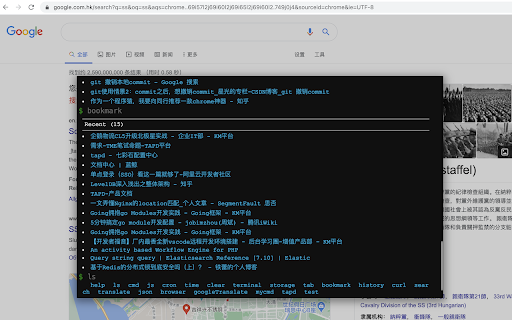
A browser terminal designed for programmers, you can use the command line to control the browser, it is small, and very beautiful. This terminal can help you to do some automated tasks on the page, such as regularly log in to a website, and then do some automated operations, of course, you can also quickly use the search engine, json engine, translation engine, curl, etc., everything is just the beginning, We hope to bring more surprises to you.

5250 Web Terminal Add-on
Browser extension for Green Screens 5250 Web Terminal to improve user experience by enabling local user settings. Green Screens Web Terminal Plugin enable terminal macros and user based UI customization. This extension is not a web terminal itself. It is add-on to store and keep user preferences across browser cache cleanup.

Secure Shell
Terminal emulator and SSH and SFTP client. This is the development version of the Secure Shell extension. It contains fixes & features that may not yet be available in the stable version. Use it at your own risk. If you're not comfortable running lightly tested code then install the stable version instead: https://chrome.google.com/webstore/detail/iodihamcpbpeioajjeobimgagajmlibd Please read the FAQ, available here: https://hterm.org/x/ssh/faq. You can also exchange feedback in the chromium-hterm mailing list, available here: https://hterm.org/x/ssh/contact. The changelog is available here: https://hterm.org/x/ssh/changelog

StackTab
Increase your dev productivity with access to websites, tools, resources, and shortcuts, including a terminal with easter eggs! StackTab is a 'new tab' chrome extension designed to increase the productivity of developers by ensuring access to websites, tools, resources, and time-saving shortcuts. It includes a command line terminal featuring bookmarks, tab management, custom actions, and Easter Eggs! GET IN TOUCH Email us at help@stacktab.io we would love to hear your suggestions and comments.

Secure Shell
Terminal emulator and SSH and SFTP client. Secure Shell is an xterm-compatible terminal emulator and stand-alone ssh client for Chrome. It uses Native-Client to connect directly to ssh servers without the need for external proxies. A SFTP command line client is included. On ChromeOS, you can create SFTP mounts and access them from the Files app! It has been well tested for a couple of years. Please read the FAQ, available here: https://hterm.org/x/ssh/faq. You can also exchange feedback in the chromium-hterm mailing list, available here: https://hterm.org/x/ssh/contact. The changelog is available here: https://hterm.org/x/ssh/changelog
