
lmdnefllhiljfomcenmaojglalglejfo
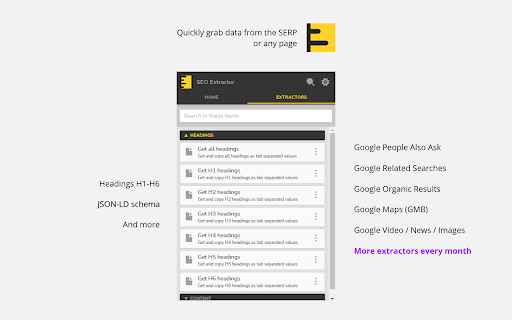
Tools to extract and analyze SEO data Update: This extension has not been updated lately. Grab SEO data quickly, right on your browser with the SEO Extractor. * Extracto SERP data like organic results or PAA * Extract headings, links, image URLS, etc. * Grab Wikipedia common terms * Grab common terms from any page * Much more

SERP Snippet Extractor by searchanalyzer.io
Extract Google search results with just one click. The perfect plugin for snippet optimization & Offpage SEO. Effortlessly Extract & Analyze Google Search Results! 🚀 Looking for a fast, easy way to extract Google’s search results? SERP Snippet Extractor makes it simple! ✅ One-click extraction – Instantly grab all organic search results from Google ✅ Comprehensive data – Extract titles, descriptions, structured data (Rich Results), SERP features, exact 🖥️ pixel position ("pixelrank"), snippet height and more ✅ Optimize faster – Easily analyze and fine-tune your SERP snippets How It Works: 1️⃣ Search on Google – Use your preferred User-Agent (Desktop/Mobile results) 2️⃣ Click the extension icon – Extract organic rankings instantly 3️⃣ Paste the data – Export to a spreadsheet for easy analysis Perfect for SEO professionals, content marketers, and digital analysts who want to streamline SERP analysis and snippet optimization. 🚀 Install SERP Snippet Extractor now and supercharge your SEO workflow! Find more information on https://www.searchanalyzer.io/serp-snippet-extractor-browser-extension/installed

Schema Builder for Structured Data
Easily build validated json-ld structured data markup for any webpage. Based on schema.org specification Generating structured data markup for your webpages doesn't have to be hard! No more having to learn each Schema type, which elements are required vs. recommended or worrying about errors and issues. Schema.dev's Schema Builder makes it as simple as point and click to generate the perfect JSON-LD structured data for dozens of Google supported Schema types! and all for FREE! ============================================= Be sure to view the initial training video for fastest time to value. https://videos.seoclarity.net/video/kazj73n005plxgv61 ============================================= Simply enable the plugin, choose the schema markup you'd like to add and then populate the form using the point and click capabilities or manual input. Already have schema markup on your webpages? The built-in Schema testing tool helps validate your schema markup and shows errors and warnings. Key Features - Updated March 2nd, 2025 ================================== + NEW! Support for Vehicle Listing Markup + Support for 20+ Schema types - including ALL Google supported markups + Automatic detection of existing structured data + Point-and-click ease to populate schema fields + Intuitive UI that guides you through required, recommended and optional elements for each schema + Structured Data Testing capabilities built in for any schema markup generated + Intuitive UI to guide through required, recommended and optional elements NOTE: The plugin is in actively development - Join the forums at https://support.schema.dev for feedback, bugs and tips.

PageOptimizer Pro
The PageOptimizer Pro extension syncs with the on page SEO tool, PageOptimizer Pro This is the official Chrome Extension for PageOptimizer Pro. The extension serves two purposes: 1. The extension syncs with your PageOptimizer Pro account for faster processing and more accurate location results. 2. With this extension you can open your PageOptimizer Pro recommendations while editing your pages within your Page Builder or CMS. You can edit directly in most Wordpress Page Builders such as Elementor, Oxygen, and Thrive Architect, just to name a few. You can also edit directly in CMS's such as Wix, Shopify, Squarespace, and many more. The PageOptimizer Pro extension also works with Google Docs if that is where you manage your content. Additionally, you can give your content writers a secret key to access your recommendations without having to log into PageOptimizer Pro. To see the full list of compatible Page Builders and CMS's, please visit: https://pageoptimizer.pro/compatible-editors/ This extension is for paid users of PageOptimizer Pro. For more information on PageOptimizer Pro or to start your free trial, please visit: https://pageoptimizer.pro

PlePer Local SEO Tools
Useful shortcuts and quick analyzes for Local SEO`s The extension offers collection of tools and shortcuts for Local SEO's. With this extension you get detailed information for every google my business listing in Maps, Local Finder, Knowledge panel and making four different analysis based on maps search results. Listing details returned by the extension: Name / Address / Phone / All Categories / Verification status / Attributes / Coordinates / All important Google ID’s (CID, Place ID, Knowledge Graph ID) / Export function / Pin function / Links to popular business directories, search engines, different website analysis tools (Speed Test / Mobile Friendly Test / Whois information / Domain backlink analysis etc ). For US listing direct link to corespondig Secretary of state business lookup website. Four different analyzes when searching in Maps: - Categories - top categories used, average categories per listing, max categories per listing; - Reviews - average rating and reviews, maximum/minimum rating and reviews, listings without reviews; - Attributes - all the attributes used; - Business Hours - when business are open and the average business hours; Pin function - the listing information on any website with keyboard combination (CTRL + ALT + E). Easiest way to compare / enter data anywhere. The chrome extension is plug and play - no settings or configuration needed! Instructions: 1. Install the extension 2. Open in new tab google maps 3. Make a search and you will see the analyses. 4. Select any listing from the results and you will see the details.
