
lloccabjgblebdmncjndmiibianflabo
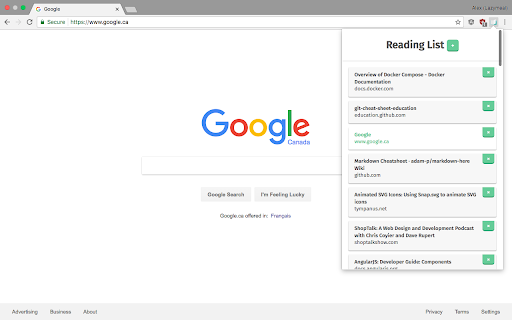
This extension saves a list of links to pages to read later. This reading list extension allows you to save pages in a list to get back to later. It’s super slick and easy to use, and it helps keep your tab count down. 1. Go to a page you want to save for later 2. Click the reading list icon on the top right of your browser Chrome Reading List icon 3. Click the + button 4. When you want to read a page you saved, open up the extension and click the reading item you want to read (control + click or command ⌘/windows key ⊞ + click to open the page in a new tab) 5. Done with a page? Click the × next to said page in your reading list, and it will magically vanish.

Reader View
Removes clutter like buttons, backgrounds, adjusts text size, contrast, and layout for better readability Reader View extension brings Mozilla's open-source Readability implantation to Chromium. Using this extension you can strip clutters from webpages and read them on "Reader View" mode. The extension allows you to toggle between normal view and reader view by pressing the page-action button. Note that reader view mode works best for web pages that have a lot of content. There are some tools in the left side panel that can help you personalize your Reader View. You can change color, background-color, font-size, font-family and width of the reader view. Features: -> Remove distraction -> Read in fullscreen mode -> Remove advertisements -> Save in HTML format -> Print document -> Read content using a powerful Text to Speech (TTS) engine -> Edit HTML content (live editor) -> Email document (with title, body, and reference to the original document) -> Correctly display mathematical formulas (MathJax equations are Supported) -> Highlight selected text -> Move to the next and previous pages -> Keyboard shortcuts for almost all actions -> Resize images on the design-mode -> Display DOI (Digital Object Identifier) details -> Display publish date -> Add persistent sticky notes -> Bionic Reading -> Adjust number of columns *** 0.6.x releases *** The extension is now running on manifest v3! Make sure you have the latest version of your browser to use this extension (The minimum acceptable Chrome version is 104). There are a few changes to make it compatible, so please report bugs if you see broken features. For more info please visit: https://github.com/rNeomy/reader-view/ Change Log: 0.1.3: Calling a reader view by restoring it from history will trigger history.back 0.1.4: A more visible icon. Fixes a reader bug. 0.1.5: It is now possible to toggle the reader view using keyboard shortcut (define one from Chrome's settings page) 0.2.1: Document parsing is improved. Switched to the latest Readibility.js library. Ctrl + S now saves the document same as pressing the "Save" button. Reader View now supports both rtl and ltr languages 0.2.2: It is now possible to select some content and ask the reader view to convert only the selected part. This is useful if the automatic selection tool is not detecting the content correctly. 0.2.4: Speech engine is added. You can now ask the extension to read the article for you. Estimated reading time is displayed below the article title

Bookmarkie - Bookmarks in popup
View and manage your bookmarks in a popup. Maybe the most beautifully designed popup bookmark you can ask for Chrome. View, organize or edit your bookmark within a popup menu. @Ztail, Daniel and Mirosław Żylewicz also contributed to this extension.

Just Read
A feature-packed, customizable reader extension. Just Read is a feature-packed and customizable reader view. With one click (or less!), you can remove distractions like: - The page's styling - Ads - Popups - Comments And read the article in a customizable, simplified format - like a read mode but better! Users can: - Summarize the article using AI. - Use the default white and dark themes. - Modify their theme using a graphical editor or CSS. - Use a theme someone else has made (found at https://goo.gl/Z59SM4 ). - Use their very own custom styling. - Auto-run the reader format on specific sites. - Auto-run summarization. - Use a keyboard shortcut to run the reader. - Print the custom-styled version of the article. - Use the selection mode to choose exactly which text they want to select for reading. - Use the deletion mode to remove any unwanted content after selection. - Edit incorrect meta information generated. - Control which options the reader uses. - Go straight to the next chapter from the reader view. Just Read Premium has even more features! - Permanently save the reader version of pages - Share the reader version of pages with others - Link directly to a section of the page within the shared reader view - Highlight and annotate pages - Add comments - Use a custom scrollbar - Auto-scroll the article - Apply domain-specific selectors, which give ultimate control to the content auto-selection Just Read collects zero data from users by default. If you sign up for an account, only your email address is stored. No analytics are sent to anyone else. Any data that is stored is safely secured and private. Just Read is completely open source and can be found on GitHub here https://github.com/ZachSaucier/Just-Read Please read the README in the GitHub link above for more details!

Bookmark Sidebar
Adds a toggleable sidebar with all your bookmarks at the edge of your browser window. This extensions allows you to access your bookmarks by clicking on the left or right side your screen. You can edit, delete or rearrange your bookmarks by drag&drop and view some information about them by just clicking them with your left mouse button. You can check your bookmarks for updated or broken urls, too. You can also open your bookmarks in the side panel provided by Chrome. The sidebar will then be opened alongside the websites and stays there as a permanent sidebar. You can also optionally use a New Tab Page with the bookmark sidebar that can be enabled in the settings. If you found a bug, have ideas for features or improvements, please let me know.
