
llllflgakifpdcmoanonghipldcpaggn

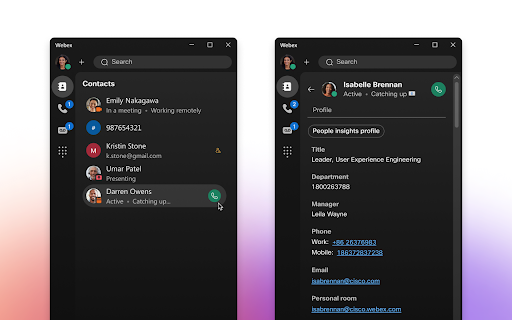
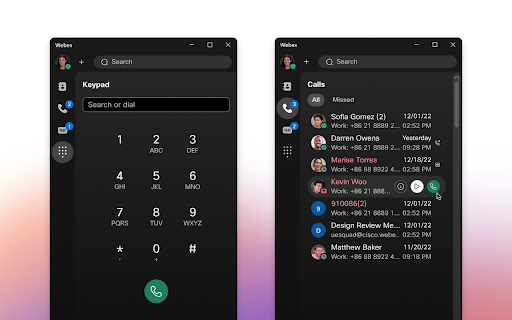

Rich enterprise calling features for Google Chrome Google Chrome users now have access to an enterprise-grade calling experience with the Webex Calling for Chrome extension. Tightly integrated with the Google Chrome experience, Webex Calling for Chrome provides immediate access to a comprehensive suite of enterprise calling features that fits seamlessly within your Google productivity workflow. Webex Calling for Chrome is powered by the Webex platform used by over 45 million people around the world, with service in more than 120 countries. Enterprise calling features: • Inbound and outbound calling • Mid-call features like hold, resume, call transfer, call waiting • Visual voicemail • Click to call phone numbers from a Chrome webpage • Detailed call and voicemail history • Enterprise directory search and single-sign-on • Presence indicators for contacts Highlights of Enterprise calling platform: • Proven cloud calling platform used by more than 45M people worldwide • Service available in over 120 countries • More than 20 integrated service provider partners • Option to bring your own carrier

Click-to-Call for Web and CRM
Click to Call dialing from web pages, integration with any softphone, screen pops in Salesforce and other CRMs Click-to-Call for Web and CRM, also known as Click2Call or Click-to-Dial, allows you to click phone numbers on any webpage and quickly make a call. The Click-to-Call for Web and CRM extension by Thirdlane transforms phone numbers on web pages into clickable links for easy dialing and integrates seamlessly with various CRMs and Service Desk applications. With the Click-to-Call for Web and CRM extension, you can: - Use Click-to-Call with or without Thirdlane Products. The extension works best with Thirdlane PBX or Thirdlane Multi-Tenant PBX when paired with the desktop version of Thirdlane Connect. When used with Thirdlane PBXs, it supports desk phones, mobile phones, and desktop softphones connected to your telephony server. You can also use the extension with any other compatible telephony system. - Streamline Click-to-Call functionality while working inside your CRM. Log in to your web-based CRM, and the extension will automatically identify callers or contacts during active calls. It displays contact or lead information (screen pop-ups) for enhanced productivity. - Use it with popular CRMs like Salesforce, Zoho, Zendesk, Freshdesk, and more. Don’t see your CRM? Let us know, and we’ll be happy to add support for it. - Easily add call notes to your CRM. Add notes for all incoming and outgoing calls directly from the extension, keeping your CRM updated effortlessly. - Combine Click-to-Call for Web and CRM with Thirdlane Connect. Use the extension for Click-to-Call functionality and Thirdlane Connect for voice and video calls, instant messaging, video conferencing, and CRM integration. Click-to-Call for Web and CRM offers seamless integration, flexibility, and efficiency, helping you save time and boost productivity. Whether you're using it for CRM workflows or general web dialing, this extension is your perfect companion.

SAML-tracer
A debugger for viewing SAML messages A tool for viewing SAML and WS-Federation messages sent through the browser during single sign-on and single logout.

Cisco In Product Support
This extension is compatible with Cisco product UIs and facilitates the establishment of a Cisco CX Point of Presence. Cisco Support Assistant (CSA) Extension aims to bring Cisco Support closer to the Cisco products and extend Cisco Technical Assistance Center (TAC) insights and expertise directly inside the Cisco product portals to create a frictionless self-support experience for our customers. Learn more at https://cs.co/extension.

Click to Dial Phone Number
A Chrome extension to send highlighted phone numbers to the dialing program. By James Fisher Click to Dial Phone Number Google Chrome Extension. The Click to Dial Phone Number Chrome extension offers a convenient solution for effortlessly dialing phone numbers found on web pages which aren't formatted as a hyperlinks and thus are not clickable. No longer do you need to manually copy and paste phone numbers into your dialing program. With this extension, simply highlight a phone number on any web page, right-click, and select "Dial Phone Number" from the context menu to instantly initiate a call using your preferred dialing program. Seamless Integration: Easily dial phone numbers found on any web page with a simple right-click. Quick and Easy: Eliminate the hassle of manually entering phone numbers by leveraging the extension's intuitive interface. Efficient Workflow: Streamline your workflow by saving time and effort when making calls from web pages. Enhance your browsing experience and productivity with the Click to Dial Phone Number Chrome extension. Say goodbye to tedious manual dialing and hello to effortless calling right from your browser.
