
cbjgpemimjmpbldgimfocbanmmkoefbi


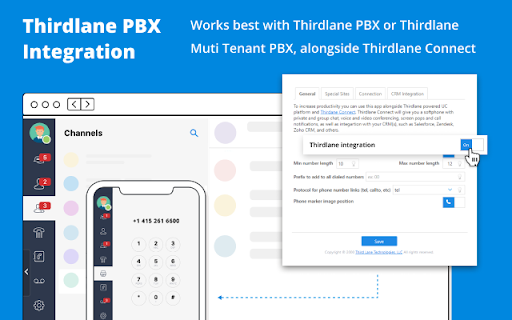

Click to Call dialing from web pages, integration with any softphone, screen pops in Salesforce and other CRMs Click-to-Call for Web and CRM, also known as Click2Call or Click-to-Dial, allows you to click phone numbers on any webpage and quickly make a call. The Click-to-Call for Web and CRM extension by Thirdlane transforms phone numbers on web pages into clickable links for easy dialing and integrates seamlessly with various CRMs and Service Desk applications. With the Click-to-Call for Web and CRM extension, you can: - Use Click-to-Call with or without Thirdlane Products. The extension works best with Thirdlane PBX or Thirdlane Multi-Tenant PBX when paired with the desktop version of Thirdlane Connect. When used with Thirdlane PBXs, it supports desk phones, mobile phones, and desktop softphones connected to your telephony server. You can also use the extension with any other compatible telephony system. - Streamline Click-to-Call functionality while working inside your CRM. Log in to your web-based CRM, and the extension will automatically identify callers or contacts during active calls. It displays contact or lead information (screen pop-ups) for enhanced productivity. - Use it with popular CRMs like Salesforce, Zoho, Zendesk, Freshdesk, and more. Don’t see your CRM? Let us know, and we’ll be happy to add support for it. - Easily add call notes to your CRM. Add notes for all incoming and outgoing calls directly from the extension, keeping your CRM updated effortlessly. - Combine Click-to-Call for Web and CRM with Thirdlane Connect. Use the extension for Click-to-Call functionality and Thirdlane Connect for voice and video calls, instant messaging, video conferencing, and CRM integration. Click-to-Call for Web and CRM offers seamless integration, flexibility, and efficiency, helping you save time and boost productivity. Whether you're using it for CRM workflows or general web dialing, this extension is your perfect companion.

Click to Dial
Make phone numbers on any page click to dial. You can dial a number directly from a web page by selecting it and right clicking it to make either a webrtc call or a call through your desktop sip phone

Llamada Web
Extensión para Google Chrome de Duocom para hacer llamadas web La extensión Llamada Web detecta los números de teléfono dentro de las páginas web y permite llamar directamente mediante la extensión; también puede desplegar un teléfono virtual en la extensión y llamar a cualquier número de teléfono. Incluye la posibilidad de grabar las llamadas (estas grabaciones se le enviarán al correo del cliente). Si tiene varios números de teléfono contratados en su cuenta de cliente puede cambiar la máscara de llamada (es el número de teléfono que ve la persona llamada). Para poder utilizar esta extensión debe ser cliente de Duocom; puede darse de alta en www.mioficinaweb.es Los pasos a seguir son: - Crear la cuenta de cliente. - Descargar la extensión. - Recargar el saldo de su cuenta. - Indicar desde que número quiere realizar las llamadas vía web.

Telephone Number Detection
This extension will update all telephone numbers on a page, with the ability to dial. Version 1.1.9: -------------- - Fixed: Failure to update page. - Fixed: Issue where text contained excessive whitespace. - Fixed: Updated Chrome API. Version 1.1.7: -------------- - Updated search patterns. - Options: Can select protocol type to use. (instead of just 'dial:') - Options: Option to replace existing clickable telephone numbers on web pages. - Paragraphs with multiple numbers no longer gets ignored. - Fixed issue where some sites break the phone icon transparency. Version 1.1.6: -------------- - Updated number detection. - Better Google Contacts Support*. (Note: Number invokes Google dialler, icon invokes your preferred dialler.) - Options panel: Set Min/Max number length.

Zoiper Click2Dial
Make phone numbers clickable and initiate calls from Zoiper. With the Zoiper Click2Dial extension, phone numbers on web pages become clickable. When you click to call a number, the extension will make the call from Zoiper. New and improved Click2Dial extension! Now features the following: Icon has quick option to enable/disable the extension on either entire website or just a page. Extensions settings: • Options to hide/show the Zoiper logo & country flag next to phone numbers • Region select – will help recognize numbers that are shown on web pages without prefix and country code. • Blacklist – to enable/disable the extension from working on specific website or page of your choice Additional features: New option in context menu "Dial with Zoiper": select any text or number in your website or CRM, right click and choose "Dial with Zoiper" and the call will be initiated by Zoiper. Important: Click2Dial extension works only with an official paid license of Zoiper. You can obtain one here: https://www.zoiper.com/en/shop/buy/zoiper5?ftr=C2D
