
jakahgbcggmbjgkfjghonlokknhkdfeg

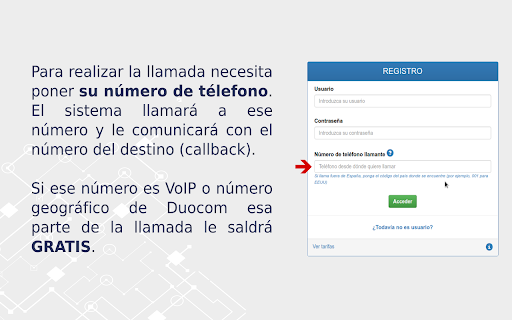
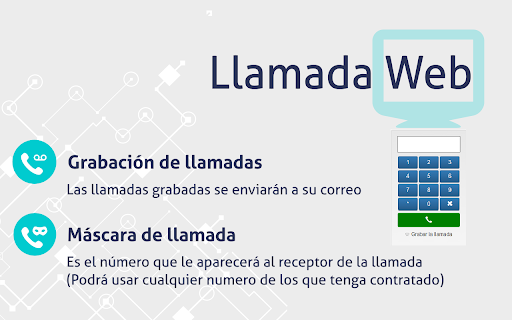
Extensión para Google Chrome de Duocom para hacer llamadas web La extensión Llamada Web detecta los números de teléfono dentro de las páginas web y permite llamar directamente mediante la extensión; también puede desplegar un teléfono virtual en la extensión y llamar a cualquier número de teléfono. Incluye la posibilidad de grabar las llamadas (estas grabaciones se le enviarán al correo del cliente). Si tiene varios números de teléfono contratados en su cuenta de cliente puede cambiar la máscara de llamada (es el número de teléfono que ve la persona llamada). Para poder utilizar esta extensión debe ser cliente de Duocom; puede darse de alta en www.mioficinaweb.es Los pasos a seguir son: - Crear la cuenta de cliente. - Descargar la extensión. - Recargar el saldo de su cuenta. - Indicar desde que número quiere realizar las llamadas vía web.

Click to call Zadarma
Zadarma WebRTC extension for calls from the browser. Zadarma Click to Call extension allows to make calls straight from the browser. Zadarma users can call any number without a hustle - simply click on a number and make a call. You can use Click to Call to make a call, instead of reaching for your phone. Using the Chrome extension allows you to continue browsing through the website without dropping a call. The extension finds phone numbers on the website. You can make a call by simply clicking a telephone icon or highlight the number and click on it using the right mouse button. You can also pull up a phone keypad by clicking the extension icon. All calls made using the extension and are included in PBX statistics and integrated CRM systems. The Click to Call extension is especially convenient when working with CRM/helpdesk and similar systems.

Phone-C
Manage your calls from your computer in the office and outside the office. Phone-C is an application that integrates your company's phone extension into your browser (Chrome or Edge). With Phone-C you will have a communication and collaboration tool that will allow you not only to receive and make calls from your computer, but also to transform calls into video calls during the conversation, with a single click and without the need to install any additional application. FEATURED FEATURES: • Manage your business calls from your computer anywhere • Turn calls into video calls with a single click • Can be accessed directly from your Microsoft or Google email account WHAT ELSE PHONE-C CAN DO: • Single phonebook (Google or Outlook contacts and PBX directory) with caller identification. • Monitor the status of the PBX extensions • View a single record of all calls from the extension • You can transfer calls, make conferences or even record them • If you are unable to answer the call, a voice-over will alert the caller that you will call them back later and the application will create a reminder in your calendar • Share your screen and make presentations while you are on the phone • If you use Phone-C with Gmail, you can manage your calls directly from within your email Phone-C is available for Gamma's Centrex virtual PBX service. www.gammacom.es/work/

InTouchApp Phone Contacts & Data Saver
Save unknown numbers & other data from WhatsApp, LinkedIn, Gmail to your phone instantly. Make phone call from web + much more! InTouchApp for Chrome connects the web to your phone! It helps you save unknown numbers & other data from chat apps (WhatsApp, etc.), LinkedIn, Gmail, or any other website to your phone contacts instantly. In addition, you can easily call any number you see on a website with just a click. See a nice photo of one of your contacts? Just right click and instantly save it as their profile pic! Why save to phone contacts?: It makes it easy to communicate with a person via phone call, text message (SMS), WhatsApp, Telegram, InTouchApp, Messenger or any other app that works off your phone contacts. WhatsApp Tip: If you get enquiries from customers on WhatsApp, they show up as "unknown numbers". With InTouchApp add-on, you can easily save all these numbers to your phone contacts with one click! Save time and effort and build your customer database properly. Every customer counts! Do not miss! KEY FEATURES: - WhatsApp Web: Save all unknown numbers from incoming chats to phone contacts with one click - WhatsApp Web: Save all unknown contacts from groups to phone contacts with one click - WhatsApp Web: Save profile pictures to phone contacts - GMail: Save any sender as phone contact - LinkedIn: Save contact info on a profile to phone contact including photo, company, title, etc. - Right click on any image and set as profile picture for the contact - Select a number and make calls directly via your mobile phone - Select any text and add as a phone contact - Add contacts to your phone from the comfort of your PC or Mac FEATURES (Coming Soon): - Save data from websites into a private space on your phone for quick access on the go - Share content from websites directly with your contacts - Your Idea! (Got a neat idea to make this even more useful? write to us at support@intouchapp.com - we are all ears!) GETTING STARTED: Install InTouchApp on your mobile phone from your phone's app store (available for Android, iPhone, Windows Phone, Blackberry, etc.), or by visiting intouchapp.com from your phone. ABOUT INTOUCHAPP: Your phone contacts is your most important network - InTouchApp helps you build and maintain these contacts over time so you never lose touch or forget anyone! InTouchApp is a powerful, universal contacts manager that ensures you have a single, clean contact list accessible everywhere you need your contacts. ------------------------------------------ *LEGAL* ------------------------------------------ WhatsApp, GMail, LinkedIn are registered trademarks of respective companies in the U.S. and other countries. This add-on is an independent product developed by Volare Technologies Pvt Ltd and has no relationship to any of those companies.

Photo editor PhotoStudio for images
PhotoStudio to create and edit photos and images online PhotoStudio is a photo editor to modify any image, use your camera to take pictures, import them, and edit any kind of images and graphics. It provides a flexible area with a multitude of photo editing features, effects and filters. Moreover, it scans and collects the webpages you browse in the Internet. These webpages are uploaded to our servers in order to know if they contain image files that can be edited using our extension integrated with our online app. Its main features are: - Take pictures from your PC or laptop camera. - Import pictures to modify them. - Filters, which determine the atmosphere of pictures and help convey the right message for your creative. - Custom filters, that can be created by anyone using LUTs (Lookup Tables) from popular apps like Photoshop, GIMP or Lightroom. - Overlays, which can be used to create neat lighting effects such as lens flare, bokeh or light leaks. It can also be used to furnish pictures with textures like crumpled paper or plaster. - Adjustments like brightness, contrast or clarity so that users can tune their images and graphics to produce stunning creatives. - Transform effects like cropping, flipping and rotation operations. - Allow to quickly add text to any picture or creative. The corresponding font library can easily be exchanged, reduced, or expanded. - Provide Stickers. - Brush, which is optimized for touch screen interaction and supports different brush strokes that can be edited in terms of thickness and color. - Download or share the pictures modified. PhotoStudio is an adaptation of the IMGLY PhotoEditor to the RedcoolMedia platform. It is open source.
