
lkpknmgfopkjcpbgkkcnoolijfggioba

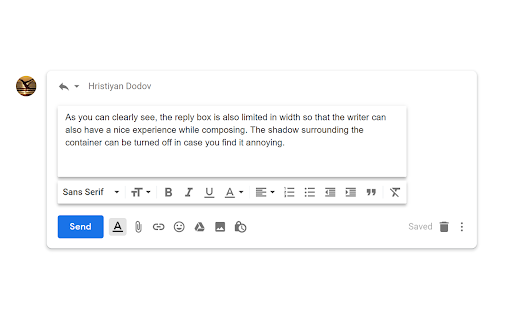
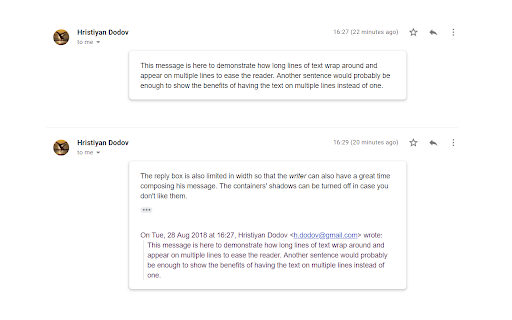
Improves the readibility of plain text Gmail messages by putting them in a neat container. Tired of the extremely long rows of text in Gmail? This extension will help! All plain text emails are put in a neat container where you can comfortably read them. In the meantime, HTML emails that are designed and have everything looking nice will be left unchanged. -------------------------- This extension will NOT modify the emails’ content! It will only change how you (and only you) see them. -------------------------- Customize the extension via the Options page!

Auto Expander for Gmail™
Do you often receive too long mails and you're tired of scrolling to the bottom to open the full mail? "[Message clipped] View entire message" is your foe? Look no further! This extension automatically expands the mails in Gmail™ for you (also works in the new re-designed Gmail!). Permissions: Rights to read from Gmail in order to expand the mail. No data collected.

Gmail Inline Image Fit
Get rid of that nasty horizontal scrolling, with inline images fitting Gmail's message area. [[ Abandoned project / open to contributions ]] There has been ages that I don't work in companies that send nasty emails which need fixing by this extension, and thus I stopped following the Gmail changes. Every now and then, someone sends an email with an issue, which unfortunately I don't have the time or will to fix. However, I'm still open to Pull Requests in the project's GitHub repo, so feel free to collaborate! [[ Description ]] Ever complained about the horizontal scrolling that large images create on Gmail messages? Like those screenshots your client sent you, or a fancy signature that's cool for their widescreen monitors, but not for your windowed view? This is a small extension that adds a slight rule so inline images will always fit in the message body. No need to keep scrolling back and forth to read any paragraph. Gmail already provides a lightbox with an enlarged view of pictures, so you can use it as usual to view the complete image :)

inboxy: Inbox Bundles for Gmail
inboxy makes it easier to manage your inbox, by bringing Google Inbox bundles to Gmail. inboxy bundles together emails that share the same labels. To get started with bundling, simply create filters to apply labels to incoming emails. HIGHLIGHTS - Messages with the same label are bundled together in your inbox - Archive all bundled messages on the current page quickly - Use email filters to bundle messages automatically - Star a message to pin it outside of its bundle - Intuitive date headings - Supports light and dark themes PRIVACY & SECURITY inboxy is a lightweight visual layer over Gmail, and it uses Javascript and CSS to draw bundles. With the default settings, inboxy does not handle any personal/sensitive data. In addition, inboxy is open-source, and all code is available on Github. However, if you choose to customize your extension settings, inboxy uses the Chrome Storage Sync API to sync settings to browsers that you're logged into. For further details, see the privacy policy at https://www.inboxymail.com#privacy-policy. HAVE FEEDBACK? Post issues to the Github repo at https://github.com/teresa-ou/inboxy/issues. Visit https://www.inboxymail.com for more info.

Gmail - Reply at the TOP
Move the reply/compose box to the top of conversation thread. Allows you to refer the latest response as you compose the reply. If you are frustrated of scrolling up and down while composing your email replies in Gmail, THIS IS THE EXTENSION YOU NEED! This will move the reply/compose box from the bottom of the page to the top of the page. You can now see the latest email in the thread as you type, without have to scroll up and down. This is especially loved by Outlook users who are used to the reverse chronological view. I developed this after I could not find any solution. After using it for a while, I have noticed a significant boost in email productivity ... no more scrolling for those long conversation threads! NOTE: Refresh/reopen the Gmail tab for the extension to start working.
