
clahkkinbdcdnogkkgmacmiknnamahha


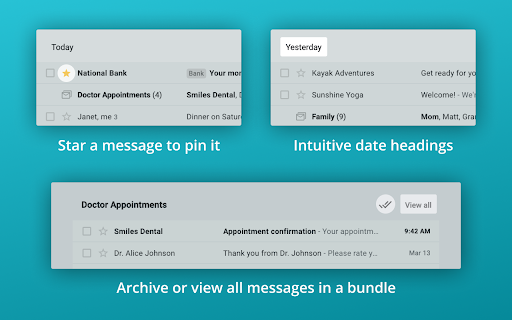
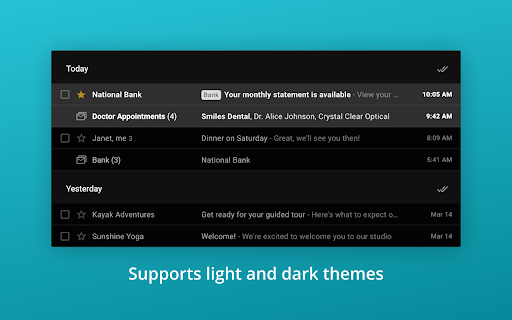
inboxy makes it easier to manage your inbox, by bringing Google Inbox bundles to Gmail. inboxy bundles together emails that share the same labels. To get started with bundling, simply create filters to apply labels to incoming emails. HIGHLIGHTS - Messages with the same label are bundled together in your inbox - Archive all bundled messages on the current page quickly - Use email filters to bundle messages automatically - Star a message to pin it outside of its bundle - Intuitive date headings - Supports light and dark themes PRIVACY & SECURITY inboxy is a lightweight visual layer over Gmail, and it uses Javascript and CSS to draw bundles. With the default settings, inboxy does not handle any personal/sensitive data. In addition, inboxy is open-source, and all code is available on Github. However, if you choose to customize your extension settings, inboxy uses the Chrome Storage Sync API to sync settings to browsers that you're logged into. For further details, see the privacy policy at https://www.inboxymail.com#privacy-policy. HAVE FEEDBACK? Post issues to the Github repo at https://github.com/teresa-ou/inboxy/issues. Visit https://www.inboxymail.com for more info.

Better Gmail Buttons
Improve the usability of the Gmail buttons. Avoid marking valid email as spam by mistake, since Gmail fails to distinguish those two Gmails buttons are all visually identical, which makes it too easy to hit the wrong one. Frustrated by the number of times I hit the SPAM-button rather than the DELETE-button as intended, I made this light weight Chrome extension to make the buttons easier to distinguish.

Sender Icons for Gmail™
Add a sender icon for all emails in your Gmail inbox. Sender Icons for Gmail™ is an extension that lets you easily add icons for individual emails (based on the sender's address) in the Gmail inbox. Simply add the addon to your browser and open or reload your Gmail inbox. You will see an icon next to the - subject - column for each email. The icon is derived from the email's domain address. Please note that icons are set to be 16 pixels in width and height. To change the icon size to 32 pixels, please visit the extension options page. Note: to hide icons, please press on the toolbar button once to disable the addon, then reload the Gmail tab. Important note: Sender Icons for Gmail™ add-on does NOT belong or relate to Google Inc at all. It is an unofficial extension that is developed and maintained independently by its author. Gmail™ is a registered trademark of Google Inc. If you see any bug(s) or have a feature request, please fill out the bug report form on the addon's homepage (https://mybrowseraddon.com/sender-icons-for-gmail.html).

Gmail Tabs by cloudHQ
Which can be time-consuming when scrolling through your labels in order to find the one you want. Cut the time you spend sorting through Gmail labels with our newest (and free!) email productivity tool, Gmail Tabs! Gmail Tabs lets you customize Gmail to give you clear visibility (and easy access) to: - Your favorite Gmail Labels - Common Gmail search queries, like: receipts with attachments, or emails from your customers or boss Key features: ✅ Add any query as a tab in Gmail ✅ Add tab with all emails in a label ✅ Add tab with all emails in a label and sublabels ✅ Change font color of your tabs ✅ Change background color of your tabs ✅ Modify tabs descriptions and queries Try it today, and start working smarter to save more time. 1) Install the extension. 2) Select a label or enter a search query 3) If you selected the label, in label menu select "Add to tabs" or "Add to tabs (including sublabels)" 4) If you entered the query, click on the "Add to tabs" button cloudHQ. Helping your productivity, 1 click at a time. Website: https://www.gmailtabs.com/ Pricing: https://www.gmailtabs.com/pricing Support page: https://support.cloudhq.net/category/browser-extensions/gmail-tabs/ Blog: https://blog.cloudhq.net

Neat Messages for Gmail
Improves the readibility of plain text Gmail messages by putting them in a neat container. Tired of the extremely long rows of text in Gmail? This extension will help! All plain text emails are put in a neat container where you can comfortably read them. In the meantime, HTML emails that are designed and have everything looking nice will be left unchanged. -------------------------- This extension will NOT modify the emails’ content! It will only change how you (and only you) see them. -------------------------- Customize the extension via the Options page!
