
lkjogeoldakjceempbkdahkojohmbaja

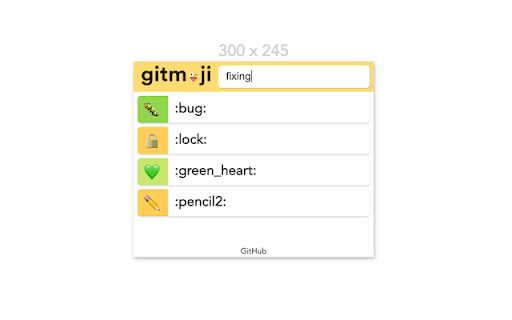
The Gitmoji extension to easily search and copy gitmojis 😜 This extension allow to easily search the gitmoji you want to use and then copy its shortcode or the emoji in your clipboard. Lean more about the features on https://github.com/johannchopin/gitmoji-browser-extension

Material Icons for GitHub
Material icons for the file browser of popular websites like GitHub, Azure, Bitbucket etc. Replace GitHub's default icons with icons from Visual Studio Code's Material Icon Theme icons. Use the same icons on your code editor and on github.com, and quickly identify file types, configuration files and project scaffolding at a glance. This extension pull icons and replacement lists directly from the open source vscode extension https://github.com/material-extensions/vscode-material-icon-theme. This extension can replace icons on many other leading source control platforms. For bug reports, please open Issues on the extensions repository at https://github.com/material-extensions/material-icons-browser-extension Don't forget to star the github repository if you like the extension.

Superdense
Manage your bookmarks with ease. Linked to your Superdense account. No text, just icons. The most compact bookmark manager for all your browsers and devices. All your favorite sites are just 1 click away. Superdense means "of extremely great density and highly compact." That's precisely what we had in mind when building this tool to manage your web favorites. Superdense is no bookmark manager in the oldskool kind of way, as there are 99 tools available to store your long list of web URLs. Superdense is different, as it's optimized to display as many bookmarks as possible in the least amount of space by focussing on one key element: ✨ favicons ✨ If you're a bit like me, you probably have 20+ tabs open before you finished your first coffee in the morning. And how do you know what browser tab to click? That's right, the favicon. We created Superdense to bypass the limitations of the bookmarks bar with its single row of links. With Superdense, you can create multiple categories, add unlimited bookmarks, drag and drop to have the icons in your preferred order and be ready to make it another wonderful day with all your favs at the click of a button. No problem to store like 200 bookmarks and have them all above the fold. Don't mind a little scrolling: just keep adding categories and bookmarks, as many as you want. ⭐ What you can do with Superdense: ✅ Add unlimited bookmarks and categories 💻 Access your favorites in all your browsers on all devices ↔️ Drag and drop to organize bookmarks and categories 📣 Public profile: promote your portfolio sites and endorse the tools you use most often 🔐 Privacy settings: Mark categories as public or private to show or hide on your public page 👉 Upload custom icons ℹ️ Public Page bio & link 🎟 Invite team members (team plan or higher) 🎨 Themes for custom styling 🪧 Remove branding (company plan) 🌐 Custom domain (company plan) ⭐ Chrome Extension How to use the Chrome Extension to add bookmarks to your Superdense account: 1. Make sure you have your Superdense created and verified at app.superdense.com 2. Install the extension. 3. Simply pin the superdense extension and click on the icon on any page you wish to bookmark. 4. Select or create a new suitable category for your bookmark and save 5. Refresh your Superdense app page and voila! 6. With the extension installed, you can now open an entire category in a new tab group

Easy Extensions Manager
Simplify extension management. Enable, disable, and uninstall with ease. ⭐ Support us by giving a 5-star rating if you like Easy Extensions Manager! Your feedback matters to us, and we're eager to hear your thoughts. Feel free to share your ideas, and we'll do our best to implement them as soon as possible. Introducing Easy Extensions Manager: The Ultimate Extension Manager for Chrome Easy Extensions Manager is a powerful yet lightweight tool designed to help you take complete control over your browser's extensions. With a file size of only a few kilobytes, it's a nimble and efficient addition to your Chrome experience. 🌐 Features: - Manage with Ease: Easily enable, disable, or delete extensions with just one click. Say goodbye to clutter and make your browser light as a feather. - Search & Find: Quickly locate the extensions you need with our intuitive search feature. - One-Click Disable All: Want to disable everything at once? Use the 'Disable All' feature and don't worry about losing track. When you recall, only the extensions that were disabled using this feature will be re-enabled. - Performance Boost: Keep your computer running smoothly by turning off unnecessary extensions, preventing lags, and enhancing your browsing experience. - 100% Free: Enjoy all these features without any subscriptions or hidden fees. 🚀 Why Easy Extensions Manager? - Lightweight: Made with minimalism in mind, Easy Extensions Manager itself is lightweight, ensuring that your browser remains agile. - Time Saver: Managing extensions has never been quicker. With Easy Extensions Manager, time-consuming tasks are reduced to simple clicks. - Performance-Focused: Enhance your browser's performance by disabling or deleting extensions that are no longer needed. - User-Centric: We listen to your feedback and are committed to continuous improvements to make your experience even better. Easy Extensions Manager is more than just an extension manager; it's a must-have tool for anyone looking to keep their browser optimized and their computer's performance at its peak. Download now and discover the seamless browsing experience you deserve!

File Icons for GitHub and GitLab
A simple browser tool changes file's icon on GitHub, GitLab, gitea and gogs. On GitHub, no matter what kind of file is, their icons are all same. However, in your fancy editor, there are some packages which give every filetype an unique icon. Therefore, I build a simple extension to replace original file icon with filetype-specific icons. This improves visual recognition on GitHub, GitLab, etc. Hope you like it! **This extension is not a project of GitHub or any company**
