
lkinepihoopcnfblhbbmnjeohihijcla

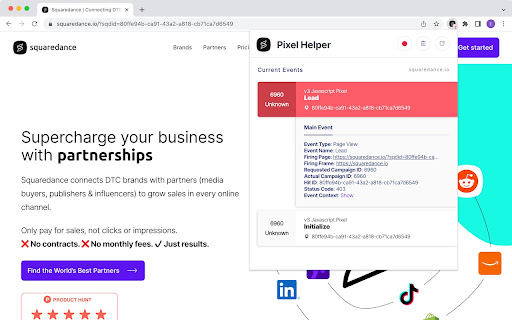
Squaredance Pixel Helper - A Chrome Extension Inspect and debug the events generated by the Squaredance Pixel

Reddit Pixel Helper
The Reddit Pixel Helper is a tool to QA your pixel implementation. While browsing any site, the extension badge will show the number of Reddit Pixel events firing on a page. Open the extension on any page with the pixel implemented to see which events are actively firing, identify any errors in their configuration, and get recommendations for fixing errors. Check out our Help Center for more info: https://advertising.reddithelp.com/en/categories/measurement/reddit-pixel-helper By using the Reddit Pixel Helper you agree to the Reddit Advertising Platform Terms: https://advertising.reddithelp.com/en/categories/policy-guidelines/advertising-terms-ads-platform

Screen Ruler
Use screen ruler for Chrome measure pixels on screen and as browser plugin. Get pixel ruler extension for website page dimensions. The ultimate page ruler chrome extension made for designers and developers. Whether you're building responsive interfaces or checking layouts, it streamlines your workflow. Quickly measure any digital component by px ruler on screen with professional precision. 📌 Key Advantages You'll Get 1️⃣ Compatible with any web page. 2️⃣ Keyboard shortcuts for actions. 3️⃣ Intuitive interface for your work. Get the data you need with our CSS ruler screen, designed for modern web development. It adapts seamlessly to different resolutions. Switch between modes instantly. 1. Drag-and-drop positioning for exact placement. 2. Customizable colors and transparency settings. 3. Keep the measuring area locked while scrolling. 4. Configurable alignment guides for consistency. 5. High performance across open browser pages. 💡 Perfect for Design Teams The Chrome ruler for screen saves valuable time when comparing mockups with live implementations. It helps you inspect spacing, margins, and proportions effortlessly to ensure your designs match specifications perfectly. 🔑 Use Cases for On Screen Ruler App 🎨 Instant Results You Need Work on pages with confidence using our chrome screen ruler that provides real-time feedback. And also analyze complex layouts. Help is always there. 🔆 Highlights of On Screen Ruler Pixels 🔸 Fully adjustable grid overlays for all verification. 🔸 Perfect accuracy for professional page projects. 🔸 Optimized performance with minimal resources. Transform your design process on screen ruler chrome functionality. Flexible configuration options let you adapt to match your workflow requirements. 🛠️ What's Inside Chrome Extension ➤ Full zoom support for high-DPI displays. ➤ Quick settings reset and save options. ➤ Lightweight code for instant app loading. ➤ Seamless integration with all web pages. ➤ Built-in help tips for users quick learning. The screen pixel ruler requires no third-party software installation. Measure layouts directly within your development environment. 1️⃣ Zero data collection — complete privacy protection for your professional work. 2️⃣ Page grid overlays help maintain consistent spacing throughout your projects. 3️⃣ Functions perfectly online without compromising pixel measurement accuracy. Standardize your design verification process across teams with pixel measure website capabilities. Ensure every component matches your specifications and maintains visual consistency using Chrome extension page ruler. 🍹 Drawing and Hover Options Enable screen ruler extension with two powerful techniques. Outline any area and pixel dimensions appear instantly. Q: What makes a screen ruler website different from desktop tools? A: It runs directly in your browser without any downloads or installations. Q: How does it compare to a typical addon? A: It offers advanced features like page grid overlays and other. Q: Does it support pixel measuring for responsive sites? A: Yes, with real-time accuracy down to 1-pixel precision across all sizes. 💎 Complete Page Layout Control Designers and developers can pixel measure website to their original plan and ensure brand consistency. You will receive regular updates for stability and page performance inside the screen ruler plugin chrome. ✅ Extension Components 📸 Showing the exact cursor position. 📸 Floating toolbar to access anywhere. 📸 Pause mode for page interaction. Teams rely on digital ruler on screen to catch alignment issues before they reach production. This speeds up client approvals and reduces revision cycles. ✏️ Works on Any Site with the Screen Ruler Chrome Extension ● Remains stable on infinite scroll and lazy-loaded pixel content. ● Supports right-to-left (RTL) layouts for international projects. ● Customize colors and opacity on screen rule for good visibility. ● Maintains accuracy on pages with transforms and animations. Screen ruler addon chrome transforms your workflow because it is a professional tool that brings precision to every project. Whether you're debugging or conducting reviews, app with pixel accuracy you can trust. Install now and experience the difference.

Voxels - The Pixels Extension
The Pixels Extension is a tool made for every pixels enthusiast. Essential and easy to use for every Web3 Gamer. NEW - Voxels V5.1.0 📚 Multi-Search - Use Industry Search to look up multiple Industries in 1 search 📦 Bundled Timers - Easily cycle through your timers and see all in a glance + QoL (Merchant Ship stats now with raw material cost) V5.1.1 - Menu remains visible on overlay toggle Voxels V5.0.8 🛠️ QoL Updates - Back button on market page, Surplus percentage per land, Arrows for timers (+ houses) + New shortcuts: Q (Toggle off arrows), Shift + Q (Go back on market page) V5.0.9 - Bug Fix + QoL (Land Highlight, Bookmark Indicator) Introducing the ultimate tool to elevate your Pixels gaming experience and propel your progress to new heights – the Voxels extension! Say goodbye to waiting for your farm timers to run down and unlock maximum efficiency and boost your Pixels gains. After installation, be sure to pin the extension in the top right corner for quick and easy access. Follow the instructions displayed on play.pixels.xyz to integrate Voxels into your daily farming routine. - Press 'v' to open and close Voxels. - Press 't' to calculate total value of items in inventory - Press 'Shift' + '1/2/3/4/5/6/7/8' to switch between Voxels pages - Press 'Shift' + 'Q' to go back on market pages - Press 'Shift' + 'U' to open surplus page - Press 'Shift' + 'Y' to open yieldstone page - Press 'Shift' + 'X' to open crafting page - Press 'Shift' + 'G' to open Guild Page - Press 'Shift' + 'P' to open Voxels Passes Page - Press 'Shift' + 'A' to open Leaderboards - Press 'Shift' + 'S' to open settings - Press 'Shift' + 'F' to toggle full page - Press 'Shift' + 'D' to toggle list task view - Press 'r' to disable prices in inventory - Press 'n' to toggle notifications - Press 'q' to toggle off arrows Make sure to leave a review with ideas, or if you like the extension :) V4.0 Farm timer red, Save your storages, Task board feature, Large scale design overhaul, Bug fixes V4.1 - Total cost in tasks tab, Timer for tasks tab, Inventory prices style change, Bug fixes V4.2 - Number of items in inventory displayed in task page, Total value of items with 't', NuCyber Integration, Bug fixes V4.3 + Timers: "Free Collectibles", Trees and tree stumps, Cow, Custom timers + Inventory: Added total inventory value, Added toggle by pressing "R" + Stats: Personal stats (current world, pixels in USD, total skill level), In depth stats and graphs on pixels made and coins spent, Leaderboard + Design: New Logo, New navigation hub, New main page + QoL: Mobile responsive version, Press "Shift"+"1/2/3/4/5" + Other: Storages increased to 40 (premium), Bug fixes, UI changes + A lot more! Voxels V4.4 🛡️ The Voxels Guild update + Biggest guild assistant with guild leaderboards, guild member statistics (sort by levels, shards, pixels made per day) and special guild leader analytics ⏱️ Timers + Added all industries and crops + Search locations by name + Added filter for farms and industries + Added notifications for timers (enable chrome/browser notifications in your system settings) 📦 Storages - Search storages by name or by items + QoL changes and Bug fixes Voxels V4.6 🏆 Player leaderboards (rank players by overall level or individual skills) + Player pages with all stats: levels, coins, pixels, reputation, guilds, skills with rank and historical tracker + Press 'Shift' + 'A' to open Leaderboards + Bug fixes Voxels V4.9 📝 The Taskboard Update - A huge update to the whole stats section + List of Tasks done per 24h + Pixels made for each task category (Basic, VIP, Landowner) + Minimum Levels required for Pixel tasks (on Leaderboard page) + In depth stats for leaderboard (view other players coins spent, coins/pixels ratio, tasks done etc.) + QoL: Real time tracking of inventory items for task page. Increased task tracking accuracy to 100%. Click on your username on your stats page to open your profile page. Voxels V4.9.1 📦 The Storage Update - View your items and storage values + Hover over any storage to see items inside, as well as their prices (activate in settings) + View total value of your storages on the hover display + Stack prices of storage items now displayed Voxels V4.9.2 + Bug Fix: Fixed overlay issue on mobile not allowing to close inventory + Coins Tasks per 24h exchanged for items delivered per 24h Voxels V4.9.3 📝 Taskboard Update 2.0 + More precise listing of minimum levels for Pixel Tasks + User Skill Level check for minimum levels + Taskboard rework (view all tasks in 1 view) + Bug fixes: Storage Hover closes when opening a storage, Fixed coin display toggle Voxels V4.9.4 🐾 Pet & Taskboard Update + Hover over your pet to view its inventory (enable storage hover in settings first) + Large taskboard rework: Toggle between minimal and detailed view (Shift + D) to view a tasks reward, cost and total amount, as well as the skill XP reward! + Live task speed for last 5 and 60 minutes + Skill XP summary on stats page + Player name history + Many QoL updates! Settings now remain on reload for minimised Voxels and inventory prices Voxels V4.9.5 💸 Player Networth Update + Brand new networth page + Full breakdown on your networth, includes: Coin balance, Inventory balance, Pet Inventory, Market Listings, All Storages, All Industries + Live value of market listings + Summary of all storage items (automatically tracks all storage updates) + Many QoL updates and bug fixes! Voxels V4.9.6 + V4.9.7 ⚔️ Spore Sports Update + Real time data on division points + Mixer points & timers + Stats page featuring: Weekly divisions & Players, Stored T4 items, Mixer timers, Weekly Top 10 + Item Hover with Recipe + QoL updates (Halloween storages now on hover!) and bug fixes! + 4.9.7: Bug fixes and changed display texts Voxels V4.9.9 🔥 Massive Update with item price history, storage finder, surplus view and a lot more! + Item Hover (inventory, market, networth page): 7-day Price graph & Updated recipes with energy and timer + Storage finder: Hovering over any item (task board, inventory, networth page) highlights any chest containing that item + Surplus view: Similar to chest hover will now display contents of your silo & quonset hut + QoL & Bug fixes: Fixed timers, Settings for toggling recipes/graphs/storage finder V4.9.9.1 - Bug Fix Voxels V4.9.9.2 🔎 Industry Search (Shortcut: Shift+8) + Easily find ANY industry type and tier and view its remaining time + Filter by land type (land, water, space) + Checks for GUILD lands & lands you have permissions on ℹ️ Market Assistant + When purchasing items on the market the assistant shows you existing amount in your inventory and in storage (for those with networth page) + Displays real time amount changes when purchasing + QoL & Bug fixes (Updated images, Creator code reminder etc.) V4.9.9.3 - Bug Fix & Added title to Industry Search Voxels V4.9.9.4 - V4.9.9.6 🚢 Merchant Ships (Shortcut: Shift+6) + View all your merchant ship contracts + Full calculations on contract costs, pixels earned, delivered costs & XP earned + Click on contract items to copy and directly search on marketplace + New Tier images on Industry Search + QoL & Bug fixes Voxels V5.0 🔥 Major Overhaul – Fully Redesigned Experience + Complete rework of core pages with cleaner UI & new Voxels overlay (resizable/expandable) + Full iOS & Android mobile support with complete functionality + Timers, Tasks & Stats pages now available for all players (no premium required) ⏱ Fully Overhauled Timers + Automatic tracking for all skills & industries (Energy, Farming, Crafting, Petcare, Business) + Quicksilver & $Pixel cost calculations, XP overview, and Infiniportal auto-insert + Multi-device support 👤 Player Page (Premium) + Redesigned layout with currency balances, live market listings, market value & 12-month history + Search players by historical username 📋 Tasks + Total coin value, daily timer, and storage locate shortcut 📊 Stats Page + New highlights, daily earnings, CPP & EPM, and task overviews per skill + History up to 24 months + leaderboards (Premium) ⚓ Merchant Ships + Leaderboard for Pixels earned, CPP & contracts delivered (Premium) ⛏ Mining Assistant + Live mine status and player currently mining ✨ QoL Improvements + Crafting favourites + Profit calculation for crafted items + Fishing spot timers + Quick market price insert + Land wallet click → owner page + New settings page design + Quick access to own player page + And a lot more! V5.0.1 - Bug fix: Mining and Fishing Highlights now available for all users Voxels V5.0.2 ℹ️ New Market Item Quick View + Redesign of the tools page (Market & Land Limits) + Search for any item in the game and by skill categories + All information on level requirements, crafting recipes, usage, market listings and more! ✨ QoL Improvements + Updated Mining and Fishing assistant (improved camera tracking) & Added toggle in the settings + Updated timers page info: Mining and Farming XP & pending coins for crafted items and farming items V5.0.3 - Visual bug fixed Voxels V5.0.4 🛠️ New Crafting Page - View all craftable items with stats (Profit, Usage, Surplus QS...) 🔮 Chapter 3 Yieldstones - Taskboard integration of chapter 3 (Full overview and Stats) 🛟 Buoy Buck Daily Leaderboard + Coins/Buoy calculation ✨ QoL Updates and Bug fixes + Current land highlighted on bookmark page + Find industry timers for bookmarked lands + Filter industries close to the entrance on search + Timers: Sections can now be toggled & Efficiency improvements + More detailed item info on market page & Base ingredient cost calculation + New fishing timers And a lot more! Voxels V5.0.5 ✨ Chapter 3/Bountyfall Update - Taskboard Stats & Tools page with all chapter 3 info + Automatic Pixels calculation for yieldstones received from taskboard (CPYP) + New chapter 3 page with all info related to yieldstones, Pixels per YP ratio, power offering cost etc. + Yieldstone shortcut: Shift + Y 🛠️ Performance improvement settings + 2 new toggles on the settings page for improving performance on timers ("Timer countdown" + "Manual timer update") + Other: Player Page Graph now with Buoy, Token and Zonez History; Player Page now displays player union; Shift + R to reload Industry Search Page Voxels V5.0.6 🎁 Surplus Update - Surplus Favourites, Taskboard Restyling, Unions Leaderboards + Quickly check any lands surplus & set favourites to get detailed stats (Shortcut: Shift + U) + New Taskboard List view with base recipe cost (also on merchant ships) + Player union now directly displayed on leaderboard (filter per union added) + Other: Fixed animal timer, Style changes, Fixed Yieldstone Box count Voxels V5.0.7 🧭 Navigation Update - Pointers, Stats Update & QoL + When using industry search arrows will guide you towards the industry (easy to find hidden industries) + Stats page now calculates CPM and CPP + Other: Setting added for resizing the overlay, Update to base recipe calculations, Market Amount automatically calculates difference

Visualping
Visualping Chrome Extension Website change detection and monitoring that does the watching for you. Right now you're checking that page by hand. Refreshing to see if the price dropped, the job posted, or the policy changed. Visualping does the checking instead. It watches any web page and emails you the moment something changes, with a plain language summary of exactly what's different. Visualping reads the change and tells you what happened in one sentence. ➤ How it works: • Click Visualping on any page you want to watch. • Pick how often to check: every few minutes, hours, days, or weeks. • Tell Visualping what you're monitoring for on the page • Get an alert the moment something important changes. ➤ Visualping AI reads the change for you: • Every change comes with a plain-English summary, so you read one short description of what happened • Visualping AI flags the changes that actually matter, so a small footer update doesn't ping you at 2am. ➤ What people watch with Visualping: • Price drops and back-in-stock alerts on shopping sites • Concert, event, and travel-deal availability • New job postings at the companies you want to work for • New property and rental listings that match your criteria • Grades, course registration dates, and scholarship deadlines • Competitor pricing pages, product launches, and policy updates ➤ Get notified your way: • Email, WebHooks, Zapier, and the API on every plan. Paid plans add SMS, Slack, Microsoft Teams, and Google Sheets. • Run as many local monitors as you want, free. They check pages right in your browser. • For pages you want checked even when your browser is closed, a free account includes 5 cloud monitors, and paid plans add more. Never check that page by hand again. Stay in the know with Visualping.
