
ebgpcjlgganlidigifggjjiglghjnjcj
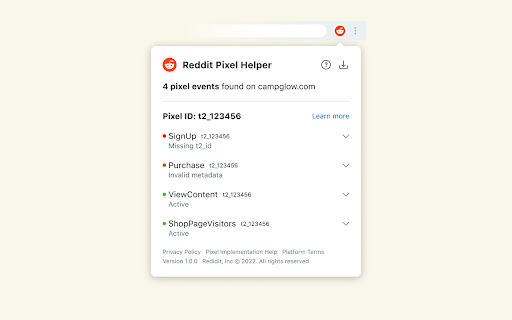

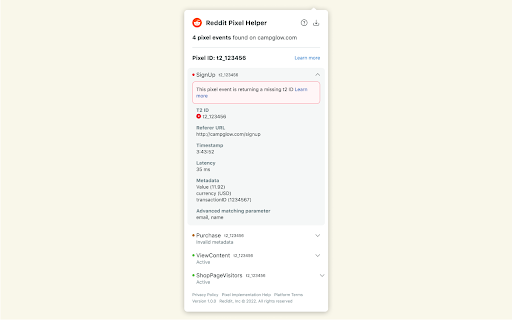
The Reddit Pixel Helper is a tool to QA your pixel implementation. While browsing any site, the extension badge will show the number of Reddit Pixel events firing on a page. Open the extension on any page with the pixel implemented to see which events are actively firing, identify any errors in their configuration, and get recommendations for fixing errors. Check out our Help Center for more info: https://advertising.reddithelp.com/en/categories/measurement/reddit-pixel-helper By using the Reddit Pixel Helper you agree to the Reddit Advertising Platform Terms: https://advertising.reddithelp.com/en/categories/policy-guidelines/advertising-terms-ads-platform

Tag Assistant Companion
The Tag Assistant Companion extension works with Tag Assistant to help troubleshoot installation of gtag.js and Google Tag Manager. We’re grateful for your feedback—we've listened and are moving the functionality of Tag Assistant Companion into the original Tag Assistant extension and are retiring this extension. The original Tag Assistant extension now supports features from both the original and companion extensions, including in-page debugging and advanced functionality on tagassistant.google.com. Please install the Tag Assistant extension. If you have both the original and companion extensions installed, the companion extension will be automatically uninstalled in the coming months.

Snap Pixel Helper
About the extension: Snap’s Pixel Chrome Helper is a simple Chrome Extension, which allows advertisers to verify, debug, and troubleshoot Snap Pixel implementations. About Snap Pixel: The Snap Pixel is a piece of JavaScript code that helps advertisers measure the cross-device impact of campaigns. Advertisers will be able to see how many Snapchatters take action on their website(s) after seeing their ad. The Snap Pixel is best suited for your direct response goals, such as driving leads, subscriptions, or product sales. You can measure these goals beyond what happens during a single session, or on a single device. By adding the Snap Pixel Helper you agree to the Snap Terms of Service at https://www.snap.com/en-US/terms/

Stape GTM Helper
Enhance your Google Tag Manager debugging. Stape GTM Helper is a free Google Tag Manager Chrome extension designed to speed up and simplify GTM debugging. This GTM tool helps you bring order to containers packed with tags and improves your workflow in Google Tag Manager preview mode. ➤ Google Tag Manager tools and features for a cleaner GTM preview - Tag Type Coloring – add color and platform logos for Meta, GA4, Google Ads, Microsoft, and more for easier navigation in preview mode. - Entities Filter – focus only on the tags or variables you’re testing for cleaner, faster debugging. - JSON Formatter – make incoming and outgoing JSON requests easy to read. - Consent Status in sGTM – view consent states (granted or denied) directly in your server GTM preview. ➤ Clarity through a tag assistant extension that organizes the GTM preview mode - Debug Google Tag Manager for both web and server containers - Get a structured, color-coded view of all your GTM tags - Improve your Google Tag Manager debugging and testing experience ➤ Perfect For - Developers and analysts working with GTM tools - Anyone who uses Google Tag Manager preview and debug mode daily

Bing Pixel Helper
Bing PIxel Helper detects and resolve Microsoft Advertising problems with UET tag! 🛠️ Perfect for developers and marketers. Simplify UET tracking with Microsoft Ads! Introducing Bing Pixel Helper Chrome extension. This extension detects and resolves UET tag related issues allowing for effortless conversion tracking. Ideal for developers and marketers. 🚀 Keyfeatures of Bing Pixel Helper chrome extension Effortless Issue Detection and Resolution: The Bing Pixel Helper simplifies the otherwise complex task of identifying and resolving Microsoft Advertising problems related to the UET tag, ensuring a seamless experience for users. 🚀 Tailor-Made for Developers and Marketers: This tool is specifically designed to cater to the needs of both developers and marketers, acknowledging the diverse roles involved in managing and optimizing advertising campaigns. 👩💻👨💼 User-Friendly Interface: With a user-friendly interface, the Bing Pixel Helper prioritizes ease of use, making it accessible to individuals with varying technical proficiencies for a smoother troubleshooting process. 🖥️ Seamless Integration and Validation: This indispensable tool streamlines the integration and validation of UET tags, eliminating potential complications and ensuring a more efficient deployment of advertising strategies. 🔄 Optimized Advertising Experience: By incorporating the Bing Pixel Helper into your toolkit, you're poised to elevate your advertising game on the Microsoft Advertising platform, promising a more optimized experience for enhanced precision and better results. 🛠️ Open Chrome and visit the Chrome Web Store. Search with “Bing Pixel Helper Chrome extension” 🕵️ Locate the extension and click “Add to Chrome.” Confirm the installation when prompted. 🛡️ After installation, open any page of your website that you are interested in viewing. To activate it, click on the Bing Pixel Helper icon in your browser’s toolbar. 🛠️ It will automatically scan the webpage and provide a list of identified UET tags – Universal Event Tracking tag. The extension will provide feedback on the status of each tag, indicating whether it is operating properly or encountering issues. Also, it will present a pop-up that reveals the UET tags identified on the page along with their corresponding statuses (e.g., "Success," "Warning," "Error"), and the events and tracking code associated with that page.
