
liegojdnlblaohkbjofnagkhfnjdphpd
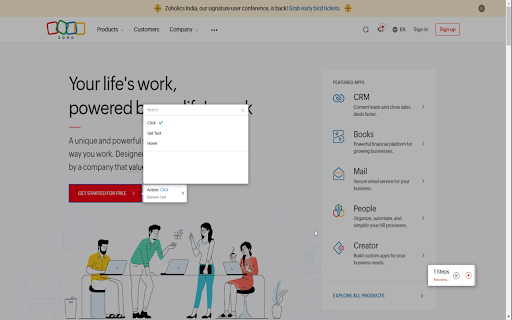
Chrome extension to capture steps for web automation in Zoho RPA (Robotic Process Automation) Zoho RPA's web automation feature empowers you to automate tasks involving interactions with web-based applications and websites. With the browser extension installed, you can use web automation to configure a wide range of tasks, including form completion, button clicking, menu navigation, and data extraction from web pages, effectively automating your daily workflows on the web. With this extension, you can: * Record your webpage interactions as workflow steps * Deploy workflow robots to handle repetitive and manual tasks around the clock. * Utilize powerful web automation to capture and streamline everyday tasks on web applications and websites. * Emulate a multitude of human-like interactions, such as Open URL, Click, Hover, Refresh, Scroll, Set text, Get text, Send hotkeys, Go back, Go forward, Switch to, and more. * Improve the accuracy of your day-to-day tasks by significantly reducing human error. * Streamline data extraction and reproduction with quick, almost-instantaneous actions.

Zoho Annotator
The most elegant and efficient annotation tool. Capture screenshots or recordings of your web page or desktop screen. Add annotations to the captured screenshot of your web pages or images on your desktop, such as design mockups, illustrations, and diagrams, by uploading the respective image. Check out the features below. - Capture the full page, the visible area of a page, or only part of the page.. - Capture the whole desktop screen or an application window. - Use delayed capture to screenshot sections that appear only after clicking a link or button within the page. SCREEN RECORDER - Record the visible screen of a page or part of the page. - Record the whole desktop screen or an application window. - Record a video with your webcam to share your knowledge with your target audience. - Use square and circle shapes to mark areas to comment. - The freehand drawing tool enables you to circle portions correctly without disturbing other parts of the document. - The highlighter pen emphasizes the content that needs attention. - Add contextual comments to the highlighted areas. - Use tagging tools to number the places to comment and describe them in any of your communication apps after completion. - Blur or smudge private or confidential data. - Get a shareable link and share it in social media (Facebook, Twitter, and WhatsApp) and other websites/applications. - Upload the files to your Zoho WorkDrive, Google Drive, OneDrive, and Dropbox accounts. - Share the files in Zoho Cliq, Zoho Connect, Zoho Projects, and Zoho Sprints. Customize the default values, such as Line Color, Font Family, Text Color, etc., as per your preference. For any questions or help, send an email to annotator-support@zohocorp.com.

Robomotion RPA
Robomotion RPA Chrome Extension simplifies and automates repetitive browser tasks. Harness the power of Robotic Process Automation (RPA) effortlessly with our user-friendly extension. Automate repetitive tasks, from data entry to complex workflows, quickly and efficiently with Robomoiton Web Recorder.

Zia Search from Zoho
Search, Refine, Review and Act - All in one place Zia Search is the unified search system for Zoho Apps. Zia Search saves you a huge amount of time and energy in finding resources spread across multiple apps. It helps lookup any information available in Zoho apps for a company, customers or any other search query. Just select the text and invoke Zia Search from the contextual menu of the browser or issue the query directly in the search box. Zia Search searches and finds information across 20+ Zoho apps and gets you the most relevant results, fast! No more switching between apps or browser tabs. Find everything in one place with one search. Zia Search extension can be opened by the following methods : 1. From Browser Toolbar 2. Search on Selection text 3. Via keyboard shortcut - Cmd + / (or) Ctrl + / We made sure you do not miss any features in the browser extension. This is a fully featured browser extension of the Zia Search app. - Search data across 20+ Apps in one go - Very fast - Relevant results - takes into account Textual Relevance, Proximity as well as Recency - Search across your multiple accounts / portals / networks - View Documents, Mails, CRM records and other resources right in the search interface - Fine grained and Contextual filters - Contextual actions on the results - Reply to a mail, assign owner to a ticket, accept a meeting invite in Calendar, etc., Zia Search is available on the web at https://zoho.com/ziasearch. For Mobile, Android App is available at https://zco.to/aziasearch and IOS at https://zco.to/iziasearch If you have any questions or suggestions, please reach out to us at support@zohosearch.com. Version 1.3.4 + Projects Service integrated with Zia Search + Improved UI experience Version 1.3.2 + Mail Streams integrated with Zia Search + Improved UI experience + Fixed Notebook Preview bugs Version 1.2.0 + Improved UI experience + Fixed Third-party cookie disabled case for image rendering Version 1.1.0 + Bigin Service is integrated with Zia Search

Writer - Extension & Clipper
Create, access and edit Writer documents from any tab, and clip references to a document. Love using Writer? Here's a great time saver for you! Use the Writer extension to quickly create and access Writer documents in just a couple of clicks. Here's everything you can do with it: - Quickly access the list of your most recent documents. - Import your existing MS Word documents to Writer. - Quickly start with a new template. - Import MS Word or other supported files directly to Writer as you download them. - Go to the Writer dashboard to view all your Writer documents. Install the extension to get the most out of Writer (and also save time!). What are you waiting for? Get started. Write away! Send us your feedback to support@zohowriter.com
