
oolomhkjhpdfgpfhnhhjkcjbfjendhcf
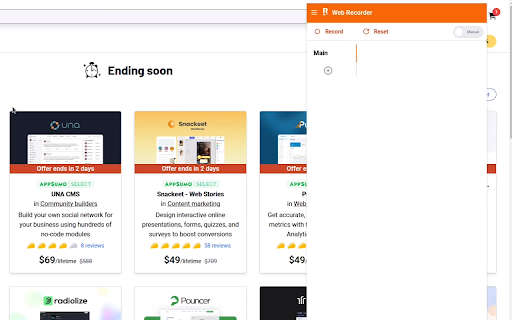
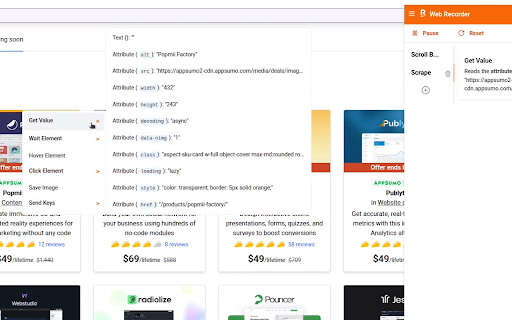

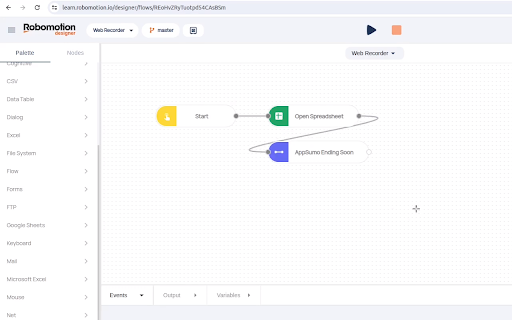
Robomotion RPA Chrome Extension simplifies and automates repetitive browser tasks. Harness the power of Robotic Process Automation (RPA) effortlessly with our user-friendly extension. Automate repetitive tasks, from data entry to complex workflows, quickly and efficiently with Robomoiton Web Recorder.

RoboForm Password Manager
RoboForm Password Manager makes your life easier by remembering passwords and logging you into websites automatically Generate strong passwords for new accounts, manage your passkeys, and enjoy seamless autofill for all your credentials—all in one lightweight extension. 🌎 Works on every device RoboForm works in all major browsers and on all devices, including Windows, Mac, iOS, and Android. ⬆️ Easy import Bring your passwords from your browser or any other password manager in seconds. 🧩 All-in-one management Manage passwords, passkeys, and authenticator codes directly from the extension. ⚡ One-click logins Open a Login, and RoboForm takes you to the site, fills your credentials, then signs you in automatically. 🛡️ Monitor weak, reused, or compromised passwords RoboForm scans your vault for weak, reused, or compromised passwords and alerts you so you can fix them quickly. 🔍 Know immediately if your data is exposed Get alerts for breaches affecting up to 5 email addresses, along with recommended steps to mitigate the threat. 🔒 Zero-knowledge security Your data is encrypted locally with your Master Password—never transmitted to our servers. Uses AES-256 encryption, PBKDF2-SHA256, and full end-to-end encryption. 🔓 Passwordless unlock Skip typing your Master Password. Unlock RoboForm using Windows Hello, Touch ID, passkeys, hardware security keys (e.g., YubiKey), or a trusted device like your smartphone. 🔐 Built-in authenticator & advanced 2FA Use RoboForm as your TOTP authenticator for any website. Secure your account with passkeys, security keys, authenticator apps, or a trusted device. 🔗 Secure sharing Share individual items or entire folders with end-to-end encryption, and assign permissions to each recipient for complete control. 🆘 Emergency Access to trusted contacts Grant trusted contacts secure, controlled access to your RoboForm data in case of an emergency. ⏱️ Real human support Chat, phone, and 24/7 email support whenever you need help.

Automatic Clicker
Enable this chrome extension to simplify your tasks and automate repetitive clicking easily. Tired of endless clicking and scrolling? Our powerful Chrome extension takes care of these repetitive tasks, allowing you to focus on what truly matters. With this efficient tool, you can automate monotonous actions, saving valuable time for more important activities It doesn’t matter if you’re gaming, doing projects, or just browsing the website: this extension makes your job easier and faster. Try the Automatic Clicker Chrome Extension right now and discover how simple automation is. Key Features of this Chrome Extension Customizable Click Intervals: Set your desired click intervals, such as 1 second or 2 seconds, for complete control over automation. Scrolling Automation: Automate scrolling with an interval of your choice, such as 3 seconds, to navigate through pages or games effortlessly. Keyboard Shortcuts for Efficiency: Start clicking with Ctrl + Comma, stop with Ctrl + Period, and begin scrolling with Ctrl + Slash. Game-Optimized Performance: Perfect for games like Minecraft, where repetitive clicking can be automated to enhance your experience. Install the Extension: Drive to the Web Store and install The Automatic Clicker Chrome Extension and pin it to chrome browser Start Clicking: To start clicking, press Ctrl + Comma and then set the number of click to be 10 for instance. Choose ,the length of clicks it should be 1 or 2 seconds depending with the nature of the task at hand. Start Scrolling: To start scrolling you press Ctrl + Slash and the scrolling starts automatically. Choose how long each item in the list would take to scroll, for example 3 seconds. Customize Settings: There is a settings button which should be pressed to set the time intervals and adjust the automation. Professionals: Ignores form filling, data entry and also web scraping. Students: Flawlessly browse through the database of eBooks and research papers. Everyone: Lead effective automatic clicking and scrolling. Improves gameplay drawing the Perl script for mining and building in Minecraft. Enhances browsing: Makes going through long documents faster and smoother. Easy to use: To work with the proposed VPLS service quickly and conveniently, they use keyboard shortcuts.

Auto Refresh
Enhance efficiency with Auto Refresh Chrome Extension. Automate page reloads and updates for seamless browsing experience. 🚀 Auto Refresh Chrome Extension! 🔄 Say goodbye to manual page refreshing and welcome a new era of seamless browsing. ⏲️ With our cutting-edge features like auto refresh page and auto reload tab, your browsing experience will never be the same. 📈 Stay up-to-date with automatic page updates and never miss a beat with our auto refresh web page feature. 💻 Tired of constantly hitting the refresh button? Let our auto page reloader do the work for you, saving you time and effort. 🔁 Experience the convenience of our page auto reload function, ensuring your tabs are always current and ready for action. ❓ Why Choose Our Extension? ➤ Efficiency at Its Best: Say goodbye to the constant click of the refresh button. With our auto page reloader and auto tab reloader, information retrieval is faster and more efficient. ➤ Tailored to Your Needs: The customization options ensure that the auto reloader for Chrome works exactly how you want it to, fitting perfectly into your workflow. ➤ User-Friendly Design: We prioritize ease of use, making our tool accessible to everyone, regardless of their technical skills. ➤ Time Saver: Automating the refresh process with our auto webpage refresh feature saves you a significant amount of time, especially when monitoring fast-changing data. ➤ Reliability: Built with robust technology, our extension guarantees reliable performance, ensuring that the tab auto refresh function is always smooth and consistent. 📋 Here's why our Auto Refresh Chrome Extension stands out from the rest: • Tracking stock market fluctuations without needing to manually refresh for the latest updates. • Keeping up with live sports scores or news events in real-time. • Monitoring social media feeds for the most current posts. • Ensuring auction and bidding sites are refreshed to catch the latest bids. • For developers, keeping documentation or development tools updated with the latest changes. 🌟 Upgrade your browsing experience with the power of auto reloader for Chrome! 🔗 Keep your tabs fresh with the page auto refresher feature, ensuring your content is always up to date and relevant. 💪 Forget about manual updates - our auto webpage refresh function keeps your browsing experience smooth and effortless. 🌐 Enhance your productivity with our tab auto refresh capability, allowing you to focus on your tasks without interruptions. 📊 Don't let outdated content slow you down - our extension guarantees that your web pages are continuously refreshed and ready for action. 🚦 Take control of your browsing with our auto tab reloader feature, making it easy to manage and update your tabs efficiently. 📌 Upgrade your browsing game with the auto reload page feature, keeping your content fresh and engaging with minimal effort. 🌐 Unleash the full potential of your browsing experience with the Auto Refresh Chrome Extension - your key to effortless and efficient browsing! 🎯 Say goodbye to manual refreshing and hello to a smoother browsing experience with our auto reload page feature. ✨ Experience the difference our extension can make in your daily browsing routine - try it out now and discover a new way to browse the web! 🌟 Enhance your browsing experience with the simplicity and efficiency of our Auto Refresh Chrome Extension. 🛡️ Safety and Privacy: ▸ Your safety and privacy are our top priorities. Our extension is designed with state-of-the-art security measures, ensuring that your browsing data remains private. Unlike other extensions, we do not track your browsing activity or collect personal information. ▸ In conclusion, our Chrome extension revolutionizes the way you interact with the web. By automating the refresh process, it enhances productivity, saves time, and ensures you're always up-to-date with the latest information. Embrace the future of browsing with our auto refresh page, auto reload page, and auto refresh web page capabilities. ✅ Try it today and experience a seamless, more efficient way to surf the web.

Auto Clicker Free Chrome Extension
Powerful auto clicker & form filler for web tasks & games like Travian. Schedule clicks, fill forms, and automate your strategy. Easy right-click setup. Tired of repetitive web tasks? Need to manage your empire in games like *Travian* while you're away? Meet the Auto Clicker Free Chrome Extension, your personal web automation powerhouse designed to save you time and supercharge your productivity. This is more than just an auto clicker; it's a smart, flexible tool that lets you schedule any sequence of actions on any website. From automatically clicking buttons at a specific time to filling out complex forms and refreshing pages, our extension handles the boring stuff so you can focus on what matters. --- Why Choose Us? The Power of Simplicity Unlike other automation tools, we are built for everyone. Our revolutionary right-click menu makes creating tasks incredibly simple. Just right-click on any element—a button, a link, or an input field—and tell the extension when to act. No coding required! * 🤖 Advanced Task Scheduler: Don't just click, automate! Schedule tasks to run at a specific time of day (HH:MM:SS) or at regular intervals (e.g., every 5 minutes). Perfect for automatically refreshing a page or checking resources. * 🖱️ Multi-Action Support: Go beyond simple clicks. Create rules that can Click, Fill forms, or Refresh the page. * ✨ Simple Right-Click Setup: The easiest way to create automation rules. Right-click any element on a page and select "Set as 'Click' Target" or "Set as 'Fill' Target" to instantly capture it. * 📂 Organize with Groups: Keep your tasks tidy with collapsible groups. Create groups for different websites or workflows (e.g., "Work Reports," "Game Villages," "Social Media"). * 🔄 Smart Tab Management: Is the target page closed? No problem. If the extension can't find a matching tab, it will automatically open the page for you before running the task. * 📤 Import & Export per Group: Back up your precious workflows or share them with friends. You can export and import individual groups as .json files, making it easy to transfer your setups. * 📊 Detailed Logging: Wondering if a rule ran? The built-in log viewer shows you the exact time of every execution, its status (success/error), and detailed error messages to help you troubleshoot. * 💪 Full Management: Rename groups, delete rules, and enable/disable any task with a single click. You are in full control. Perfect For: * ⚔️ Strategy Gamers: Players of browser games like Travian, OGame, and similar titles who need to schedule resource collection, troop movements, or construction queues while away from the computer. * 💼 Professionals who fill out the same web forms and reports daily. * 🕵️ QA Testers who need to run repetitive test cases on web applications. * 📈 Data Entry specialists who want to reduce manual input and errors. * Anyone who wants to save time and avoid boring, repetitive tasks on the web. Your Privacy is Our Priority. All your rules and data are stored locally on your browser and are never transmitted to any server. Install the Auto Clicker Free Chrome Extension today and automate your world! ## History ## ----------------------------------------- Version:1.0.1 - Random intervals have been added. Repeats will occur at random minutes. - When interval or random interval is selected, a new task will be added immediately after the first task is added. - Labels have been added to rules. Rule tracking has been made easier. - Dark and light theme options have been added. These are available on the Options page. - Design fixes have been made.
