
ikfjgjdcechliibmcjnaoabbfjabbaoc
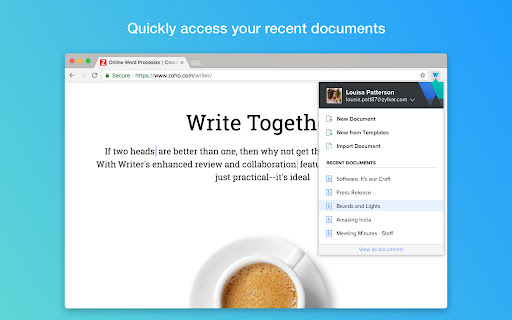


Create, access and edit Writer documents from any tab, and clip references to a document. Love using Writer? Here's a great time saver for you! Use the Writer extension to quickly create and access Writer documents in just a couple of clicks. Here's everything you can do with it: - Quickly access the list of your most recent documents. - Import your existing MS Word documents to Writer. - Quickly start with a new template. - Import MS Word or other supported files directly to Writer as you download them. - Go to the Writer dashboard to view all your Writer documents. Install the extension to get the most out of Writer (and also save time!). What are you waiting for? Get started. Write away! Send us your feedback to support@zohowriter.com

Zoho Mail Bookmarks
Effortlessly save and organize bookmarks in Zoho Mail. Zoho Mail Bookmarks is integrated with your Inbox and can be accessed from anywhere. With this plugin, you can easily save any URL/ link to your Zoho Mail Bookmarks for your personal reference or to share with your team.

Zoho CRM for Gmail
A quick way to manage and add leads, contacts to Zoho CRM from Gmail. • Create new leads and contacts right from Gmail. • See complete lead/contact detail when you open a mail. • Add tasks, events, log calls for a customer. • Create deals and notes for instant update. • FREE extension; no credit card required. • Installs in seconds, easy to use. ⦿ Manage your Zoho CRM from Gmail. Why switch windows when you can manage your CRM from Gmail? Zoho CRM for Gmail shows you a complete customer profile immediately upon opening an email from the customer. Instantly view customers’ contact information without opening Zoho CRM. You can create new Contacts and Leads, and log calls, add tasks, events, allowing you to keep better track of prospective deals and customers. ⦿ Keep track of all your information. Convert leads to contacts, add, edit and delete notes, events, tasks, log calls using this powerful extension. It's easy to use interface helps you see all the information when you need it. ⦿ Make the most out of your CRM investment. Increase your ROI by entering timely and accurate information about your leads and contacts in your CRM system. Create tasks and notes to keep your CRM always updated.

Zoho Meeting
A perfect web conferencing tool to host online meetings, share screen and join conference with video collaboration in browser. Zoho Meeting is easily accessible from the Chrome extension with one click. Zoho Meeting helps you find new ways to collaborate and work remotely. Create a meeting or webinar, invite participants, and interact through screen sharing, audio, and video conferencing. With this extension, you can: Schedule meetings and webinars Start meetings and webinars Host instant meetings and invite participants View and keep track of upcoming sessions Change your account settings Meeting: Host meetings with up to 250 participants Audio/video conferencing Screen and application sharing Chat functionality Lock a meeting to make it secure Audio, Video and screen recording Pass keyboard and mouse control Virtual background Add co-hosts Whiteboard Meeting polls Picture-in-Picture mode Raise Hand and Emoji reactions Use moderator controls during the meeting Webinar: Host webinars with up to 3000 attendees Share Screen or Session Materials Video webinars Registration customization Source tracking Embed registration widget Clone Webinars Polls, Q&A, Raise hand, Allow to talk Co-organizers Recording and cloud storage Virtual Background Live streaming webinars on YouTube Webinar analytics Integration with marketing automation and CRM tools Our Pro version starts at $3/month for meetings and $19/month for webinars. Meeting plans support up to 100 participants and Webinar plans support up to 3000 attendees. View more webinar and meeting features: https://www.zoho.com/meeting/pricing.html Apps and extension

zShare
zShare - The easiest way to share content on social media. Capture, create & share instantly with zShare zShare is your go-to browser extension for effortless content sharing for social handles. As social media marketers, we are always on the lookout for content that resonates with our audience. Whether it’s a compelling article, an inspiring quote, or a striking visual, we often stumble upon pieces that inspire us and might pique the interest of our audiences too! How can we capture such catchy phrases or images immediately before they slip out of our mind? zShare to the rescue! zShare is a powerful browser extension designed to help you capture and share content seamlessly across your social media channels. With zShare, you can instantly select key phrases, quotes, or images from any webpage and draft or schedule posts for platforms like Facebook, Instagram, X, and more, all without leaving your browser. No more switching tabs or losing great ideas. With zShare, inspiration meets action in just a click. Zoho Social is a robust, unified social media management platform designed to help businesses and marketing agencies streamline their social media efforts. From AI- powered content creation to real-time engagement and advanced analytics, Zoho Social offers a smart, centralised solution for managing multiple social channels. With Zoho Social, you can: ●Create, schedule, and publish content across various social platforms from a single dashboard. ●Leverage AI-powered tools to generate engaging, on-brand content in seconds. ●Automate workflows by automating repetitive tasks for greater efficiency. ●Collaborate with your team seamlessly to ideate, review, and approve content all within the platform. ●Monitor brand mentions and tags across the web to stay informed and responsive. ●Access detailed analytics and reports to drive data-backed decisions and optimize performance. ●Work collaboratively on insights, turning data into actionable marketing strategies. Whether you're a growing brand or an agency managing multiple clients, Zoho Social equips you with everything you need to elevate your social media presence. The Chrome extension requires a Zoho Social account and is included with all plans. For more information about Zoho Social, visit https://www.zoho.com/social/
