
lhpbckonakppajdgicbjdfokagjofnob


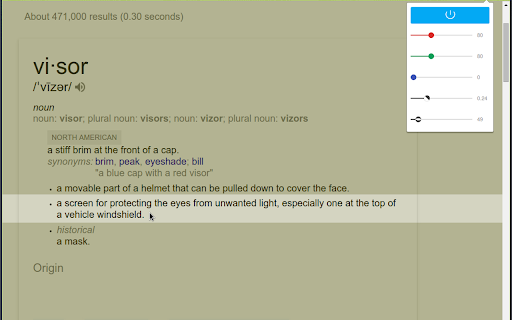
Screen dimmer and reading aid, may help with fluency, eye-strain, concentration and comprehension whilst reading. Version 2.0.4: Bug-fixes and updated style. As well as being a great general purpose screen dimmer, Visor's overlays and point of focus feature may be assistive to users with visual perceptual difficulties such as Dyslexia, Scotopic Sensitivity Syndrome and Visual Stress. Whilst research shows results vary from person to person, some users may find that the use of overlays can help with fluency, eye-strain, concentration and comprehension whilst reading. In addition to the traditional overlay method, Visor also employs a point of focus feature, designed to further reduce visual confusions and the tendency to skip lines. This horizontal focal point tracks your mouse, giving full focus to the content being read, whilst reducing the visual noise of the surrounding page. Visor requires no special permissions, so must be reactivated with each page load. Note: This extension will not work on Chrome's start page, options pages or the Chrome web store. This is a restriction of chrome.

Bullet Journal - Notes, Lists, Weekly Planner
Beautiful bullet journal for weekly tasks, todos, agendas. Brainstorm, share, and plan your weekly list. Turn your New Tab into a bullet journal to capture your ideas, goals, and daily tasks. This extension is a simple and forgiving way to stay organized. Customize your bujo the way you want, share it with friends, and edit your journal from anywhere. Try the perfect flexible solution to manage your tasks, plans, notes, and ideas. Use it to organize your thoughts, ideas, and daily, weekly, monthly todos. Declutter your thoughts so you can focus on your tasks, ideas, and getting more things done. Use this extension to capture your ideas, goals, daily tasks and stay organized. • New Tab into a beautiful and customizable journal • Edit bujo together with friends and team members • Share your bullet lists instantly using a link • Easily invite friends and teammates to your folder • Collaborate together in a group folder • Select any style, whether bullet list, numbered list, or checklist • Infinitely nested bujo lists with unlimited hierarchy • Tag and filter tasks using #hashtag and @mentions • Works on all devices with live real-time syncing • Inspiring wallpaper backgrounds • Beautiful and minimal interface • Simple, instant, and FREE ➜ IS THIS EXTENSION FREE? Yes, this extension is completely free. Soon you will have the option to upgrade to Pro, which will have additional features like themes, sticker packs, and customizations. If you are feeling unmotivated, find one small task that needs doing and do it. Sometimes just getting the ball rolling has a snowball effect. Break down larger tasks into smaller steps (hit tab to add sub-tasks) and start with the smallest one. Get motivated, the only way to gain momentum is to start moving. Create bujo checklist, and studyblr for organizing your notes, tasks, and getting things done. This extension is simple and easy to use, but incredibly powerful, and can help you manage all the information in your life into beautiful lists. Bullet Journal is like a notepad with superpowers. ➜ CAN I USE THIS WITH MY FRIENDS AND TEAMS COLLABORATIVELY? Yes. Create a shared folder and invite your team. It helps keep your lists and team organized. Members will have full access to lists in the workspace. Use this as your collaboration tool to help each other get stuff done for team group project, brainstorming session, and more.

Screen dimmer
screen dimmer Screen dimmer control the brightness of the computer’s screen, when you work in a light or darker environment it can help you, It can dim all screens and monitors; LCD, TFT and LED backlit types, it can adjust the gamma value of your computer’s display adapt, reduce the blue part (RGB value) of the light, filter blue light, it makes your computer screen looks more comfortable.

fluany
Fluany is a flashcards platform that helps you memorize and study anything. Quickly and easily while you do your work. Fluany is a flashcards platform to memorize and study anything, fast and easy while you're surfing the Internet. With our extension, you have an incredible tool to improve your learning and consolidate your knowledge quickly and efficiently. With a minimalist and easy-to-use interface, fluany displays your flashcards in a New Tab, making your study more dynamic and interactive. You can learn a lot while you work, or spend hours on social networks. Create your study lists, customize, add questions, terms or expressions you want to memorize, choosing the interval at which a question/term should appear for you. Friendly and intuitive interface. Start practicing in a few clicks. Your time is precious and with fluany, you can study while you work, talk with your friends or even watching videos. The fluany enters into your routine forcing your mind to learn.

Focus To-Do: Pomodoro Timer & To Do List
Focus To-Do combines Pomodoro Timer with Task Management, it is a science-based app that will motivate you to stay focused and get things done. It brings Pomodoro Technique and To Do List into one place, you can capture and organize tasks into your todo lists, start focus timer and focus on work & study, set reminders for important tasks and errands, check the time spent at work. It's the ultimate app for managing Tasks, Reminders, Lists, Calendar events, Grocery lists, checklist, helping you focus on work & study and tracking your working hours. Focus To-Do syncs between your phone and computer, so you can access your lists from anywhere. How it works: 1. Pick a task you need to accomplish. 2. Set a timer for 25 minutes, keep focused and start working. 3. When the pomodoro timer rings, take a 5 minute break. Key Features: - ⏱ Pomodoro Timer:Stay focused and get more things done. Pause and resume Pomodoro Customizable pomodoro/breaks lengths Notification before the end of a Pomodoro Support for short and long breaks Skip a break after the end of a Pomodoro Continuous Mode - ✅ Tasks Management: Task Organizer, Schedule Planner, Reminder, Habit Tracker, Time Tracker Tasks and projects: Organise your day with Focus To-Do and complete your to do, study, work, homework or housework you need to get done. Recurring tasks: Build lasting habits with powerful recurring due dates like "Every Monday". Reminders: Setting a Reminder ensures you never forget important things ever again, you can set up recurring due dates to remind you each and every time. Sub-tasks: Break down your task into smaller, actionable items or add a checklist . Task Priority: Highlight your day’s most important To-Do with color-coded priority levels. Estimated Pomodoro Number: Estimate the workload or set a goal. Note: Record more detailed about the task. - 📊 Report: Detailed statistics of your time distribution, tasks completed. Support the calculation of the total time of Focus Time. Gantt Chart of the Focus Time. Statistics on completed To Do. Statistics on time distribution of project. Trend chart of the completed To Do and the focus time. - 🖥📲 All-Platform synchronization: View and manage your goals wherever you are for better goal achieving. Support seamless synchronization within iPhone、Mac、Android、Windows、iPad、Apple Watch. - 🎵 Various Reminding: Focus Timer finished alarm, vibration reminding. Various white noise to help you focus on work & study. Contact Us: focustodo@163.com, reply within 24 hours. Website: http://www.focustodo.cn Pomodoro ™ and Pomodoro Technique ® are registered trademarks of Francesco Cirillo. This app is not affiliated with Francesco Cirillo. Users have been focused on our app for 200 million hours, join us and we help you to be focused and increase your productivity, reduce procrastination and anxiety.
