
lhlkedhmnfkjmbedonkegcifhmpbhbpk

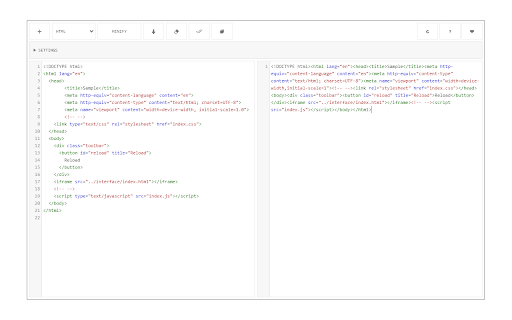


A lite and free JavasScript, CSS and HTML minifier for your browser. Code Minifier, is an extension that lets you easily minify codes in your browser. This addon supports JavaScript, CSS, and HTML as input languages. You can either browser files via the (+) button at the UI (top-left corner) or drag & drop a file in the left textarea. The former method is preferred as the coding language for the input file can be detected automatically and the interface will be updated accordingly (no need to adjust the input language manually). Code Minifier can work offline without the need for an internet connection. It uses an open-source library called "Terser" and available in this (https://github.com/terser/terser) GitHub repo. Moreover, it also uses the famous CodeMirror (https://github.com/codemirror/CodeMirror) library to format the input and output codes. Within the interface, there are several buttons at the top toolbar which are self-explanatory. There is also a settings list at the top which contains several options for the minifier. Change any desired settings and see the live result in the output field. To download the minified result, please click on the download button at the top toolbar. If you have a feature request or found a bug to report, please fill the bug report form on the addon's homepage (https://mybrowseraddon.com/code-minifier.html).

Code Beautifier (JS, CSS, HTML)
A lite and free JavasScript, CSS and HTML beautifier for your browser. Code Beautifier, is an extension that lets you easily beautify codes in your browser. This addon supports JavaScript, CSS, and HTML as input languages. You can either browser files via the (+) button at the UI (top-left corner) or drag & drop a file in the left textarea. The former method is preferred as the coding language for the input file can be detected automatically and the interface will be updated accordingly (no need to adjust the input language manually). Code Beautifier can work offline without the need for an internet connection. It uses an open-source library called "js-beautify" and available in this (https://github.com/beautify-web/js-beautify) GitHub repo. Moreover, it also uses the famous CodeMirror (https://github.com/codemirror/CodeMirror) library to format the input and output codes. Within the interface, there are several buttons at the top toolbar which are self-explanatory. There is also a settings list at the top which contains several options for the beautifier. Change any desired settings and see the live result in the output field. To download the beautified result, please click on the download button at the top toolbar. If you have a feature request or found a bug to report, please fill the bug report form on the addon's homepage (https://mybrowseraddon.com/code-beautifier.html).

HTML,CSS,JS Minifier & Compressor
A lite and free JavasScript, CSS and HTML minifier & Compressor for your browser. HTML, CSS, and JavaScript code minifiers and compressors are used to reduce the size of the code files, making them load faster on websites. This is achieved by removing redundant or unnecessary characters and spaces, shortening variable names, and merging files. Minifications improves the performance and loading speed of websites, leading to a better user experience. [+] Features 1. File compression: The extensions can compress code files, reducing their size and improving the loading speed of websites. 2. Code optimization: The extension remove redundant or unnecessary characters, spaces, and comments from the code, optimizing it for faster performance. 3. Variable name shortening: The extension can shorten variable name, further reducing the sizes of the code. 4. File merging: The extension can merge multiple code file into a singles file, reducing the numbers of request to the server and improving performance. 5. Code analysis: The extension can analyze code files to identify areas that can be optimized, providing suggestions for improvement. 6. User-friendly interface: The extension has a simple and intuitive interface that makes it easy for web developers to used. 7. Real-time compression: The extension compresses code files in real time, providing instant feedback on code optimization and performance improvement. 8. Compatibility: The extension is compatible with HTML, CSS, and JavaScript code, making it a versatile tool for web developments.

Link Cleaner
Link Cleaner extension removes or replaces desired parts from a URL with regular expression rules. The toolbar button is the ON|OFF switch to enable or disable the extension. To work with this addon, please first open the options page. In the middle section, add a regex filter to match the request URL on the left side, then write a regex substitution pattern on the right side. For example: With the above regular expression rule, if you navigate to URL #1 below in the address bar, it will be redirected to URL #2 (as shown in the first screenshot). Note 1: The first match of the regex filter within the left side URL, will be replaced with the pattern on the right side URL. Note 2: In the regex substitution pattern, backslash-escaped digits (\1 to \9) are used to insert the corresponding capture groups. \0 refers to the entire matching text (see sample rule #1). Note 3: This extension only works when a URL or link is about to load in a tab or window; it does not change the link's href within the page. If you have a feature request or found a bug to report, please fill out the bug report form on the addon's homepage (https://mybrowseraddon.com/link-cleaner.html).

Policy Control
Policy Control is an extension that helps you easily adjust all content settings (via contentSettings API) from the toolbar popup UI. These settings are adjusted on a website (domain) basis. Once you open the toolbar popup UI, the tab URL will appear at the top section in the UI as a pattern (i.e. http://example.com/*). Adjust what you need for this pattern and then reload the webpage. Please note, all changes are auto-saved to the memory. If you want to reset the content setting changes to the default values, please press the reset button at the top toolbar. Note: The extension interface supports dark mode. To switch the interface theme to dark, please press the moon icon in the top-right toolbar. To report bugs, please fill out the bug report form on the addon's homepage (https://mybrowseraddon.com/policy-control-wext.html).
