
lhgadannddhdpkfhfjjgcpdjhpmjhkfm

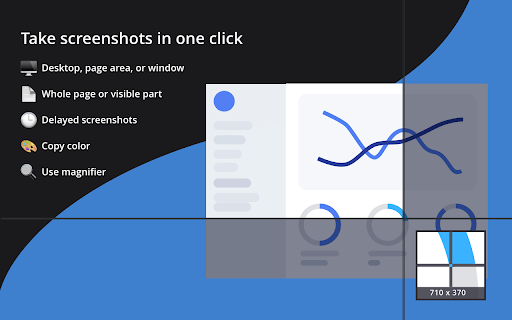


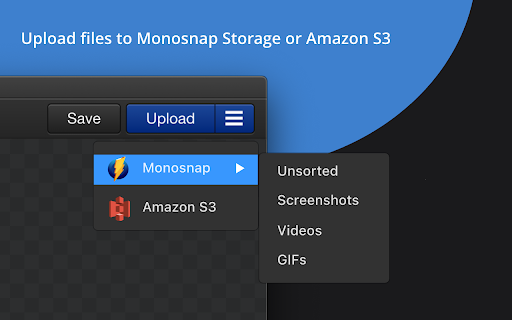
Capture pages or blocks with the awesome smart screen capture tool! Capture and edit screenshots, upload files, record video and .GIFs! Share a visual explanation with your clients and colleagues. 📸 Capture: ▸ Desktop screenshots: fullscreen and window. ▸ Page: screenshots: area, visible content, and whole page. ▸ Taking timed screenshots. ▸ Customize hotkeys. ✏️ Annotate and edit: ▸ Highlight important details with arrows, pen, shapes, and text. ▸ Hide too personal and private information with the blur tool. ▸ Resize and crop screenshots. ☁️ Upload and share: ▸ Log in to get 2 GB in Monosnap Cloud storage. ▸ Amazon S3 storage (Non-Commercial and Commercial plans) 🎥 Record: ▸ Desktop, window or browser ▸ WebM and GIF ▸ Add audio to your videos ▸ Customize FPS ℹ️ Info: ▸ Pricing and Plans: https://monosnap.ai/pay ▸ Support Docs: https://medium.com/@monosnap ▸ Terms of Service: https://monosnap.ai/tos ▸ Privacy Policy: https://monosnap.ai/privacy ❓2.0.21 changelog: Manifest permission cleanup ▸ Removed: system.cpu, system.storage, audio, identity, identity.email New feature: Recent Media page ▸ New MSRecentMedia class with default state tracking ▸ Captures registered on upload; blob deletion guarded against active consumers ▸ Popup button added conditionally (only shown when there are recent items) ▸ Dedicated page, EJS template, and styles ▸ Recovery hints surfaced on upload failure notifications i18n strings added ▸ Empty state shown by default; EJS template registered inline Blob / offscreen infrastructure ▸ Offscreen blob bridge added to background ▸ Editor and screencast player register as blob consumers ▸ Consumer-aware blob utils with lifecycle guard to prevent premature deletion S3 settings fixes ▸ Debounced credential input handlers (400ms) to prevent rapid-fire saves _bucketsRefreshed flag + one-shot background bucket refresh after cached render ▸ Removed bucket-fetch from render() to break an infinite update loop ▸ buckets_loaded refresh trigger removed; logout resets state cleanly ▸ Robust bucket fetch with safe type coercion Authentication / Okta ▸ OAuth client cached across calls; service worker handling hardened ▸ Logging: Okta data redacted in prod, mirrored only in dev ▸ BackgroundPopupChromeExtensionLoader added Settings / accounts ▸ Account syncing deferred to the accounts handler (not settings init) ▸ account_updated event routing fixed: moved back to local.subscribe; settings.js bridge relays chrome-to-local ▸ [object Function] bug in Path field fixed Misc ▸ Export UI: reuse cached folders; S3 labels clarified ▸ Sessions substantially reworked (204-line diff) ▸ hardware.js removed from chrome_api

Zendesk Dark Mode Theme
Take care of your eyes day and night using dark theme for Zendesk tools and services. ZENDESK DARK MODE Take care of your eyes day and night using dark theme for Zendesk tools and services. Set up this eye-care extension on the fly for your night and daily browsing. The theme inverts bright colors into high contrast ones and makes them easy to read at night. NIGHTSHIFT When we are exposed to blue light produced by electronic devices, our body suppresses sleep-inducing hormones. As a result, our biological clocks are thrown off which can lead to harmful consequences for our health.

Shopify Theme Inspector for Chrome
Profile and debug Liquid templates on your Shopify store Profile and debug Liquid templates on your Shopify store Shopify themes are fast out of the box, but Liquid changes made afterwards can cause slowdowns. Shopify Theme Inspector for Chrome helps identify Liquid changes that are slowing your site down by providing a visualization of Liquid render profiling data, and giving you the means to triage the slowest parts of your Shopify theme. Once you install this extension you should be able to sign in with your Shopify credentials and see a “Shopify” panel in Chrome DevTools. This tool helps you visualize results as a flame graph which is readable and easy to understand. You can examine the flame graph nodes to localize performance issues down to the exact file and line. This is the perfect tool to accelerate your workflow while debugging Liquid performance. If you would like to learn more, contribute a feature, open an issue, or make a feature request you can check out the shopify/shopify-theme-inspector Github repository.

Fellow: AI Meeting Notes, Agendas, and Action items
Get AI Meeting Notes, Transcripts, AI Action Items and Summaries in Google Meet and Google Calendar Get AI to take meeting notes for you and so much more. Access Fellow AI agendas directly in Google Meet and get the most accurate AI meeting notes, action items and summaries. Get full AI Meeting Notes with Fellow’s FREE Chrome extension including a full transcript, meeting summary, AI action items, highlights, the discussion organized by topics - all available in 36 languages. Fellow’s free Chrome extension takes AI meeting notes so you can stay focused on your meeting. Improve your team’s productivity without leaving Google Meet and Google Calendar. Fellow is trusted by leaders at Fortune 500 and Unicorn companies such as Warner Media, Fanatics, Shopify and Aledade, to run productive meetings. KEY FEATURES Get started with Fellow for FREE and you’ll have access to: - ✨AI meeting notes, transcriptions and summaries - 💼Pre-meeting AI briefs so you’re always prepared for your next meeting - 💬“Ask Copilot” answers questions about any meeting with AI - 🗄️AI Meeting call and clips library to organize your AI meeting calls - 🖊️Collaborate on meeting agendas directly in Google Meet - ✅Build accountability with assigned action items - 🗓️Keep track of due dates directly in your Google Calendar - 📬Easily share the agenda with your meeting attendees - 👨🏫Apply expert-approved meeting templates - 📷Insert images, gifs, Google Drive files and more directly into your meeting notes - 🏃♀️Run effective 1-on-1s with a clear purpose, agenda, and outcome 👩💻 GOOGLE MEET INTEGRATION - Get AI Meeting Notes automatically - Ask the AI Copilot questions during the meeting - Have your shared meeting agendas open automatically when you join your video call - Collaboratively view and add additional meeting minutes and action items in real-time - See your meeting attendees and notes, side-by-side with our intuitive overlay - End the call with clear takeaways and action items to build accountability 🗓️ GOOGLE CALENDAR INTEGRATION - Access AI meeting notes, AI clips, AI recaps and transcriptions directly from Google Calendar - Quickly open your notes by clicking on the button in your calendar event description - Easily add discussion topics to your upcoming meetings and 1-on-1s by using the side panel - Encourage your meeting attendees to collaborate on the agenda by including the link in the calendar invite - See what tasks need to be completed with due date indicators on your calendar - Make the notes easy to find by including a direct link to your meeting agenda in the calendar description. 🔐 SECURITY & PRIVACY Fellow employs security and industry best practices to ensure our product and systems stay secure. Highlights include SOC 2 Compliance, ongoing Vulnerability Scans, and Firewalls + Encryption on our Server Infrastructure. Read more here: https://help.fellow.app/en/articles/4302231-security-compliance Learn more about Fellow and our other integrations at https://fellow.app

Talkdesk Click-to-Call Extension
Click-to-Call Directly from Your Helpdesk, CRM, Sales Software and Any Website. TalkdeskⓇ Click-to-Call Extension makes placing calls seamless for sales, support, service and marketing representatives. Use this extension to convert phone numbers* into clickable links that allow quick dialing from your favorite CRM and service desk applications or any web page using Talkdesk Enterprise Cloud Contact Center. - Call directly from your favorite helpdesk, CRM, sales software or any website just by clicking on a phone number*. - Save time and effort by reducing manual work and enabling seamless dialing. - Streamline your workflow with advanced call functionality like call recording, mute, on hold, transfers and conferencing. * The extension identifies all phone numbers in the e.164 format. NOTE: - For installation and additional information, read this article (https://support.talkdesk.com/hc/en-us/articles/204965789-Installing-Talkdesk-Click-to-Call-extension). - To learn more about Talkdesk CX Cloud go to www.talkdesk.com.
