
adjgicoimjhccdcjgepkmigomegpjplg
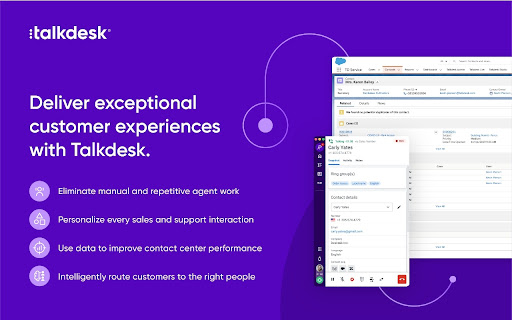


Click-to-Call Directly from Your Helpdesk, CRM, Sales Software and Any Website. TalkdeskⓇ Click-to-Call Extension makes placing calls seamless for sales, support, service and marketing representatives. Use this extension to convert phone numbers* into clickable links that allow quick dialing from your favorite CRM and service desk applications or any web page using Talkdesk Enterprise Cloud Contact Center. - Call directly from your favorite helpdesk, CRM, sales software or any website just by clicking on a phone number*. - Save time and effort by reducing manual work and enabling seamless dialing. - Streamline your workflow with advanced call functionality like call recording, mute, on hold, transfers and conferencing. * The extension identifies all phone numbers in the e.164 format. NOTE: - For installation and additional information, read this article (https://support.talkdesk.com/hc/en-us/articles/204965789-Installing-Talkdesk-Click-to-Call-extension). - To learn more about Talkdesk CX Cloud go to www.talkdesk.com.

Okta Browser Plugin
Work outside the perimeter Okta Browser Plugin protects your passwords and securely logs you into all your business and personal apps. The world's largest organizations and over 100 million people rely on Okta to connect to apps inside and outside of their organization knowing that their credentials are protected. With the Okta Browser Plugin you can: *Automatically sign in to your business and personal apps with just one click *Add your own apps into Okta *Quickly generate strong, random passwords on the fly for all your apps *Easily access your Okta dashboard apps and tabs *Seamlessly and securely switch between multiple Okta accounts You need an Okta account to use the Okta Browser Plugin. If you cannot access your Okta account via Okta Browser Plugin, please contact your IT admin. Use the following link to learn about the most recent version changes: https://help.okta.com/en/prod/Content/Topics/Settings/Version_Histories/Ver_History_Browser_Plugin.htm

Seismic
Get the content you need, where you need it, instantly. Search Seismic from anywhere you work. The Seismic browser extension allows for quick, easy access to enablement materials. Bookmark content for faster reuse and share it without leaving your browser. No more clicking from app to app and context switching – get the content you need, where you need it, instantly. Seismic Premier customers or those specifically with the Seismic Knowledge add-on have additional benefits, including automated AI detection of natural language questions and verified, bite-sized answers. Source expertise from across your company; team members can up or down-vote answers to improve their relevance. Intelligent search functionality finds the content you’re looking for, no matter where it lives.

Magical: Text Expander & Autofill
Magical is a text expander and autofill automation app used by over 100K companies. Expand text like magic and auto-fill forms. Magical is a text expander and autofill automation app used by over 100K companies. Expand your text like magic and auto-fill forms, spreadsheets, and messages. ✍️ Automate writing & messaging: Use Magical’s text expander to autofill messages with your contact’s personal information. 🔢 Automate any data entry task: With a single click, autofill contacts, leads, patient details, or job candidates into any database, form, or spreadsheet. 📍**Works where you do**: Boost your productivity on 10,000,000+ apps where you already work, like Salesforce, Zendesk, Gmail, LinkedIn, Greenhouse, or any other website. ⏱ **Set up in seconds:** Magical doesn't rely on integrations, APIs, or complex workflow builders. Just download and start saving time with simple automations. 👆 **Automation at your fingertips**: Call up Magical anywhere, anytime. The app speeds up repetitive tasks like messaging, data entry, and more as you work. Top Use Cases for Magical **👋 Customer service & support** • Communicate fast and close more customer tickets. • Call up template responses without taking your hands off the keyboard. • Automatically fill in your customer's details to personalize your comms. • Magical has official integrations with customer support tools like Zendesk, Intercom, Freshdesk, Gmail, and more. **🎯 Sourcing workflows for Recruiting:** • Close more candidates by sending personalized outreach messages 10X faster. • Source candidates to sheets with one click to track the recruitment pipeline. • Add candidates to your applicant tracking system directly from sources like LinkedIn. • Magical has official integrations with ATS recruiting tools like Greenhouse, Lever, WorkDay, and more. **💰 Prospecting workflows for Sales** • Make more money by speeding through repetitive prospecting tasks. • Send perfectly personalized sales messages 10X faster. • Autofill lead contact info, tags, and records into your CRM—instantly. • Magical has official integrations with sales tools like Salesforce, HubSpot, Zoho, and more. 🏥 **Healthcare professionals:** • Reduce burnout by speeding through repetitive typing tasks. • Add notes to your electronic medical record (EMR) in record time. • Automatically move patient info into forms for insurance claims, prescriptions, and more. • Magical has official integrations with healthcare tools like Epic, Medhost, Allscripts, and more. 👩🏫 **Educators** • Save time on admin work by automating your everyday tasks. • Add notes and grades to your learning management system (LMS) in an instant. • Send personalized messages to students and parents using pre-baked templates. • Magical has official integrations with education tools like Canvas, Brightspace, and Google Classroom. 👩💼 **Operations & Admins** • Speed through your repetitive tasks to get more done in the day. • Personalize and send repetitive internal or external messages 10X faster. • Move data between different websites and web apps to ensure accuracy—every time. • Automate tasks for your finance, admin, project management, and other teams. **🌱 Small Business and Entrepreneurs:** -Build brand consistency and allow anyone to answer frequently asked questions from customers via email, chat, or social media channels. - Manage your customer contacts in your CRM, or candidates in your ATS. ✈️ **Personal use:** • Get more done in the day by automating your busywork. • Send repetitive messages with personal details in an instant. • Fill out forms and spreadsheets in the blink of an eye. • Use Magical on any website or web app—anywhere, anytime. **💬 Text-expansion & messaging:** Tired of remembering Zoom links, email addresses, phrases about your company, FAQs and/or frequent email templates that you type repeatedly? Magical allows you to save time and increase accuracy by creating shortcuts of text you commonly use. Save time, typos, and the satisfaction of going back to things you love the most in your day. 📰 Critical Acclaim: - Recognized by several sources, including TechCrunch, LifeHacker, PCMag, Fast Company, and Business Insider. The app name was formerly Auto Text Expander For Google Chrome and is also known as GetMagical, Magical AI, or simply Magical. TextExpander® is a registered trademark of SmileOnMyMac, LLC. Google Chrome is a trademark of Google Inc. Use of this trademark is subject to Google permissions. All other trademarks are conveyed to you as customers, reference on compatibility, or alternatives.

Monosnap
Capture pages or blocks with the awesome smart screen capture tool! Capture and edit screenshots, upload files, record video and .GIFs! Share a visual explanation with your clients and colleagues. 📸 Capture: ▸ Desktop screenshots: fullscreen and window. ▸ Page: screenshots: area, visible content, and whole page. ▸ Taking timed screenshots. ▸ Customize hotkeys. ✏️ Annotate and edit: ▸ Highlight important details with arrows, pen, shapes, and text. ▸ Hide too personal and private information with the blur tool. ▸ Resize and crop screenshots. ☁️ Upload and share: ▸ Log in to get 2 GB in Monosnap Cloud storage. ▸ Amazon S3 storage (Non-Commercial and Commercial plans) 🎥 Record: ▸ Desktop, window or browser ▸ WebM and GIF ▸ Add audio to your videos ▸ Customize FPS ℹ️ Info: ▸ Pricing and Plans: https://monosnap.ai/pay ▸ Support Docs: https://medium.com/@monosnap ▸ Terms of Service: https://monosnap.ai/tos ▸ Privacy Policy: https://monosnap.ai/privacy ❓2.0.21 changelog: Manifest permission cleanup ▸ Removed: system.cpu, system.storage, audio, identity, identity.email New feature: Recent Media page ▸ New MSRecentMedia class with default state tracking ▸ Captures registered on upload; blob deletion guarded against active consumers ▸ Popup button added conditionally (only shown when there are recent items) ▸ Dedicated page, EJS template, and styles ▸ Recovery hints surfaced on upload failure notifications i18n strings added ▸ Empty state shown by default; EJS template registered inline Blob / offscreen infrastructure ▸ Offscreen blob bridge added to background ▸ Editor and screencast player register as blob consumers ▸ Consumer-aware blob utils with lifecycle guard to prevent premature deletion S3 settings fixes ▸ Debounced credential input handlers (400ms) to prevent rapid-fire saves _bucketsRefreshed flag + one-shot background bucket refresh after cached render ▸ Removed bucket-fetch from render() to break an infinite update loop ▸ buckets_loaded refresh trigger removed; logout resets state cleanly ▸ Robust bucket fetch with safe type coercion Authentication / Okta ▸ OAuth client cached across calls; service worker handling hardened ▸ Logging: Okta data redacted in prod, mirrored only in dev ▸ BackgroundPopupChromeExtensionLoader added Settings / accounts ▸ Account syncing deferred to the accounts handler (not settings init) ▸ account_updated event routing fixed: moved back to local.subscribe; settings.js bridge relays chrome-to-local ▸ [object Function] bug in Path field fixed Misc ▸ Export UI: reuse cached folders; S3 labels clarified ▸ Sessions substantially reworked (204-line diff) ▸ hardware.js removed from chrome_api
