
lgfembekgpcfapeemgalpeefnlikpobd

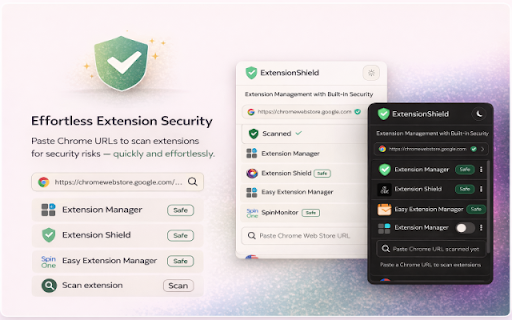


Free security check for installed Chrome extensions: risky permissions, privacy signals, and a simple score. No account required. ExtensionShield helps you scan, review, and manage Chrome extensions with more confidence. It checks installed extensions for risky permissions, privacy signals, and security concerns, then shows a simple score so you can quickly understand which extensions deserve attention. With ExtensionShield, you can: - Scan installed extensions and see clear risk labels - Review requested permissions to spot extensions with broad or sensitive access - Check privacy signals before trusting an extension - Scan a Chrome Web Store URL or extension name before installing - Refresh scans anytime to review the latest results - Enable, disable, or uninstall extensions directly from the popup - Manage all your extensions in one place without opening Chrome’s extension manager ExtensionShield is built for people who want a simpler way to understand browser extension risk and keep their browser cleaner, safer, and easier to manage.

Clevermail
Race through your emails with Clevermail – Your AI-powered Gmail assistant. Clevermail is an innovative AI-powered email assistant that seamlessly integrates with Gmail via a Chrome extension. It enhances your email experience by generating personalized, professional emails based on your inputs and business context. With features like multilingual support and direct email sending, Clevermail is transforming the way professionals handle their email communication

Tablyt
Quickly access tabs, bookmarks, history, and context-aware actions through a command-palette. Default shortcut: Ctrl + Shift + K (or Command + Shift + K on macOS) Extension shortcut can be customized via chrome://extensions/shortcuts.

Radial New Tab
Wallpapers, shortcut grid and folders, web/AI access (ChatGPT/Gemini temp chats), floating quick access anywhere. Radial New Tab transforms your start page into a personalized command center for productivity. YOUR DASHBOARD, YOUR WAY - Customizable wallpapers with blur, brightness, and positioning controls - Organize your go-to sites in a clean grid with folders - Drag-and-drop arrangement for quick access - Automatic icon fetching plus custom icon support - Access ChatGPT, Gemini, and other AI assistants directly - Temporary chat support for private AI conversations - Floating quick-access bar on any webpage (toggle with keyboard shortcut) - Right-click any text for instant actions - Keyboard shortcuts for power users Your layout and preferences sync so your setup stays consistent across sessions. Shortcuts, AI tools, and quick access—all in one clean dashboard.

CRXplorer
Scan and manage your browser extensions with real-time security analysis powered by CRXplorer CRXplorer helps you understand the security posture of your Chrome extensions. FEATURES: • Security Dashboard - View all installed extensions with security scores • Real-time Scanning - Automatically scans new extensions when installed • Risk Assessment - Color-coded risk levels (Critical, High, Moderate, Safe) • Detailed Analysis - View permissions, browser impact, and safety guidelines • Batch Scanning - Scan all extensions at once • Extension Management - Enable, disable, or uninstall extensions directly HOW IT WORKS: CRXplorer sends extension IDs to our secure API for analysis. We examine permissions, code patterns, and known threat databases to generate a comprehensive security score. PRIVACY: • Only extension IDs are sent for analysis • No personal data is collected • All scan results are stored locally • See our Privacy Policy for full details PERMISSIONS EXPLAINED: • storage: Store scan results locally • management: Read installed extension details • notifications: Alert you when threats are found
