
lfmfhlofoaleegdogpmknfbibciflfek

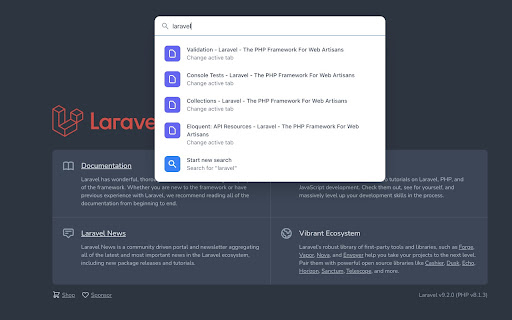
An extension that allows you to quickly switch between active tabs, open new tabs, execute commands and more. Open the command palette by pressing CTRL/COMMAND + SHIFT + K at anytime. The shortcut is editable in the Chrome's shortcuts settings (chrome://extensions/shortcuts).

Chrome Notes
A simple notepad extension for Google Chrome NEW: You can now use speech to text NEW: You can now open Chrome Notes with Ctrl+Shift+X (Command+Shift+X on mac) NEW: You can now download and upload complete backups NEW: Chrome Notes adds a right click menu option to send the selected text to a new note! NEW: You can now have multiple notes! NEW: You can now customize the font size! A simple notes extension, right in your browser! Easily copy around a few words to and from different browser windows and other apps. Thank you for over 100,000 users, 100 ratings and 4.5 stars! Chrome Notes remembers your notes and mode, even after closing your browser or restarting your computer! Notes are stored in local storage, so nobody else will ever see them, not us, and not Google, Microsoft, or Apple. Features: * Resizable notepad * Shortcut buttons for cut, copy, paste, and select all * Normal keyboard shortcuts work too * Save as a .txt file * Open in new window * Speak selected text out-loud * Remembers last notepad size for you next time * Store multiple notes, and quickly create, edit, share, or delete * Focus mode for distraction free writing * Adjustable font size * Right click and send selection to new note * Download and upload full backups * Speech to text (click the mic and speak to put your words on the notepad) * Keyboard shortcut Ctrl+Shift+X (Command+Shift+X on mac) to open Chrome Notes is the smart, simple notepad built for you 😊

Chrome Dice
A simple dice rolling extension for Google Chrome Chrome Dice is a simple dice rolling extension for Google Chrome. Simply click the button and click a die to roll, wherever and whenever. * Ad-free * Works offline * Very small (less than 0.1mb) * No permissions and no data

Simple Counter Button
Adds a counter controlled by a button to your Chrome Toolbar If you need a simple counter that can be incremented by clicking a button, this extension is for you. The counter can be set to increment by any value, positive or negative. The default step is +1 for each click. Right-click to quickly make a -1 step or to reset the counter. Additional functionalities (to be activated in the options page): 🔔 Notifications: you can set a limit and you will receive a notification when the counter reaches that number. 🔊 Sound: enable the sound option to hear a sound every time you press the button. 📅 Chronology: see a list with the date and time of the last 100 clicks. Right-click on the button and select "Options" to access the options page. ❗⌨️You can also set a custom keyboard shortcut for clicking the button by going here: chrome://extensions/shortcuts

Shortcuts for Chrome
Navigation menu of Chrome URLs: internal pages of the Google Chrome browser. Chrome browser navigation is optimized for non-technical users. For users who want to inspect what is happening with indexedDB, service workers, or Bluetooth devices etc., this menu brings shortcuts to those hard-to-find, internal browser pages. This menu lists all Chrome URLs in a single, flat list, configurable menu. This application is free and open-source software, built by Chrome users for Chrome users. ✔️ Pin your favorites on top for fast access ✔️ Drag and drop pinned links to change their order ✔️ Discover hidden browser features you never knew existed ✔️ Automatically matches dark/light mode based on browser setting
