
jnmekaomnicdcpgdndekkmojfomifjal
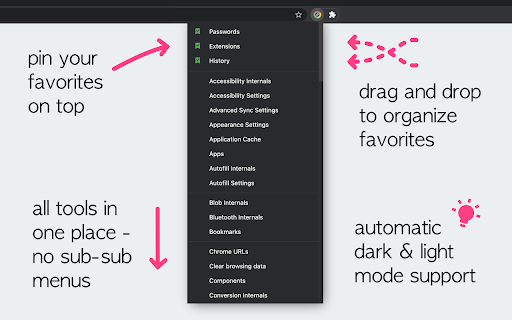
Navigation menu of Chrome URLs: internal pages of the Google Chrome browser. Chrome browser navigation is optimized for non-technical users. For users who want to inspect what is happening with indexedDB, service workers, or Bluetooth devices etc., this menu brings shortcuts to those hard-to-find, internal browser pages. This menu lists all Chrome URLs in a single, flat list, configurable menu. This application is free and open-source software, built by Chrome users for Chrome users. ✔️ Pin your favorites on top for fast access ✔️ Drag and drop pinned links to change their order ✔️ Discover hidden browser features you never knew existed ✔️ Automatically matches dark/light mode based on browser setting

MyMenu
Your personal menu ! Former name: Customize Menu. A collection of chrome pages with additional functions v1.3.0 customize font size fix edit item and delete item button v1.1.1 new feature: Cloud sync It is disabled for old user. (Because you may have different setting in different computer) To enable it, just go to Backup tab and check "Synchronous Setting". new feature: a lot of panels related functions Unless you use dev or canary channels, you should go to "chrome://flags/#enable-panels" and Enable Panels to make them work. v1.0.0 Chrome Style option page Remove Task Manager Remove script and custom item support(because of new chrome extension rule)

Extension Manager
Let's keep it short and simple. This extension does not collect data. ★ No more grammar checker enabled all the time with access permissions to your webpages and clipboard, while you only need it when you write one of those important emails. ★ When you switch off an extension with Extension Manager, it is *effectively off*, unlike when using the "Disable" or "Pause" mode that some extensions are offering. You can always switch them back on very fast. You decide. - Add the ability to search through extensions - Add access to extensions options page - Settings icon is shown for active extensions which provide an option page - Redesign browser action icon - This is to avoid confusion with the informational popup related to extensions, introduced in Google Chrome version 83

Awesome Window & Tab Manager
Displays a list of all windows and tabs open in Google Chrome. Allows filtering, sorting, refreshing, bookmarking, and saving. Awesome Window & Tab Manager does the following: (1) - Tells you how many Chrome windows and tabs are open. (2) - Displays all the windows and tabs. (3) - Allows text filtering (searching) on the windows and tabs. (4) - Allows alphabetic sorting of tabs. (5) - Categorizes tabs by window, domain, or category. (6) - Categories are determined by your own bookmark structure. (7) - Window, domain, or category groups can be refreshed or closed. (8) - All windows and tabs can be saved and restored later. (9) - Window, domain, or category groups can be saved and restored later. (10) - Unbookmarked tabs can be bookmarked. Note: Google Chrome version 16 or higher is required for tab refreshing functionality.

Super Bookmark Desktop
Super Bookmark Desktop - the new tab page + bookmark manager that acts like your computer desktop!… Super Bookmark Desktop - the new tab page + bookmark manager that acts like your computer desktop! If you've ever wanted to treat your bookmarks like files on your desktop then give this a try! Some features: * Cool desktop backgrounds and ability to add your own. Add a subreddit source and get new backgrounds every day! * Click and Drag icons to move them around the desktop or into folders. * Create a selection of multiple items by clicking and dragging with the mouse (then try moving all of them). * Hold down Ctrl, Shift, or Command and then click an icon to multi-select icons. * Right Click the desktop create bookmarks or to change backgrounds and set background settings. * Right Click icons to edit or delete them (editing and deleting affects the actual bookmark). * Create text files that sync like a normal bookmark. Good for making quick reminders!
