
lfjcgcmkmjjlieihflfhjopckgpelofo

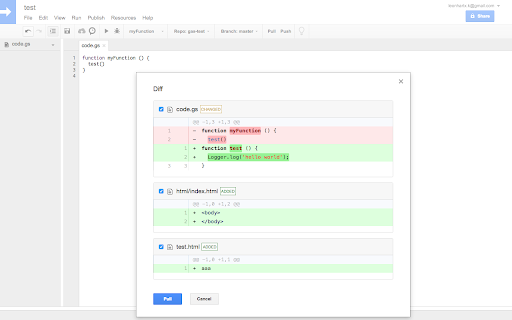

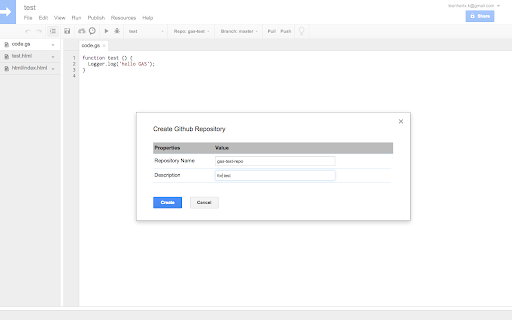

Manage your gas code with github/github enterprise/bitbucket/gitlab Manage your Google Apps Script code with your favorite scm(github/github enterprise/bitbucket). [IMPORTANT] The new version requires Google OAuth to call Apps Script API, before the OAuth app be verified by Google, it only allow to grant 100 users' permission, if you encounter some errors said can not grant permission to the app, please wait for the verification process completed, sorry for the inconvenience! If you can not wait, please try check out the code from https://github.com/leonhartX/gas-github and switch to v4.0.3, install the extension from source with "Load Unpacked" in the extension page, it can still work with the old IDE. Feature: - Push/Pull code between github and Google Apps Script - Sync your code to public/secret Gist - Works with "Embedded" scripts (Scripts that are bound to SHEETS, DOCS, and FORMS) - Create github repo, branch and file from Google App Script IDE - Show diff when pull/push - Support choose files to pull/push - Support commit comment when push - Support Github, Github Enterprise, Bitbucket and GitLab - Support two-factor authentication(only for Github and Github Enterprise) - Support directory(with slash in filename) - Support Github Organization, Bitbucket Team and GitLab Groups. - Google Apps Script native ui - The *Pull* is not work actually the same as Github, since Google Apps Script do not have revision info, the *Pull* will just fetch your code from github and OVERWRITE(not merge) to the project. Changelog 5.1.0 - support auto-completion in repo and branch list - adjust diff window size Changelog 5.0.1 - improve log for new IDE - change extension icon Changelog 5.0.0 - [IMPORTANT] Use Google Apps Script API instead of internal RPC since it changed in new IDE, need to login with Google to work(currently the Google OAuth App is note verified yet, so there will be a warn page) - Support new GAS IDE(old IDE is not supported anymore) - Fix can not work with multi IDE tab in same browser Changelog 4.0.7 - Fix GitHub deprecation notification for using token in query parameter Changelog 4.0.2 - Remove support for hosted GitLab Changelog 4.0.0 - Add support for GitLab (the addition permission requested is for GitLab) Changelog 3.3.6 - Fix extension not work with AppsScript Color 1.0.1 Changelog 3.3.2 - Fix push/pull not work with embedded script. Changelog 3.3.0 - Support manifest file with a new config item. - Fix unexpected deletion when push to Github. Changelog 3.0.3 - Fix login github with email not work. Changelog 3.0.0 - Support bitbucket.org. - Show repo's full name (with user/organization) in dropdown list. - Support create repo under Github organization or Bitbucket team. - Fix create new branch from current branch. - Fix several minor bugs. Changelog 2.0.1 - Support create private repo from extension. Changelog 2.0.0 - Support file deleted and rename. Changelog 1.0.0 - Add Gist support. now you can sync your code to gist(public/secret). - To use gist, you must re-login to create a new access token which has the gist permission, or manually add gist scope in your current github access token. - Simple usage: select 'Using Gist' in repo dropdown list, and then select gist id in Gist dropdown list.

GitZip for github
It can make the sub-directories and files of github repository as zip and download it Why GitZip: - You DO NOT have to download the whole project just for those few files/folders you need. Usage: 1. Browse any Github repository page. 2. Two ways to download: 2.1. Choose the items: 2.1.1. In default, you can double click on items or check the checkbox on the front of items. 2.1.2. Click download button at the bottom-right of the page. 2.2. In context menu: 2.2.1. Click "GitZip Download" > "Whole Repository" or "Current Folder". 2.2.2. Move the mouse cursor on the item and click "GitZip Download" > "Selected Folder/File". 2.2.3. Click "GitZip Download" > "Checked Items" after doing 2-1-1. 3. See the progress dashboard and wait for browser trigger download. 4. Get the ZIP file. Options: "How to select" for item selecting behaviour and "theme" for dark or light themes. Get Token: - If you see the "Rate Limit" warning message on progress dashboard, you should get the Github API access token for upgrade rate limit. GitZip provide a convenient way for it: 1. Click GitZip Extension icon on your browser. 2. Click "Normal" or "Private" link beside "Get Token". 3. Authorize GitZip permission on Github auth page. 4. Back to repo page automatically. 5. Continue to use. 1.0.2: 1. Compatible with new UI (In feature preview called: New Code Search and Code View) 2. Fix a bug about saving personal token. 1.0.1: 1. Enhance popstate detection. 2. Deprecate ".repository-content" selector for items detection. 1.0.0: 1. More download ways in context menu. 2. Can change settings in options page for item selecting behaviour and theme. 3. Can use checkbox to select item. 4. Migrate to Manifest V3 spec.

ZenHub for GitHub
Zenhub is the only project management tool that integrates natively within GitHub’s user interface. No lengthy onboarding. No configuration headaches. No separate logins. Developers stay in an environment they love, and Project Managers get total visibility into the development process. Over 8000 software teams trust Zenhub’s powerful browser extension to help them ship better software. Visualize Issues & Track Dependencies - Multi-Repo Task Boards allow you to track and provide transparency into your development process using existing GitHub data. Drag and drop Issues between pipelines, filter by labels, assign Issues, view Issues linked with Pull Requests, visualize blockers with Issue dependencies, and much more. Plan Sprints & Epics - Epics let you group multiple GitHub Issues together for better planning and tracking and collaborating on product backlogs. Use GitHub Milestones to create sprints, then add story points to track progress. Actionable Reports - Release Reports, Velocity Tracking, and Burndowns all enable more accurate predictions and continuous improvement insights. Determine team pace and efficiency, detect trends to improve processes, and measure the value delivered to end-users. Not using Chrome or Firefox? Learn more about accessing Zenhub across all browsers and mobile devices at https://zenhub.com/web By signing up, you agree to Zenhub’s Terms of Service and Privacy Policy

Visual Python for Colab
GUI-based Python code generator for Google Colab as an extension Visual Python is a GUI-based Python code generator for Google Colab as an extension. Visual Python is an open source project started for students who struggle with coding during Python classes for data science.

Octotree - GitHub code tree
Browser extension that enhances GitHub code review and exploration. Features * Fast IDE-like code tree * Quick search in tree format * Bookmark repos, issues, PRs, files * Support GitHub themes * Support private repositories * High performance, working with repositories of any size NO BS POLICY: Octotree doesn't track you or share/care about your data at all. GitHub tokens are only needed when you want to access private repositories or exceed GitHub API rate limit. Octotree stores tokens in your browser storage and only uses them to authenticate with GitHub.
