
ccmkpknjfagaldcgidgcipbpdipfopob
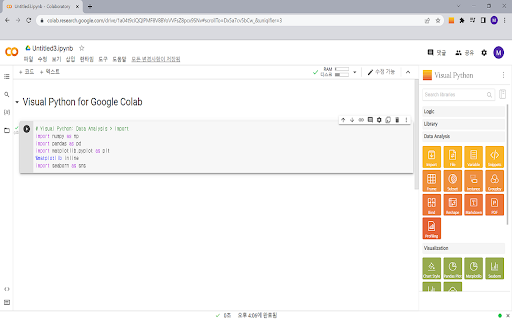


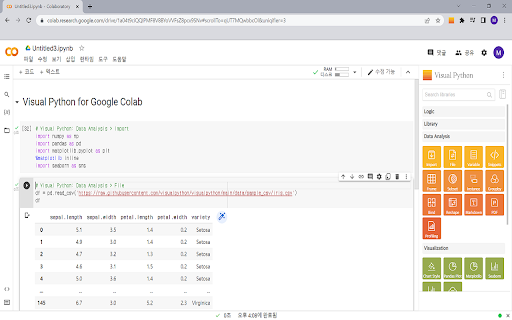
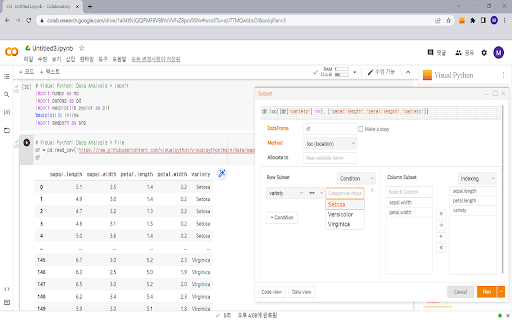
GUI-based Python code generator for Google Colab as an extension Visual Python is a GUI-based Python code generator for Google Colab as an extension. Visual Python is an open source project started for students who struggle with coding during Python classes for data science.

Copy as Python Requests
Copy requests from the devtools network panel as python requests code WebExtension to export traffic of a tab into ready to go Python Requests calls for faster traffic mimicing. With the extension installed: 1. Open the Browser Devtools. 2. Click around and generate the requests you want to export (see Network tab in Devtools). 3. Click extension icon in toolbar at the top. 4. Copy desired Python requests code from popup. - Generate Python code for every request observed by the open devtools. - Configurable filters through extension options page: - Ignore requests to static resources by filtering response content-types. - Ignore auto-generated HTTP headers like User-Agent and Connection. - Optionally hide blocked requests or 404 responses for requests e.g. for missing favicon.ico. - Optionally generate a requests.session() instance. - Try to hide cookies set by a response from an earlier request in the session. - Add option to quickly disable the whole filter lists. - Add option to render params, headers, cookies etc on separate lines. - Removed unneeded `host` permission. Apparently the devtools permission is enough to read the network HAR. - Sort requests by start date if they aren't already. - Fixed generating of `multipart/form-data` postData when the params aren't available in a pre-parsed form in the HAR. - Fixed extension losing connection to devtools after some time of inactivity.

PyConsole: Python shell uncomplicated
An intuitive python shell in the browser PyConsole is an extension which you can use to directly run python programs in the browser; It mimics the behavior of a normal REPL that you can launch in a terminal but aims to achieve more with the power of the browser environment. You can import popular data analysis libraries such numpy and pandas for data wrangling or just write normal python snippet for day to day tasks. You can even create beautiful visualizations directly in the console using various visualization libraries such as altair, plotly, matplotlib, bokeh etc. Pro tips: 1. Delete commands you don't like any more by clicking the trash icon to keep the session clean.

Python IDE
A Python IDE in the browser Perfect for learning Python and quickly testing code snippets! You will have access to: - Python 3.12 and the Python standard library - Blazing fast Python code execution - A clean and simple code editor and output terminal - Dark mode! Powered by WebAssembly and Pyodide

Python Playground
Try Python Playground - a fast, easy and convenient Python compiler and editor that can be used in any tab as an online Python IDE. 🐍 Python Playground is the ultimate online python compiler for both beginners and seasoned developers. Whether you’re learning the language or just need a quick and reliable way to test out an idea, this powerful Chrome Extension puts a fully functional environment right in your browser popup. You can now run an online code compiler anytime, anywhere - with no setup and no extra windows. 💡 Forget bloated IDEs or slow tools. With this playground, you get a fast, clean, and reliable python code runner that launches in seconds. Whether you’re on a break or deep in a dev sprint, it’s ready instantly. 💻 Need to check a snippet, refactor a function, or visualize data? Just open the playground python extension. The intuitive online Python interface makes it feel like a natural part of your workflow. 🖥️ Key Features of Python Playground 1️⃣ Run Your Code Instantly. Start coding in a modern environment with zero configuration. Run python online with just one click. 2️⃣ Built-in Syntax Highlighting and Code Completion. Get color-coded syntax and fast auto-complete. The integrated py editor boosts clarity and reduces bugs. 3️⃣ Light or Dark Themes. Work your way in a customizable py online space. Switch between light or dark modes for eye comfort. 4️⃣ Save Your Favorite Scripts. Create your own library! Store functions, utilities, and templates right in your playground. 5️⃣ Preloaded Libraries. Everything you need is already inside. Python code playground comes bundled with some of the most popular libraries used in the industry. 📌 Why Developers and Learners Love Python Playground: 1. Blazing fast performance 2. Lightweight and easy to use 3. Designed for all skill levels 4. Supports many libraries 5. Built into your browser for quick access 📊 Whether you’re writing your very first print statement or testing out advanced data analysis, an online python playground keeps the process smooth and frustration-free. 🚀 Use Cases for Python Playground online: ➤ Debugging quick code snippets ➤ Practicing exercises ➤ Automating small tasks ➤ Teaching programming in classrooms ➤ Exploring APIs and HTML with BeautifulSoup ➤ Prototyping data visualizations with matplotlib and Plotly ➤ Using it as your personal python online compiler for experimentation 🖱️ It’s perfect for fast development loops - no file creation, no virtual environments, and no terminal gymnastics. Just pure code and instant results. 🔧 A Versatile Tool for Every Coder: ⚡ Everyday python editor for quick code drafts ⚡ Handy playground for testing snippets on the fly ⚡ Lightweight online interpreter for instant execution ⚡ Flexible ide for portable coding ⚡ Reliable python sandbox for safe experimentation 🛠️ Designed for Rapid Testing and Prototyping ▸ Test one-liners ▸ Explore new algorithms ▸ Walk through tutorials ▸ Solve coding challenges ▸ Brainstorm ideas with live code 📐 This playground is a great fit for developers who want fast feedback and for educators who need a frictionless python compiler to help students get hands-on practice without setup delays. If you're teaching or learning programming, our extension simplifies access to a usable online compiler. It’s ideal for coding lessons, demos, homework reviews, or sending working examples. ❓ Do I need to install anything to use the python online playground? 💡 No. Once installed from the Chrome Web Store, it runs directly in your browser - no extra tools needed. ❓ Does it work offline? 💡 Yes. After the initial installation, you can run the playground without an internet connection. ❓ Can I use it for data science? 💡 Yes. It includes libraries such as pandas, NumPy, matplotlib, and more for analysis and visualization. ❓ Is this python interpreter good for beginners? 💡 Yes! It’s designed to be simple enough for learners but powerful enough for professionals. ❓ Can I save my work? 💡 Yes, you can save your favorite snippets right inside the extension for quick reuse later. 🐍 Python Playground app brings power and simplicity together in one elegant tool. Whether you call it a python runner, interpreter, or just your personal online IDE, it delivers value right where you need it - inside your browser. 🚀 Start coding smarter and faster - install Python Playgorund and unlock a seamless way to write, test, and use this online ide anywhere, anytime.
