
lfceojfndacpjddcojdmmcfdmokhmccn
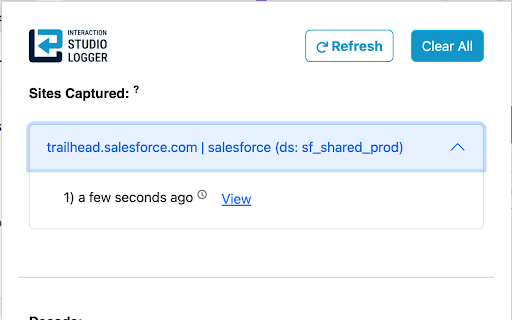


This add-on logs all events that are sent to Salesforce's MCP & Data Cloud servers and stores it in local storage. This extension is a must-have for Salesforce Marketing Cloud developers active in Interaction Studio! The new Interaction Studio (Marketing Cloud Personalization or MCP) Logger extension logs & stores all Interaction Studio (MCP) events in local storage and converts base64 string to readable JSON. This add-on logs all Interaction Studio events that are sent to Salesforce's Marketing Cloud Personalization server and stores the event details in local storage. As the payload is base64 encoded, the add-on decodes and displays formatted JSON content to make it easier for developers and testers to review and debug code.

SFMC Query Saver
This Extension saves any SQL queries executed in Query Studio. As SFMC Developers, we know that running SQL queries in Query Studio is a common task. So it can be frustrating to find that these queries are not automatically saved or stored in any way by the default platform. This is where our Chrome extension comes in. Every time an SQL query is run in Query Studio, the SFMC Query Saver extension automatically stores it. This feature allows developers to have a historical record of all the queries they have executed, enabling devs to revisit previous queries and save tons of time (by not needing to recreate old queries from scratch or combing through unsaved vscode tabs). Additionally, it helps with better tracking and debugging. Grab your SFMC Query Saver extension today and greatly enhance the functionality of Query Studio!

SFMC Menu
A simple menu for quick access to SFMC tools. Salesforce Marketing Cloud (SFMC) Menu Chrome Extension Simplify your Salesforce Marketing Cloud (SFMC) experience with the SFMC Menu Chrome Extension! This powerful and user-friendly tool provides a streamlined way to navigate to various pages on the Salesforce Marketing Cloud platform, helping you save time and boost productivity directly from a user-friendly menu. How It Works: ---------------------------------------------------------------------- * Install the SFMC Menu chrome extension. * Use the Settings Cog button in the menu to customise your SFMC Menu. * Toggle visibility of menu items with checkboxes. * Reorder the menu in real-time. * Save your settings automatically via local storage to return to the same state. * Click on any menu item to jump directly to the corresponding SFMC page. * Add custom links to your SFMC Menu and delete when no longer needed. * Auto/Manual dark & light mode support. * Update the accent colour on links * Update the text size on links * Update text alignment on links * Update the colour of links * Update the font weight of links * Update font family of links * Language support for English, Español (Spanish), Português (Portuguese), Français (French), Deutsch (German), Italiano (Italian), Nederlands (Dutch), Polski (Polish), Svenska (Swedish), Dansk (Danish), Norsk (Norwegian), Suomi (Finnish), Русский (Russian), 日本語 (Japanese), 한국어 (Korean), 简体中文 (Chinese Simplified), 繁體中文 (Chinese Traditional), العربية (Arabic), हिन्दी (Hindi), ไทย (Thai) This extension is perfect for Salesforce Marketing Cloud users who want to streamline their workflow, reduce clutter, and navigate the SFMC platform with ease.

MCX - Marketing Cloud eXtension
🚀 Fill critical gaps in Salesforce Marketing Cloud with MCX! MCX solves SFMC's biggest limitations: investigating subscriber and complex data relationships, missing Journey and DE comparison tools, zero native documentation, and expensive push notifications. Built by SFMC experts who understand daily frustrations, MCX extends Marketing Cloud with essential capabilities that should already exist. 🔍 Explore – Investigate Data Extensions, subscriber details, and object relationships across your SFMC instance with visual mapping that native views hide. Find what you need in minutes, not hours. ⚖️ Compare – See exact differences between Journey versions and Data Extension configurations side-by-side. No more manual inspection or guesswork when managing multiple variations. 📄 Document – Auto-generate professional technical documentation from Journey and Automation JSON packages. Eliminate hours of manual documentation for stakeholder reviews and compliance audits. 💬 Push – Send push notifications directly from Journey Builder without native app (iOS/Android) development. Transform your website into a Progressive Web App and deliver Salesforce-driven notifications in minutes. ⚡ Quick Setup: 1️⃣ Log in to Salesforce Marketing Cloud 2️⃣ Launch MCX extension on any SFMC tab 3️⃣ Start working immediately 💡 Perfect for: Marketing Cloud administrators managing complex implementations, developers needing deeper subscriber insights, consultants documenting intricate configurations, and marketers sending push notifications without mobile apps. ⚠️ MCX is not an official Salesforce product and is not endorsed or supported by Salesforce.

MCP Cookie Assistant
This is an extension to look up and edit MC Personalization Cookie User IDs This extension helps you test MC Personalization integrations by accessing the _evga_ cookie. It includes the following functionality: 1. Show details of an existing _evga_ cookie, including cookie name, cookie domain and your anonymousId or persisted ID (more about MCP cookies: https://developer.salesforce.com/docs/marketing/personalization/guide/web-integration.html?q=_evga_). 2. Remove the _evga_ and _sfid_ cookies, e.g. to make MC Personalization generate a new cookie and anonymous ID. 3. Update or set a new _evga_ cookie to make it use specific ID values. To set a cookie you first need the extension to track an _evga_ cookie from the actual domain. The extension saves the cookie details in your local browser storage to reuse it when setting a cookie. - The extension might not be able to distinguish between multiple _evga_ cookies set by MCP instances/datasets, for example because of running different SDKs on the same domain. - Buttons (especially deletion) sometimes do not react: Please try to close and open the extension frame. - The ID shown in the extension is not available in MCP: The extension is showing the anonymous ID, usually created by the WebSDK and stored in the cookie. For various reasons (e.g. known user) it is possible that MCP does not use/provide this ID in the user profile. - Deletion does not create a new user: It is possible that MCP uses additional IDs to identify the user. In that case, even when we set a new anonymous ID, it does not lead to a new user record. The behvior of MCP and it's WebSDK differs based on your implementation, sitemap, configuration, CMS, etc. This browser extension might not work with every implementation. Right now there are no plans to extend any functionality. This extension is not a product of Salesforce, Inc. or supported by Salesforce in any way.
