
bkajbggginfjnjhaiififajmncgdneli
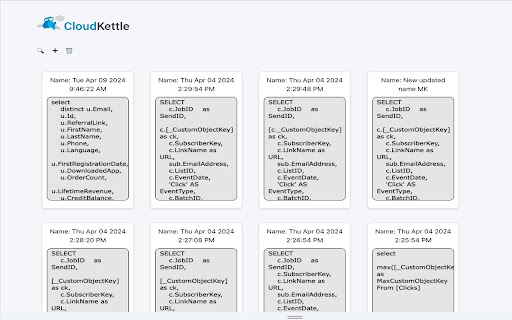
This Extension saves any SQL queries executed in Query Studio. As SFMC Developers, we know that running SQL queries in Query Studio is a common task. So it can be frustrating to find that these queries are not automatically saved or stored in any way by the default platform. This is where our Chrome extension comes in. Every time an SQL query is run in Query Studio, the SFMC Query Saver extension automatically stores it. This feature allows developers to have a historical record of all the queries they have executed, enabling devs to revisit previous queries and save tons of time (by not needing to recreate old queries from scratch or combing through unsaved vscode tabs). Additionally, it helps with better tracking and debugging. Grab your SFMC Query Saver extension today and greatly enhance the functionality of Query Studio!

Interaction Studio (MCP) Logger
This add-on logs all events that are sent to Salesforce's MCP & Data Cloud servers and stores it in local storage. This extension is a must-have for Salesforce Marketing Cloud developers active in Interaction Studio! The new Interaction Studio (Marketing Cloud Personalization or MCP) Logger extension logs & stores all Interaction Studio (MCP) events in local storage and converts base64 string to readable JSON. This add-on logs all Interaction Studio events that are sent to Salesforce's Marketing Cloud Personalization server and stores the event details in local storage. As the payload is base64 encoded, the add-on decodes and displays formatted JSON content to make it easier for developers and testers to review and debug code.

Salesforce Inspector Reloaded
Productivity tools for Salesforce administrators and developers to inspect data and metadata directly from the Salesforce UI. This extension is based on the original Salesforce inspector extension made by Søren Krabbe. IMPORTANT: If you have any question or facing bugs, please use the GitHub repository : https://github.com/tprouvot/Salesforce-Inspector-reloaded/issues - Analyze Field Usage in Show All Data - Multi Query tabs in Data Export - Download & Deploy Metadata - Security improvements - Field Creator page to bulk create fields from the extension - Event Monitor page to subscribe to Platform Events from the browser - Import / Export configuration from Option page - Customise extension shortcuts - Support SOSL and GraphQL languages - REST Explore page to run any API from the extension without external tool - Load recent records from popup - Customize extension favicon and Sandbox banner - Check QueryPlan on data export - Enable Logs from User tab - Customize settings in Option page - New Org tab - Search for a particular flow, profile or permission set from Shortcut tab - Restrict Salesforce Inspector usage with a default connected app - New "Shortcut" tab to quickly access setup menu - Link to permission sets assignment from User tab And many more !

SFMC Automation Viewer
This extension lets you view the details of your automation without pausing it or opening each activity

Salesforce Interactions SDK Launcher
Provides support for launching either the Salesforce CDP Sitemap Editor or Interaction Studio Visual Editor on any domain. This extension provides support for launching either the Salesforce CDP Sitemap Editor or Interaction Studio Visual Editor on any domain.
