
mhmpepeohaddbhkhecaldflljggicedf

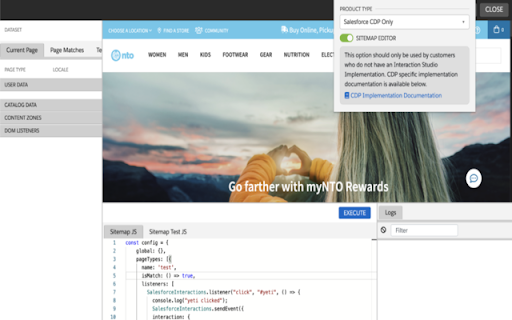
Provides support for launching either the Salesforce CDP Sitemap Editor or Interaction Studio Visual Editor on any domain. This extension provides support for launching either the Salesforce CDP Sitemap Editor or Interaction Studio Visual Editor on any domain.

Salesforce
Work with Salesforce records directly in your browser. Sales Cloud Everywhere lets you work on your to-dos, see engagement alerts, create records, and update multiple records. You can use it in your Gmail inbox, or in a standalone window alongside any web page. - Sell where you work: Move deals forward as you move around the web. - Access data anywhere: Bring context to every conversation. - Accelerate deals with real-time buyer data: Engage with people who want to engage with you. What you can do with Sales Cloud Everywhere: - Work with Salesforce directly in Gmail. - View, sort, and complete tasks like sending emails, reaching out on LinkedIn, and updating records, without returning to Salesforce.com. - Connect Salesforce to your Calendar and send calendar links, set availability, and more. - Get real time notifications of recent engagements as you browse the web. - Create and update records from within your Chrome web browser without leaving the current page. - Access and quickly update CRM records like leads, opportunities, and contacts. If you can’t access Salesforce via the extension, ask your Salesforce admin for help. Review the app’s terms of service: https://c1.sfdcstatic.com/content/dam/web/en_us/www/documents/legal/Agreements/software-order-form-supplements/gmail-integration-order-form-supplement.pdf

Datalayer Checker
The easiest way to debug and check the dataLayer implementations without having to use the browser console! We are happy is happy to release Datalayer Checker 3 with several new features and a revamped design! NEW VERSION AVAILABLE! 🔹 Redesigned interface and intuitive user experience 🔹 Integrated event search engine 🔹 Flexible variable visualization: table format or JSON object 🔹 Google Tag Manager container injection removed (to respect manifest v3 rules) EXCLUSIVE FEATURES: 🔹 Capture what matters! Save up to 100 dataLayers with our revolutionary "Snapshot" function 🔹 Deep analysis! Verify your dataLayers in batches by methodically inspecting your captures 🔹 Organize efficiently! Structure your workspace with intelligent filters by domain, dataLayer name, or specific search (e.g.: event_name) to automatically classify your snapshots 🔹 Stay up-to-date! Reopen all your snapshot URLs to capture new data and compare them instantly Transform your analytics experience with Datalayer Checker! Because we're passionate about analytics...

DESelect Search in Salesforce Marketing Cloud
Easily search for objects in SFMC: all Content Builder objects, data extensions, query activities, data filters, automations, ... Note: Due to recent security updates from Google, the Chrome extension only works if the AppExchange version has already been installed. You can get it here: https://appexchange.salesforce.com/appxListingDetail?listingId=a0N4V00000Fz2a4UAB . DESelect Search in SFMC - Salesforce Marketing Cloud is a free Chrome Extension that allows you to easily search for everything that’s traditionally hard to find in Salesforce Marketing Cloud. Why you need this if you’re a Salesforce Marketing Cloud user? Imagine looking for a data extension the name of which you partially know, but can’t recall which folder you saved it in. Salesforce Marketing Cloud’s search functionality is limited as it only scans one selected folder at a time. SFMC Quick Search does this for all folders at once, even if you only know part of the file name. *The search bar is now completely integrated with the Marketing Cloud UI so it’s always immediately available. You can start searching and get the results in seconds. *Click links to directly go to the Data Extension you're looking for. *Another benefit is persistent results. The search results remain, even if you click or navigate somewhere else. You can use the ‘Pin’ functionality to pin your results to the top of the page, so you can navigate to your result, still maintaining full path visibility. This makes it much easier to go to that automation that’s 10 levels deep in your folder structure! *DESelect Search in SFMC - Salesforce Marketing Cloud can search for results across business units, and you can also see results from just your current business unit. *We’ve extended the search functionality so you’re now able to search objects by both name and external key. Search for everything! We currently support searching for: - ALL Content Builder objects: - Email templates - Email messages - Content blocks: dynamic content, buttons, code snippets, enhanced dynamic content, freeform content, external content, html, images, image carousels, layouts, social follows, social shares, text: - Mobile app push notifications & mobile messages - Automations - Data extensions - Query activities - Classic emails - Classic email templates - Data filters… All info regarding the security of this chrome extension can be found at: https://support.deselect.com/hc/en-us/articles/360004352797. You can download the version of DESelect Search for Salesforce Marketing Cloud from AppExchange, using this link: https://sforce.co/3xafuqk

Omnibug
Omnibug is a browser extension to decode and display outgoing digital marketing tool requests. Omnibug is a Chrome extension built to ease developing with, debugging, and providing quality assurance to today's analytics, UX/CRO tools, and many other marketing technologies. These tags include the Google Marketing Cloud (including Google Analytics, Google Tag Manager, Doubleclick, and Google Ads), the Adobe Experience Cloud (including Adobe Analytics, Adobe Launch, Adobe Target, Web SDK), Tealium iQ, and many more! Events sent to these MarTech platforms are captured and decoded into a human-readable format, which can be filtered and/or exported. You can view all of our release notes at https://omnibug.io/help/changelog/ and a list of providers we support at https://omnibug.io/help/supported-tags/
