
fecaogaoaddfmdeoilcpjopplpdjedee
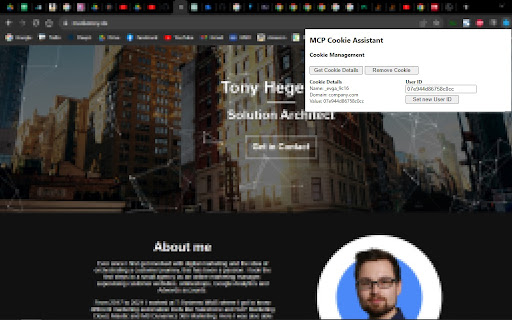
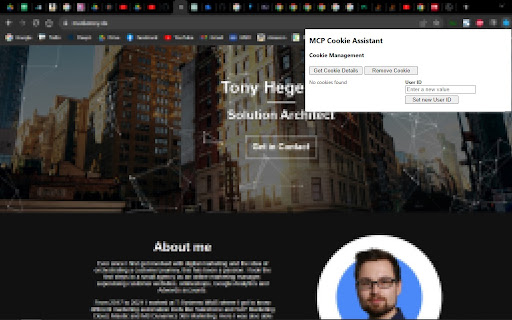
This is an extension to look up and edit MC Personalization Cookie User IDs This extension helps you test MC Personalization integrations by accessing the _evga_ cookie. It includes the following functionality: 1. Show details of an existing _evga_ cookie, including cookie name, cookie domain and your anonymousId or persisted ID (more about MCP cookies: https://developer.salesforce.com/docs/marketing/personalization/guide/web-integration.html?q=_evga_). 2. Remove the _evga_ and _sfid_ cookies, e.g. to make MC Personalization generate a new cookie and anonymous ID. 3. Update or set a new _evga_ cookie to make it use specific ID values. To set a cookie you first need the extension to track an _evga_ cookie from the actual domain. The extension saves the cookie details in your local browser storage to reuse it when setting a cookie. - The extension might not be able to distinguish between multiple _evga_ cookies set by MCP instances/datasets, for example because of running different SDKs on the same domain. - Buttons (especially deletion) sometimes do not react: Please try to close and open the extension frame. - The ID shown in the extension is not available in MCP: The extension is showing the anonymous ID, usually created by the WebSDK and stored in the cookie. For various reasons (e.g. known user) it is possible that MCP does not use/provide this ID in the user profile. - Deletion does not create a new user: It is possible that MCP uses additional IDs to identify the user. In that case, even when we set a new anonymous ID, it does not lead to a new user record. The behvior of MCP and it's WebSDK differs based on your implementation, sitemap, configuration, CMS, etc. This browser extension might not work with every implementation. Right now there are no plans to extend any functionality. This extension is not a product of Salesforce, Inc. or supported by Salesforce in any way.

MCX - Marketing Cloud eXtension
🚀 Fill critical gaps in Salesforce Marketing Cloud with MCX! MCX solves SFMC's biggest limitations: investigating subscriber and complex data relationships, missing Journey and DE comparison tools, zero native documentation, and expensive push notifications. Built by SFMC experts who understand daily frustrations, MCX extends Marketing Cloud with essential capabilities that should already exist. 🔍 Explore – Investigate Data Extensions, subscriber details, and object relationships across your SFMC instance with visual mapping that native views hide. Find what you need in minutes, not hours. ⚖️ Compare – See exact differences between Journey versions and Data Extension configurations side-by-side. No more manual inspection or guesswork when managing multiple variations. 📄 Document – Auto-generate professional technical documentation from Journey and Automation JSON packages. Eliminate hours of manual documentation for stakeholder reviews and compliance audits. 💬 Push – Send push notifications directly from Journey Builder without native app (iOS/Android) development. Transform your website into a Progressive Web App and deliver Salesforce-driven notifications in minutes. ⚡ Quick Setup: 1️⃣ Log in to Salesforce Marketing Cloud 2️⃣ Launch MCX extension on any SFMC tab 3️⃣ Start working immediately 💡 Perfect for: Marketing Cloud administrators managing complex implementations, developers needing deeper subscriber insights, consultants documenting intricate configurations, and marketers sending push notifications without mobile apps. ⚠️ MCX is not an official Salesforce product and is not endorsed or supported by Salesforce.

SFMC PowerPack
Optimize everyday tasks in Salesforce Marketing Cloud with an extensive utility pack Data Extension Search: - Find the folders where your data extensions are located, and view them in Contact Builder - Note: If it does not show results, open Contact Builder page temporarily. Visual UI Improvements: - Increased width for folder selection windows Quick copy Subscribers folder IDs: - Extract folder IDs from your audiences folder structure to use in automations Total Exclusions sum: - For any email sends, you can see the total excluded recipients count Data Handling: All data is stored using your local storage, ensuring data security and privacy.

smartGPT Multi-Tab Extension
A Chrome extension to interact with ChatGPT across multiple tabs The smartGPT Multi-Tab Resolver is a Chrome extension that allows users to interact with ChatGPT across multiple tabs to get more refined answers to their questions. This follows some of the ideas in "An automatically discovered chain-of-thought prompt generalizes to novel models and datasets" Hebenstreit, Praas, Kiesewetter, Samwald. The name was coined by the Youtube channel AI Explained. We intend to develop this project to allow a wide selection of AI models, including but not limited to Vicuna and other Llama based models. The project is open source and its Github page is here: https://github.com/TheJadeAuthors/smartGPT-Multi-Tab-Extension

Salesforce Interactions SDK Launcher
Provides support for launching either the Salesforce CDP Sitemap Editor or Interaction Studio Visual Editor on any domain. This extension provides support for launching either the Salesforce CDP Sitemap Editor or Interaction Studio Visual Editor on any domain.
