
lejobjgkpdfhmchhdaecdkdlepclglaa

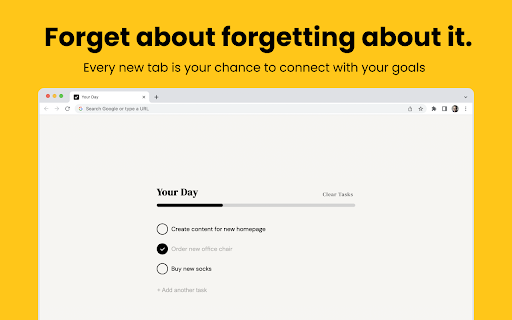

Remember everything, stay on track, and actually use your to-do list. DoTab replaces your new tab with an elegant minimalist to-do list. Why you'll like it: - wildly simple and easy to use - looks slick and comes with dark mode - you'll never forget about your to-do list again ***DATA*** We don't store your data. DoTab uses Chrome Storage to sync your tasks across whatever chrome browsers you're logged into, that's handled by Google, and we can't see it. A note from the creator of DoTab: "I made DoTab because frankly, I suck at to-do lists. I've tried tons of different apps, notebooks, and planners and they all suffer from the same problem. They're out of reach, out of sight, out of mind. I wanted to make something that was helpful, pleasing to look at, and enjoyable to use. I hope you find it to be at least one of those things. ;)"

Moment - New Tab Markdown notes & task list
Don't lose what grabs you in the moment. Don't lose what grabs you in the moment. Moment gives you a new tab experience where you can enjoy beautiful pictures whilst still giving you the functionality of taking notes. Create and track task lists or write down, Remember you had something left to do but don't know what? Just open a new tab! Moment supports markdown to nicely format your notes.

Tabba – Minimal New Tab Suite
A privacy-first new tab with calendar, to-do, bookmarks & zero tracking. A New Tab replacement with a suite of tools for both productivity and reflection. Self-hosted, no AI, no data tracking, no analytics, works offline, and privacy-focused. Features: - Calendar-grid visualization showing all the hours in a year/quarter/month/week - Add notes on the Calendar by clicking any hour cell - To Do list with tags and filtered to-do lists - Bookmarks: Save your favorite links in a grid or list view for quick access. - Timezones: Shows your awake hours compared to other timezones - Analog clock - Bitmap/pixel drawing tool - Symbols: Copy and paste commonly-used symbols like » © → § - Customization for most features including color theme and light/dark mode. - Import/export your data as json for backup and archiving - Always remembers which tool you had open last and opens the same tool when opening a new tab

NimoTab
NimoTab - Tidy up your cluttered tab bar and elegantly save your tabs. Enjoy a hassle-free browsing experience with NimoTab - the tab manager for Google Chrome. Say goodbye to cluttered tabs and hello to a more organized and efficient browsing experience with features like: * Local tab storage: Save and recover tabs & tab groups with ease, all stored locally for your privacy. * Customizable tab sorting: Effortlessly sort and organize tabs to your liking. * Tab search & filtering: Quickly search and filter saved tabs by date, domain, session, time, or count. * Tab grouping: Keep similar tabs together for more efficient browsing. * Exclusion lists: Exclude tabs from being saved with custom exclusion lists. * Window manager: Easily switch and recover tabs with the built-in window manager. * Backup & restore: Protect your data with backup and restore options. * Dark mode theme: Experience a sleek, modern dark mode theme. Streamline your browsing experience and elevate your productivity with NimoTab - the best tab manager extension for Google Chrome. Get install now and start browsing like a pro!

New Tab Todo List: Checklist, Notes, Outliner
Beautiful and sharable checklists, notes, and to-do lists. Collaborate and outline in real-time. Turn your New Tab into a Todo List! ✏️ A lightning fast new tab productivity page and dashboard with stunning backgrounds, todo, tasks, lists, and more. Make your new tab / start page the way it should be: Fast, customizable, beautiful and productive! Make lists, outlines, todos, and more. With the New Tab Todo List extension for Chrome, just open a New Tab to capture your ideas, goals, and daily tasks. New Tab Todo List is a friendly space for your lists, outlines, and teams. Use it as your simple to-do list and task manager. You can instantly make a list and share it with your friends, family, and team. Simple, clean, and beautifully designed with relaxing themes and backgrounds. New Tab Todo List declutters your thoughts so you can focus on your tasks, ideas, and getting things done. Use New Tab Todo List to capture your ideas, goals, daily tasks and stay organized. A homepage you will fall in love with! Checklists, tasks, todos, quick notes, calendar and more. Replace your new tab with a personal productivity tool featuring to-do, task lists, team outliner, and inspirations. • New Tab into a beautiful task list • Collaborate with others, with real-time syncing • Share your task lists instantly using a share link • Easily invite friends and teammates to New Tab Todo List • Work together in a shared team space • Task lists with a natural editing interface • Edit to-do lists like a word doc and document • Mark any items as complete, whether bullet, number, or checkbox. • Infinitely nested lists with indent / outdent • Tag and filter tasks using #hashtag and @mentions • Works on phones and tablets, with live real-time syncing between devices • Automatic syncing between your phone, tablet and computer • Simply click to edit, like a text document • Easily expand and collapse outlines and lists • Inspirational wallpapers and photos • Beautiful and minimal interface • Simple, instant and FREE • Feel good, get motivated, seize the momentum and get things done! Yes, New Tab Todo List is completely free. Soon you will have the option to upgrade to New Tab Todo List Pro, which will have additional features like themes, sticker packs, and customizations. ➜ CAN I USE New Tab Todo List WITH MY TEAM? Yes. Create a space and invite your team instantly. It helps keep your lists and team organized. Members will have full access to lists in space. Use New Tab Todo List as your collaboration tool to help each other get stuff done. Meeting notes, task lists, collaborative documents and processes are now in one place in your shared New Tab Todo List space. Unleash your team’s potential ➜ CAN I COLLABORATE WITH OTHERS? Yes. New Tab Todo List allows you to edit lists dynamically with anyone through a share link in real-time. Your task lists are in sync across all devices live and in real-time. Collaboratively edit together in real-time with teams and groups. Simply select and share the edit link. Stay organized and make progress with your team projects using New Tab Todo List. Your team is on the same page!
