
mhhkfkjgnfddpodoepjigdeaaookhfln


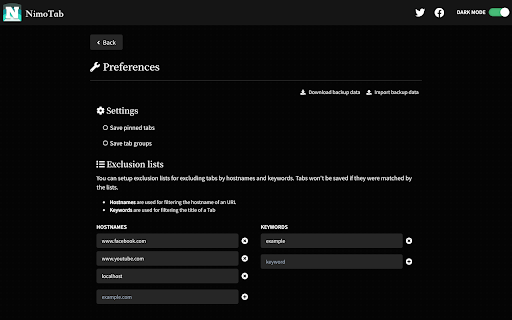

NimoTab - Tidy up your cluttered tab bar and elegantly save your tabs. Enjoy a hassle-free browsing experience with NimoTab - the tab manager for Google Chrome. Say goodbye to cluttered tabs and hello to a more organized and efficient browsing experience with features like: * Local tab storage: Save and recover tabs & tab groups with ease, all stored locally for your privacy. * Customizable tab sorting: Effortlessly sort and organize tabs to your liking. * Tab search & filtering: Quickly search and filter saved tabs by date, domain, session, time, or count. * Tab grouping: Keep similar tabs together for more efficient browsing. * Exclusion lists: Exclude tabs from being saved with custom exclusion lists. * Window manager: Easily switch and recover tabs with the built-in window manager. * Backup & restore: Protect your data with backup and restore options. * Dark mode theme: Experience a sleek, modern dark mode theme. Streamline your browsing experience and elevate your productivity with NimoTab - the best tab manager extension for Google Chrome. Get install now and start browsing like a pro!

Keptab
manage tabs friendly and reduce tabs clutter ● UPDATED: Keptab has been completely rewritten for new and add more features!!! Keptab is a powerful tabs manager that convert all your tabs with one click to a simple list. And more, you can share the list as a web page with your friends We named the project as Keptab (Kept Tabs), which means kept tabs as tabs group and read them later. Whenever you find yourself with too many tabs, click the Keptab icon to convert all of your tabs into a list. When you need to access the tabs again, you can either restore them individually or all at once. ● Save tabs as collections that can be easily restored later. - Great for freeing up memory. - avoiding clutter. ● It is designed to be lightweight yet featureful. - Keptab based on IndexedDB that can save over 30000 tabs. - Refuse data loss incident when browser gone crash. ● Instance search with magic. - Super fastest instance search! ● Dark/Light theme - Nice at night.

Vaux Tab
Vaux Tab Manager and Window Organizer Vaux is an intuitive window manager with many robust features and simple interface. Perfect for tab management and window organization. Take your organizing skills to the max with Vaux! Latest feature: Share your saved windows with other Vaux users! Tab manager Window position recall Share windows with other Vaux users. Dark Theme Icon. Toggle icon from options page.

Tab Manager
Easily organize all your open tabs in multiple windows from toolbar popup! This extension is designed to organize tabs from the toolbar popup. The UI for the extension can also be opened in a standalone popup window or a new tab (choose an item from the toolbar button context-menu). Tab Manager add-on supports multi-window and incognito mode. To work with this addon, just open the extension UI and start managing your tabs. Within the UI you can see a search bar at the bottom. Above that, there is the list of open tabs for window #1 (a new section is added for each new window). Within each row (tab item) in the list, there are several buttons. The first is the pin button which can be used to pin a desired tab(s). Next is the HTTP/HTTPS sign which shows if a website supports SSL protocol or not. The third icon is the tab icon which updates automatically depending on the tab URL. You can see the tab title right after the tab icon. There are also two buttons on the right side for editing or removing the current item. Please note that within the extension interface, all tab items are draggable. Once you drag an item, the actual tab will be re-positioned as well. Note: The extension interface supports dark mode. To switch the interface theme to dark, please press the moon icon in the bottom-right toolbar. To report bugs, please fill out the bug report form on the addon's homepage (https://mybrowseraddon.com/tab-manager.html).

TabPlus
The most feature-packed tab manager. Save & organize your tabs, sync across devices! Tab++ allows you to save your tabs for later. You can organize, categorize, and name them, then restore individual tabs or tab groups at any time. You can even sync them across devices! Tab++ is inspired by similar extensions like OneTab, only with WAY more features... Like folders, cloud-syncing, easy backup and restore, and more! # Note: Usage help can be found in the options page. # NEW IN v1.7.3 - Dark mode, woot! - Implemented more settings in the options page - Confirmation prompt before clearing all data - Don't save pinned tabs by default (configurable) - Bug fixes & improvements to automatic corruption recovery
