
lejbhnlfoaaiafgmdpjnjnkpbnbongal
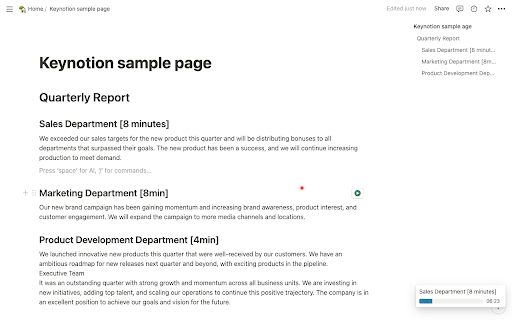
Keynotion provides useful features for presentation using Notion. Keynotion is an extension that provides useful functions for presentation using Notion! 📋 Display the table of contents in the side navigation 🔦 Turn the mouse cursor into a laser pointer ⏱️ Start the stopwatch by using heading (just includes "X min" in heading text!)

bexio Time Tracking Templates
This extension allows saving and loading of form data within the bexio time tracking page. This extension improves handling of time tracking in bexio. How? It enables the user to save the form data as templates. The templates are placed as buttons directly on the time tracking page. So with one click the form will fill out all the values you saved earlier. Sidebar These templates are also available in the panel within the browsers sidebar. In the sidebar panel you can manage the templates (edit/delete) as well as reach out to further features: ManicTime (https://www.manictime.com) You can also import entries from ManicTime and use features like, Time, Date, Billable, Notes etc. to directly apply Time entries, including selecting a template for all the other values. Data is yours only All the data is saved in your browsers storage, they are not accessible from outside nor are they sent outside of your browser. FULL FEATURE OVERVIEW & FEATURE REQUESTS & ISSUE REPORT: https://github.com/SoulcodeAgency/bexio-chrome-extension CHANGELOG: https://github.com/SoulcodeAgency/bexio-chrome-extension/blob/main/CHANGELOG.md

Clikr
Turn your phone into a wireless laser pointer and clicker for browser-based slide decks. Free, with one-time-payment Pro features. Clikr turns your phone into a wireless laser pointer, clicker, drawing tool, and presenter remote for browser-based slide decks (such as Google Slides, PowerPoint Online, Slides.com, Mentimeter, and Keynote in Safari). Hold your phone and point at the screen; a dot follows your motion. Swipe to switch slides. The Clikr extension runs in your desktop browser. The phone side is a plain web page, so there is no app to install on the phone. Pair the two with a QR code, and from then on your phone and desktop talk directly to each other. - Laser pointer dot that follows your phone's motion - Switch slides by swiping left or right - Scroll the active web page by swiping the phone screen - Reload the active page from the phone - Pointer calibration so the dot tracks accurately for your screen size and viewing distance - Spotlight mode: darken everything except the area under your pointer - Magnifying glass: live zoom on a slide region without leaving fullscreen - Draw mode: annotate over your slides with pen, eraser, and clear-all - Speaker notes shown on the phone (available in some supported slide tools, e.g. Slides.com) - Next-slide preview shown on the phone (available in some supported slide tools, e.g. Slides.com) - Page click: tap on the phone to click links, buttons, or other interactive elements on the slide - Presentation timer on the phone - Custom pointer color - Pointer trail effect What data the extension reads and sends - Phone motion, taps, and swipes are sent from your phone directly to your desktop over a direct connection. - When a Pro user opens the speaker-notes or next-slide-preview panel on the phone, the extension reads the speaker notes and a thumbnail of the next slide from supported slide tools on the active page and sends them over the same direct connection to the paired phone. Nothing about your slides is sent to any server we run. - Page click sends a click into the active page so a tap on the phone behaves like a click on the slide. - No account is required to use the free features. - A sign-in is required only when you purchase Pro, so the unlock can follow you across browsers and devices. Pricing and refunds - Pro is a single one-time payment. There is no subscription and no recurring charge. - Refunds are available within the window described in the Returns policy on the homepage. Homepage and policies: https://www.clikr.app

Costco Reviews Extractor
Scrape and download Costco product reviews to CSV/JSON/Excel, inform data-driven strategy based on customer feedback. Unlock Customer Insights Instantly with the Enhanced Costco Reviews Extractor, Now with Customizable Data Export Options. In the fast-paced world of e-commerce, understanding your customers is crucial for success. The manual process of analyzing customer reviews can be extremely time-consuming and tedious. To address this challenge, we've upgraded our extension, a powerful tool designed to simplify the extraction of customer feedback with even more functionality, including customizable data export options. Our user-friendly browser extension is tailored for e-commerce professionals looking to gain valuable insights without the need for coding skills. With just a simple click, you can now scrape and export comprehensive product review data in your preferred format, making it easier than ever to analyze and understand customer opinions. Here's how you can start leveraging the power of the Enhanced Costco Reviews Extractor with the new customizable export feature: 1. Navigate to any Costco.com product page of your choice. 2. Click the "Download Reviews" button located beneath the product title. 3. A popup window will appear, allowing you to export the data into a structured CSV, JSON, or XLSX file, depending on your needs. The files you'll receive are meticulously organized, containing all the essential review details such as reviewer IDs, ratings, comments, and much more. In the settings interface, select your desired content format for export: choose from CSV, JSON, or XLSX file options to best suit your analysis tools. These structured formats are ideal for conducting competitive research, monitoring market trends, comparing products, spotting opportunities, and ultimately making informed data-driven decisions. Say goodbye to the days of laborious manual review analysis. With this enhanced extension, you can obtain the product insights you need promptly and efficiently in the format that best suits your analytical tools and methods. Installation is quick, and you can start scraping smarter in no time. Once you initiate a data extraction request, the process begins immediately, with the duration depending on the volume of information to be retrieved. Install the Enhanced Costco Reviews Extractor now, and transform the way you gather and analyze customer feedback across multiple data formats, with the added convenience of customizable export options. In App Purchase Our Extension is a freemium product with a nominal subscription fee. With a paid subscription, you can export up to 3000 items at a time and receive premium support. The exact cost is displayed in the extension's interface, ensuring transparency and ease of understanding. Disclaimer This extension is an independently developed product by ExtensionsBox and has no association with Costco Inc.

OpenText Core SCA Select Extension
Open Source Select will help developers find and use the right open source and reduce friction between organisations and developers Open Source Select helps you find and use policy compliant and great open-source for any development project. The OpenText Core SCA Select Extension is a free plugin created with developers in mind, enabling you to check the health metrics and license information of an open source project at a glance. If you need more granular data, the extension can lead you to Open Source Select for more detailed information. The three types of metrics you can examine are: Community - How healthy the community around a project is. Popularity - Is it used by many? Is the usage declining? Security - How well does the maintainers apply security best practices. The extension now supports Start Left Policies. This lets you immediately see if the open source you are browsing is compliant with your company’s open source policy, without the need to import and scan code with Software Composition Analysis tools and common source code repositories and package registries such as GitHub, pypi, npmjs, nuget and many others are supported.
