
lbihigmoeinmajbmkbibikknphemncdl
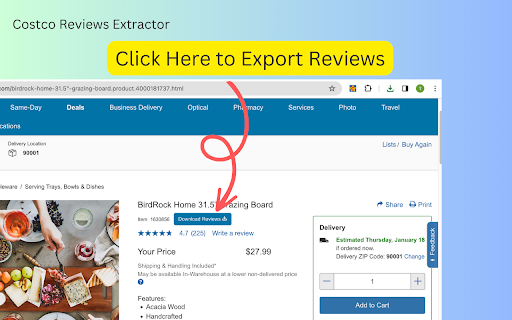
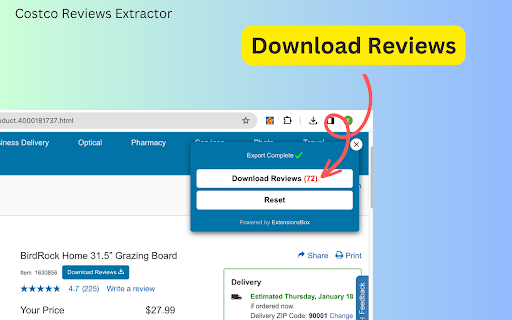

Scrape and download Costco product reviews to CSV/JSON/Excel, inform data-driven strategy based on customer feedback. Unlock Customer Insights Instantly with the Enhanced Costco Reviews Extractor, Now with Customizable Data Export Options. In the fast-paced world of e-commerce, understanding your customers is crucial for success. The manual process of analyzing customer reviews can be extremely time-consuming and tedious. To address this challenge, we've upgraded our extension, a powerful tool designed to simplify the extraction of customer feedback with even more functionality, including customizable data export options. Our user-friendly browser extension is tailored for e-commerce professionals looking to gain valuable insights without the need for coding skills. With just a simple click, you can now scrape and export comprehensive product review data in your preferred format, making it easier than ever to analyze and understand customer opinions. Here's how you can start leveraging the power of the Enhanced Costco Reviews Extractor with the new customizable export feature: 1. Navigate to any Costco.com product page of your choice. 2. Click the "Download Reviews" button located beneath the product title. 3. A popup window will appear, allowing you to export the data into a structured CSV, JSON, or XLSX file, depending on your needs. The files you'll receive are meticulously organized, containing all the essential review details such as reviewer IDs, ratings, comments, and much more. In the settings interface, select your desired content format for export: choose from CSV, JSON, or XLSX file options to best suit your analysis tools. These structured formats are ideal for conducting competitive research, monitoring market trends, comparing products, spotting opportunities, and ultimately making informed data-driven decisions. Say goodbye to the days of laborious manual review analysis. With this enhanced extension, you can obtain the product insights you need promptly and efficiently in the format that best suits your analytical tools and methods. Installation is quick, and you can start scraping smarter in no time. Once you initiate a data extraction request, the process begins immediately, with the duration depending on the volume of information to be retrieved. Install the Enhanced Costco Reviews Extractor now, and transform the way you gather and analyze customer feedback across multiple data formats, with the added convenience of customizable export options. In App Purchase Our Extension is a freemium product with a nominal subscription fee. With a paid subscription, you can export up to 3000 items at a time and receive premium support. The exact cost is displayed in the extension's interface, ensuring transparency and ease of understanding. Disclaimer This extension is an independently developed product by ExtensionsBox and has no association with Costco Inc.

BPM RunWalkYou Ext
---------------------------------------------------------------------------- You will be able to do BPM running (walking) with your favorite YouTube videos. (Supports playback speed adjustment.) ・If you can use the chrome extension on your mobile device, you can easily perform BPM running (walking) on YouTube videos. ・You can keep the BPM you want to run even if you go to the next song in the playlist.

TimeCrunch Tennis
AI-powered extension that removes non-playing time from tennis matches on Tennis TV and Tennis Channel Plus. The TimeCrunch browser extension is essential for anyone with an ATP Tennis TV or Tennis Channel Plus account. TimeCrunch uses AI to find and then skip over downtime during a tennis match. TimeCrunch is very light weight and will not increase your data usage. We also do not collect any of your browser data.

Congree Web Interface
Write according to your company's Style Guide This extension helps you to integrate your company's Congree Authoring Server into specific websites. Research Meets Practice Content optimization solutions based on scientific insight and long-standing industry experience Higher text quality with less effort Apart from the reuse of sentences and consistent use of terminology, Congree offers a comprehensive Language Check that covers 98 percent of the English and German languages. The Congree Authoring Server is scalable and thus supports the editorial work in small, medium-sized, and large enterprises. Rule-Based Language Check Apart from the spelling, grammar, and terminology, the rule-based Language Check also checks the style. Predefined rule sets cover most application cases; additional company-specific rules can be added as needed. Authoring Memory The Authoring Memory serves as a sentence repository, which shows all text segments that are similar to your text and that were written and approved in the past. You can apply these text segments with a click. New sentences are included in the Authoring Memory after they are checked and approved. Congree Data Grooming can help to maintain and improve the quality of your Authoring Memory. Terminology Component The connection of third-party terminology software enables access to a wide range of information on terminology hits. The terminology component in Congree delivers definitions and usage information on specialized terms – including preferred terms, admitted terms, and deprecated terms.

Uzera
Empower users with Uzera. Integrate tours and demos seamlessly. Design interactive tours, record engaging DemoX. Uzera: Elevate User Experience with Product Tours and DemoX 🚀 Welcome to Uzera, the ultimate Chrome extension designed to revolutionize user engagement on your website or application. With two powerful features – Product Tours 🎯 and DemoX 🎬 – Uzera empowers you to provide an immersive and user-friendly experience for your audience. 1. Product Tours 🌐: Easily create interactive product tours that guide users through the essential features of your website or application. The intuitive design interface allows you to define step-by-step instructions, ensuring users grasp the full potential of your product. 2. DemoX - Video Guides 📹: Take user guidance to the next level with DemoX. Record step-by-step actions within your website or application, transforming them into captivating video guides. Share these DemoX videos to enhance user understanding and streamline the onboarding process. - Product Tours: - Design Engaging Steps 🎨: Craft visually appealing and informative steps for your product tour. Customize each step to showcase specific features or actions. - Seamless Integration 🚀: Integrate product tours effortlessly into your website or application, enhancing user onboarding and feature discovery. - DemoX - Video Guides: - Effortless Recording 🎥: Capture user interactions and workflows within your website or application effortlessly. - Shareable Video Guides 🌐: Generate shareable DemoX videos to provide users with a dynamic visual guide for using your product. - Enhanced User Engagement 🤝: Keep users engaged and informed with interactive product tours and video guides that cater to different learning preferences. - Simplified Onboarding 🛤️: Streamline the onboarding process for new users by providing them with comprehensive product tours and step-by-step video guides. - Versatility 💼: Whether you're a developer, marketer, or product manager, Uzera Toolbox is a versatile tool that adapts to your needs, enhancing user engagement across the board. 1. Install the Uzera Chrome extension. 2. Access the intuitive design interface for Product Tours or start recording with DemoX. 3. Elevate your user engagement and provide an unparalleled experience for your audience. Transform user engagement today with Uzera – Your Gateway to Intuitive Product Tours and Dynamic DemoX Video Guides! 🚀
