
ldhjpljmgnggmkpcgaicmocfoefbcojl
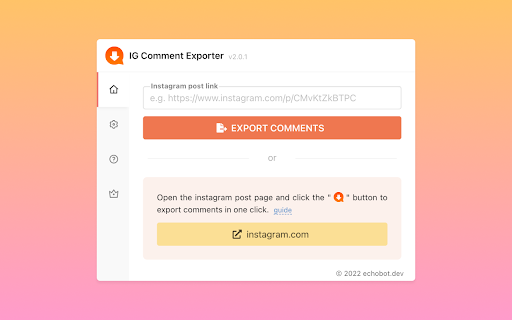


This extension will help you quickly export instagram comments to Excel xlsx or csv files. 🎉 The best Instagram tool is designed for those who want to export comments from Instagram to excel xlsx or csv for giveaways. after installing, you can download comments in bulk with one click and export to excel xlsx or csv files. 🆕 New Update ✓ Add support for exporting xlsx files in excel. ✓ Upgrade extension manifest V3, more secure and stable. ✓ Fix some issues. ⚙️ Get started 1. Enter a Instagram post URL 2. Click the export button 🔒 Data Privacy All data is processed in your local computer, it never passes through our web server and no one knows what you have saved. 👋 Contact If you have any issues, feel free to contact echobot.dev@gmail.com

Instagram Comments Scraper - IG Comment Export Tool
Export IG comments to Excel/CSV in one click! IG comment export tool, a reliable instagram comments scraper for fast, accurate data. ▬▬▬▬▬▬▬ Description Step by Step ▬▬▬▬▬▬▬ 1. Click Extension icon, which is on browser toolbar, then open a popup page. 2. Click "Export Instagram Data" button, an IGTools option page will be opened. 3. Input a valid IG post URL. 4. Click "Start parsing" button, and our Tools will run automatically. After this processing is finished, you can download IG comments to CSV or Excel. ▬▬▬▬▬▬▬ Features ▬▬▬▬▬▬▬ ● One-Click Export: Extract data using the best ig comment exporter. ● Format Freedom: Fully supports CSV and Excel downloads. ● Smart Recovery: Automatically bypasses IG rate limit errors. ● High Speed: Fast processing via our optimized ig comment export tool. ● No Login Required: We never ask for your password. ▬▬▬▬▬▬▬ Supported columns ▬▬▬▬▬▬▬ ● id ● text ● username ● profile url ● profile pic url ● date ▬▬▬▬▬▬▬▬ Security ▬▬▬▬▬▬ ● No Password Required: This ig comment exporter never requests your Instagram password or accesses any personal data — including user info, stories, visit history, posts, or social relationships. ● Smart Rate Management: Instagram comments scraper intelligently manages IG rate limits, which vary by IP address and are not publicly disclosed. ● Local Processing: All data handled by this ig comment export tool is processed entirely within your browser. No personal account details are ever stored or transmitted. ● Account Safety: A built-in "Human-Like" delay system keeps your activity within safe boundaries, helping you avoid account flags or restrictions. ● Transparent Operation: We only access the public comment data you explicitly choose to export — nothing more. ▬▬▬▬▬▬▬▬ How it works ▬▬▬▬▬▬ ● If you export a huge list of data, you can experience a rate limit error. ● The extension goes into “Cooldown” mode. The timer shows the time remaining. ● If the limit error persist, the cooldown period increases 2x. ● Once the cooldown period ends and the subsequent request is successful, the IGTools switches to the Normal mode. ▬▬▬▬▬▬▬▬ Statement ▬▬▬▬▬▬ INSTAGRAM is a trademark of Instagram, LLC. This instagram comments scraper is not affiliated with, endorsed, sponsored, or otherwise related to Instagram, LLC. or any of its affiliates or subsidiaries.

IG Exporter & Scraper: Export Instagram Comments data to list
Extract Instagram comments. Pick into CSV and Excel formats. IG Exporter & Scraper is a powerful Google Chrome extension and scraping tool for gathering Instagram comments. Export your data effortlessly into CSV and Excel formats. Perfect for analytics, content management, and social media strategies. Use this best-in-class online service to scrape data from Instagram for free, making it the ideal web scraping tool! ▬▬▬▬▬▬▬ How to Use ▬▬▬▬▬▬▬ 1. Click Ins Tools - Ins Comments Export Tool icon, which is on browser toolbar, then open IGTools popup page via IGTools Net 2. Click "Export Instagram Data" button, an IGTools option page will be opened. 3. Input a valid IG post URL 4. Click "Start export" button, and our IG Tools will run automatically. After this processing is finished, you can download IG comments to CSV or Excel. ▬▬▬▬▬▬▬ Features ▬▬▬▬▬▬▬ ● Export IG comments with one click by extension ● Export up to 50K IG comments ● CSV and Excel formats support ● Handles IG rate limit errors ● Processing in one click via IGTools net ▬▬▬▬▬▬▬▬ Security ▬▬▬▬▬▬ ● The extension neither ask for your IG password, nor any of your data including IG user information, story, visit history, posts, and social relationships. ● IG enforces IG rate limit, i.e. limit on the number of requests. The rate limit is not public information and varies depending on your IP address. ▬▬▬▬▬▬▬▬ How it works in IG Follower Export tool ▬▬▬▬▬▬ ● After every time you get 50 comments the extension goes to Cool down minimum 10 seconds (you can change it in settings tab).

Free Turbo Comment Export Tool
Free Extract Instagram comment to CSV with one click Free extract Instagram comments and export to CSV with one click Features: * Free Export comments with one click * Export up to 10,000 comments for free. * CSV formats support * Handles IG rate limit errors How to use: 1. Open the extension’s popup by clicking the extension icon in the right section of the toolbar. 2. Select the “Home” Tab 3. Specify Comment URL 4. Click the “Export Comment” button and follow the instructions within the app

InsC - Instagram comment picker & exporter
InsC is a powerful Chrome extension designed to enhance your Instagram experience by providing efficient tools for extracting comments information from Instagram posts. 1. Export Comments: Effortlessly export the list comments of your Instagram posts in various formats such as CSV, Excel, and JSON. 2. Bulk Actions: Take control of your interactions by utilizing our advanced filtering options. Seamlessly perform bulk actions like following, unfollowing, and liking recent posts on targeted user accounts. 3. Batch Download Comments: Easily download comments on your posts in batches. Access the engagement data you need for a deeper understanding of your audience. 4. History Resumption: Never lose your progress. Resume tasks seamlessly from where you left off using the history feature. 5. Lucky Draw: Randomly select a fortunate user from the list of comments. 1. Official Instagram API: We utilize the official Instagram API to extract data directly from Instagram pages. This approach closely mimics genuine browsing behavior, providing you with accurate and reliable results. 2. Local Processing: Our extension operates entirely on your local device. Your data remains private, and there's no risk of unauthorized account access. Your actions are discreet and secure. 1. Open any Instagram page. 2. Click on the extension icon, and it will automatically identify the target account for exporting. 3. Free users can export the first 100 records, while premium users enjoy unlimited exports. 1. This extension is not affiliated with or endorsed by Instagram. 2. It does not retain any user data and solely serves as a tool for data export, designed for legitimate work and educational purposes. Unlock the potential of your Instagram experience with the Instagram Data Exporter extension. Manage your interactions effectively, make informed decisions, and enhance your online presence. Download now and embark on a journey of data-driven success!
