
ikkgnabnmoommnklhifpnbgdbmollceh
Free Extract Instagram comment to CSV with one click Free extract Instagram comments and export to CSV with one click Features: * Free Export comments with one click * Export up to 10,000 comments for free. * CSV formats support * Handles IG rate limit errors How to use: 1. Open the extension’s popup by clicking the extension icon in the right section of the toolbar. 2. Select the “Home” Tab 3. Specify Comment URL 4. Click the “Export Comment” button and follow the instructions within the app

Comment Exporter - Export Ins Comments
This extension will help you quickly export instagram comments to Excel xlsx or csv files. CommentExporter is an innovative browser plugin that revolutionizes your Instagram experience. With this powerful tool, you can effortlessly export user information, including publicly available email addresses and phone numbers, of Instagram users who have commented on any post. Whether it's your own posts or posts from other users, CommentExporter allows you to extract valuable data and gain insights into your Instagram community. With one-click export to CSV (Comma-Separated Values) files and the ability to continue tasks from your task history, CommentExporter is the ultimate solution for efficient data management and seamless workflow. CommentExporter extract Instagram comments including emails & phone numbers, Export to CSV with one click. An IG Follower Export Tool to Extract Instagram comments and export to CSV. IGComments - IG Comments Export Tool, automatically scrapes user profiles from Instagram post comments and exports them to CSV files. 1️⃣ Feature ✅ Export comments from Instagram to csv ✅ Extract user profile, including follower and following count, posts count, public Email, public phone number and external URL, etc. ✅ Save extracted data to local storage, download data anytime and support to continue extract anytime. Advanced User Information Export: CommentExporter empowers you to extract detailed user information from Instagram comments. Effortlessly export user data such as email addresses, phone numbers, and more from comments on any post, providing you with valuable insights to enhance your engagement strategies and build meaningful connections. CSV Export Capability: With a simple click, CommentExporter enables you to export the extracted user information to CSV files. Seamlessly manage and analyze your data, integrate it with other tools, and streamline your workflows for efficient marketing, research, and outreach. Task Continuation from History: Never lose track of your progress again. CommentExporter allows you to continue tasks from your task history, ensuring uninterrupted workflow and productivity. Easily retrieve completed or archived tasks and seamlessly pick up where you left off. User-Friendly Interface: CommentExporter features a user-friendly interface that seamlessly integrates into your browser. Navigate effortlessly through its powerful features, export user information, manage tasks, and optimize your Instagram experience with ease. Privacy and Compliance: CommentExporter respects user privacy and operates within the boundaries set by Instagram's terms and conditions. It strictly adheres to ethical practices, ensuring that only publicly available information is extracted and maintaining the privacy and security of user data. Take your Instagram data analysis and task management to new heights with CommentExporter. Download the plugin today and unlock the power of comprehensive user data extraction, seamless task continuation, and streamlined productivity. Simplify data management, enhance your Instagram strategies, and maximize your growth potential with CommentExporter. 2️⃣ How to get started? (1) Enter a link to an Instagram post (Select Include email in Setting if you want to export email, and increase Random Interval between the requests to decrease risk, e.g.12s) (2)On the Settings page, set your preferences, such as request interval (3) Click the Export Button (4) Click to export to CSV when the data extract completes. 3️⃣ FAQ If you have any problems, don't hesitate to contact us at pingappsteam@tailang.top 4️⃣ Data Privacy All the data you process is on your local computer and never passes through our servers. 5️⃣ Statement INSTAGRAM is a trademark of Instagram, LLC. IGComments is not affiliated with, endorsed, sponsored, or otherwise related to INSTAGRAM, Inc. or any of its affiliates or subsidiaries.

Comment Exporter
Simplify your Instagram comment exporting process with this one-click Chrome extension, ideal for marketers and creators. Best tool made for people who want to export IG comments into CSV. A brilliant comment export tool that allows you to quickly export Instagram comments to CSV with just one click. Unlock the power of Instagram comment exporting for your giveaways today! How it works? 1. Enter a Instagram post URL 2. Click the export button What columns you can export? #comment id #comment text #username #username id #profile url #profile pic url #date Data Privacy: All data processing is performed locally on your computer; it never goes through our web server, ensuring complete privacy and security. Important note: Comment Exporter for IG operates on a freemium model, allowing you to export up to 100 comments per post for free. If you need more, consider upgrading.

ICommentExporter - Export Comments
One click to export Instagram Comments to Excel in CSV for analysis. ICommentExporter (previously known as "IGCommentExporter") is a powerful Instagram comment export tool that helps you export Instagram comments to a CSV file. The tool can also extract email addresses and phone numbers (if available) from the user who posted the comment, allowing you to identify potential leads, tailor your marketing campaigns, and gain deeper insights into your audience. Features: - Export comments and replies - Extract email and phone number if available - Save as CSV / Excel - Automatic and customizable handling of rate limits and challenges Note: - This tool follows a freemium model, enabling you to export up to 100 comments per post at no cost. If additional exports are required, consider upgrading to our premium version. - To protect your primary Instagram account from temporary restrictions, we highly recommend creating a separate account specifically for data exports. By keeping your data export activities separate from your main account, you can significantly reduce the chances of encountering any interruptions to your regular Instagram usage. What type of data can you export? - User ID - Username - Full Name - Comment ID - Comment - Comment Time - Followers - Following - Posts - Email - Phone - Is Verified - Is Private - Is Business - Is Creator - Category - Biography - External URL - User Homepage - Avatar URL How to use it? To use our Comment Export tool, simply add our extension to browser and create an account. Once you have signed in, you can input the post link and click the "Export" button. Your comments data will be exported to a CSV or Excel file, which you can then download to your computer. Data Privacy: All data is processed on your local computer, never passing through our web servers. Your exports are confidential. Frequently Asked Questions: https://igcommentexporter.toolmagic.app/#faqs Feel free to contact us if you have any other questions. Disclaimer: This tool is a third-party extension designed to facilitate the export of Instagram comments, along with associated data, for enhanced analytics and management. This extension is not developed, endorsed, or officially affiliated with Instagram, Inc.

Turbo Follower Exporter Tool
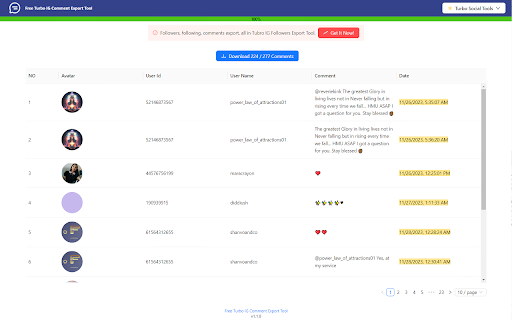
Extract Instagram follower and following, comment and export to CSV with one click Description: IG Follower Export is a powerful tool designed to help you export Instagram followers, following lists, and comments directly to CSV format with just one click. Ideal for influencers, marketers, and anyone who needs to manage their Instagram data effectively. * One-Click Export: Instantly export followers, following, and comments from any Instagram profile. * Massive Data Handling: Export up to 100,000 followers, following, and comments without hassle. * CSV Format Support: Easily convert Instagram data into CSV files for seamless integration with Excel and other tools. * Rate Limit Management: Automatically handles Instagram's rate limit errors, ensuring smooth operation. 1. Click the extension icon in your Chrome toolbar to open the popup. 2. Navigate to the “Home” Tab. 3. Enter the Instagram username or comment URL you wish to export. 4. Click the “Export” button and follow the on-screen instructions. Freemium Model: Export up to 800 followers for free. To unlock more extensive data exports, consider upgrading. Easy Account Setup: Upgrade by creating an account or logging in with your Google account. Get started today with IG Follower Export and take control of your Instagram data!
