
hdfhpnjnlgekgjmniifdieiflhfdkmlk
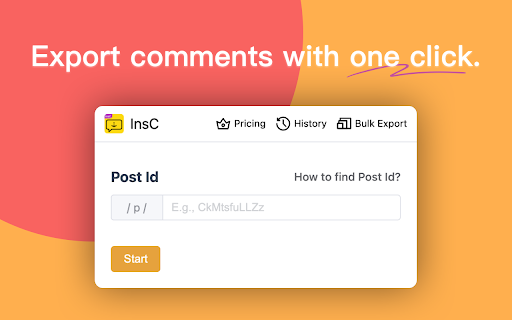

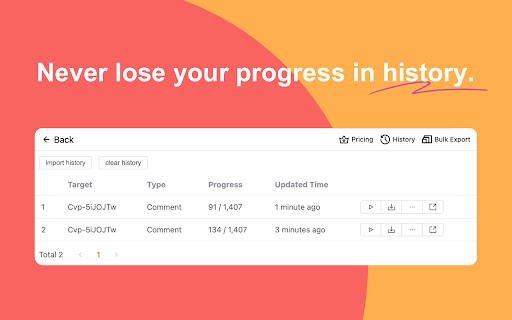
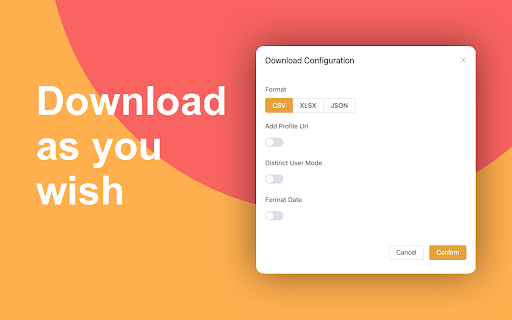
InsC is a powerful Chrome extension designed to enhance your Instagram experience by providing efficient tools for extracting comments information from Instagram posts. 1. Export Comments: Effortlessly export the list comments of your Instagram posts in various formats such as CSV, Excel, and JSON. 2. Bulk Actions: Take control of your interactions by utilizing our advanced filtering options. Seamlessly perform bulk actions like following, unfollowing, and liking recent posts on targeted user accounts. 3. Batch Download Comments: Easily download comments on your posts in batches. Access the engagement data you need for a deeper understanding of your audience. 4. History Resumption: Never lose your progress. Resume tasks seamlessly from where you left off using the history feature. 5. Lucky Draw: Randomly select a fortunate user from the list of comments. 1. Official Instagram API: We utilize the official Instagram API to extract data directly from Instagram pages. This approach closely mimics genuine browsing behavior, providing you with accurate and reliable results. 2. Local Processing: Our extension operates entirely on your local device. Your data remains private, and there's no risk of unauthorized account access. Your actions are discreet and secure. 1. Open any Instagram page. 2. Click on the extension icon, and it will automatically identify the target account for exporting. 3. Free users can export the first 100 records, while premium users enjoy unlimited exports. 1. This extension is not affiliated with or endorsed by Instagram. 2. It does not retain any user data and solely serves as a tool for data export, designed for legitimate work and educational purposes. Unlock the potential of your Instagram experience with the Instagram Data Exporter extension. Manage your interactions effectively, make informed decisions, and enhance your online presence. Download now and embark on a journey of data-driven success!

Save Ins Comment - Export Ins Comments
This extension will help you quickly export or save Ins comments to XLS/CSV file. This extension will help you quickly export or save ins comments to XLS/CSV file for free. 🎉 Best IG tool made for people who want to export comments from Instagram™ into CSV. ⚙️ How to export comments? ① Open the IG page. ② Click the "Export" button. 🔒 Data Privacy All data is processed in your local computer, it is never passing through our web server, no one knows what you exported. # Legal Instagram is a trademark of Instagram LLC. This extension is an unofficial enhacement for Instagram™ and is not related in any way to Instagram LLC.

ESUIT | Comments Exporter for Instagram™
Effortless Instagram comment extractor extension, with nested replies export feature for user convenience. Instagram™ is a trademark of Instagram Inc., registered in the U.S. and other countries. This is an independent project developed by ESUIT. and has no relationship to Instagram™ or Instagram Inc. this extension is not officially developed by Instagram™, The author is ESUIT.DEV Works on: - Any User's post - Any Page's post With ❤️ from esuit.dev Introducing our Instagram Comment Exporter, a browser extension that seamlessly extracts comments, including nested replies, and imports directly to Google Sheets or downloads as CSV/JSON. User-friendly and efficient for data handling. SEO Keywords: Instagram comments, export tool, browser extension, nested replies, Google Sheets integration, CSV download, JSON format, efficient data management, social media analytics. If you need to subscribe to our service, we will collect your email address to verify your subscription status. (We only collect this data from subscribers; if you do not subscribe, we will not collect any of your data.) This is our privacy policy. https://esuit.dev/privacy-policy Notice: this extension has In-App Purchases. This extension includes features that require payment to unlock unlimited usage. Please refer to our pricing page for more details. https://esuit.dev/pricing/comments-exporter-for-instagram Additional Features: In the Popup, we provide the following additional features: Function Description: A brief description accompanied by a video tutorial demonstrating how to use this extension. Login Button: Use when you need to subscribe to premium features or log in with an existing subscription. Relevant-Ext: We provide brief recommendations and introductions to relevant extensions in a small section. Encountering an issue? Report it to us 💪: If you encounter any issues, you can get in touch with us through this link, and we will assist you in fixing it. Got feedback or experiencing any issues? Let us know on Facebook! Your input is important to us and we're here to help. https://www.facebook.com/esuitdev How to Download Facebook Photos in bulk? (2023) How to Save Pictures from Facebook? Before you delete all the photos from Facebook and lose them forever, downloading them first might be a great idea. That way, they will all be in the same folder.

InsL - Instagram like picker & exporter
InsL is a powerful Chrome extension designed to enhance your Instagram experience by providing efficient tools for extracting likes information from Instagram posts. 1. Export Liked Users: Effortlessly export the list of users who have liked your Instagram posts in various formats such as CSV, Excel, and JSON. 2. Bulk Actions: Take control of your interactions by utilizing our advanced filtering options. Seamlessly perform bulk actions like following, unfollowing, and liking recent posts on targeted user accounts. 3. Batch Download Post Likes: Easily download likes on your posts in batches. Access the engagement data you need for a deeper understanding of your audience. 4. History Resumption: Never lose your progress. Resume tasks seamlessly from where you left off using the history feature. 5. Lucky Draw: Randomly select a fortunate user from the list of likes. 1. Official Instagram API: We utilize the official Instagram API to extract data directly from Instagram pages. This approach closely mimics genuine browsing behavior, providing you with accurate and reliable results. 2. Local Processing: Our extension operates entirely on your local device. Your data remains private, and there's no risk of unauthorized account access. Your actions are discreet and secure. 1. Open any Instagram page. 2. Click on the extension icon, and it will automatically identify the target account for exporting. 3. Free users can export the first 100 records, while premium users enjoy unlimited exports. 1. This extension is not affiliated with or endorsed by Instagram. 2. It does not retain any user data and solely serves as a tool for data export, designed for legitimate work and educational purposes. Unlock the potential of your Instagram experience with the Instagram Data Exporter extension. Manage your interactions effectively, make informed decisions, and enhance your online presence. Download now and embark on a journey of data-driven success!

Export Comments for webI
With this app you can export comments from webI post to CSV or Text File. Benefits of Using Export Comments for webI: - Getting comments of the post - Choose multiple format file to download - Select multiple fields, you want to to download - Great support - Request new feature Please Check Screenshots or Videos above for more features and how this app work NOTE: - If this app didn't work, please update your chrome to latest version - If still have any issue, don't hesitate to contact us ℹ️ Clarification/Statement/Disclaimer: The Export Comments for webI is an unofficial tool and is NOT affiliated with Instagram. We want to clarify that this tool operates independently and is NOT endorsed, sponsored or affiliated with Instagram or any of its related entities.
