
afkkaodiebbdbneecpjnfhiinjegddco
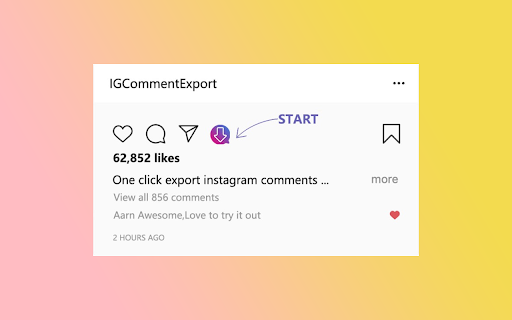
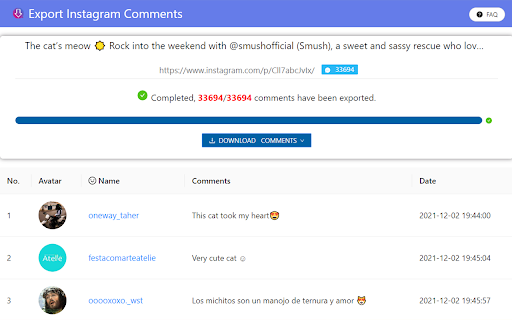
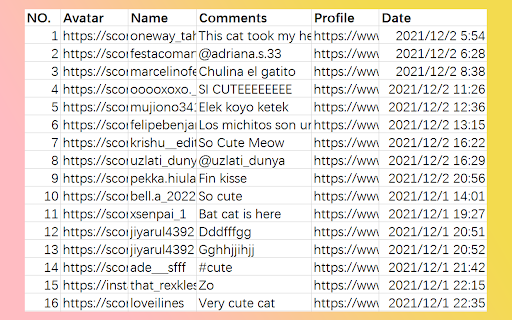
This extension will help you quickly export or save Ins comments to XLS/CSV file. This extension will help you quickly export or save ins comments to XLS/CSV file for free. 🎉 Best IG tool made for people who want to export comments from Instagram™ into CSV. ⚙️ How to export comments? ① Open the IG page. ② Click the "Export" button. 🔒 Data Privacy All data is processed in your local computer, it is never passing through our web server, no one knows what you exported. # Legal Instagram is a trademark of Instagram LLC. This extension is an unofficial enhacement for Instagram™ and is not related in any way to Instagram LLC.

Twitter Comment Export Tool
Easily export and download Tweets & Replies from any users to XLSX/CSV. Effortlessly export tweets from a Twitter user with one-click. Seamlessly download and archive tweets for social media analysis, comprehensive reporting, personal records, or digital marketing strategies. Our tool provides an easy and efficient way to export Twitter data, ensuring you never lose important tweets. Try our Twitter export feature today and simplify your social media data management. ⚙️ Get Started 1.Enter Username. 2.Choose export type. 3.Click the 'Export' button. 🔒 Data Privacy Your data privacy is paramount. All data processing occurs on your local machine; it never transits through our servers, ensuring no one else has access to your collected data. 👋 Contact For support or inquiries, reach out to us at lazytechofficial@gmail.com ⚠️ Disclaimer TWITTER and X are trademarks of X Corp. Twitter Comment Export Tool is an independent tool and is not affiliated with, endorsed, sponsored, or otherwise connected to X Corp., Twitter, Inc., or any of their affiliates or subsidiaries.

Twitter Comments Exporter
Easily export and download Tweets & Replies from any user to XLSX/CSV. Effortlessly export tweets from a Twitter user with one-click. Seamlessly download and archive tweets for social media analysis, comprehensive reporting, personal records, or digital marketing strategies. Our tool provides an easy and efficient way to export Twitter data, ensuring you never lose important tweets. Try our Twitter export feature today and simplify your social media data management. ⚙️ Get Started 1.Enter Username. 2.Choose export type. 3.Click the 'Export' button. 🔒 Data Privacy Your data privacy is paramount. All data processing occurs on your local machine; it never transits through our servers, ensuring no one else has access to your collected data. 👋 Contact For support or inquiries, reach out to us at lazytechofficial@gmail.com ⚠️ Disclaimer TWITTER is a trademark of X Corp. Twitter Comments Exporter is an independent tool and is not affiliated with, endorsed, sponsored, or otherwise connected to X Corp., Twitter, Inc., or any of their affiliates or subsidiaries.

Instagram Comments Scraper - IG Comment Export Tool
Export IG comments to Excel/CSV in one click! IG comment export tool, a reliable instagram comments scraper for fast, accurate data. ▬▬▬▬▬▬▬ Description Step by Step ▬▬▬▬▬▬▬ 1. Click Extension icon, which is on browser toolbar, then open a popup page. 2. Click "Export Instagram Data" button, an IGTools option page will be opened. 3. Input a valid IG post URL. 4. Click "Start parsing" button, and our Tools will run automatically. After this processing is finished, you can download IG comments to CSV or Excel. ▬▬▬▬▬▬▬ Features ▬▬▬▬▬▬▬ ● One-Click Export: Extract data using the best ig comment exporter. ● Format Freedom: Fully supports CSV and Excel downloads. ● Smart Recovery: Automatically bypasses IG rate limit errors. ● High Speed: Fast processing via our optimized ig comment export tool. ● No Login Required: We never ask for your password. ▬▬▬▬▬▬▬ Supported columns ▬▬▬▬▬▬▬ ● id ● text ● username ● profile url ● profile pic url ● date ▬▬▬▬▬▬▬▬ Security ▬▬▬▬▬▬ ● No Password Required: This ig comment exporter never requests your Instagram password or accesses any personal data — including user info, stories, visit history, posts, or social relationships. ● Smart Rate Management: Instagram comments scraper intelligently manages IG rate limits, which vary by IP address and are not publicly disclosed. ● Local Processing: All data handled by this ig comment export tool is processed entirely within your browser. No personal account details are ever stored or transmitted. ● Account Safety: A built-in "Human-Like" delay system keeps your activity within safe boundaries, helping you avoid account flags or restrictions. ● Transparent Operation: We only access the public comment data you explicitly choose to export — nothing more. ▬▬▬▬▬▬▬▬ How it works ▬▬▬▬▬▬ ● If you export a huge list of data, you can experience a rate limit error. ● The extension goes into “Cooldown” mode. The timer shows the time remaining. ● If the limit error persist, the cooldown period increases 2x. ● Once the cooldown period ends and the subsequent request is successful, the IGTools switches to the Normal mode. ▬▬▬▬▬▬▬▬ Statement ▬▬▬▬▬▬ INSTAGRAM is a trademark of Instagram, LLC. This instagram comments scraper is not affiliated with, endorsed, sponsored, or otherwise related to Instagram, LLC. or any of its affiliates or subsidiaries.

Etsy Reviews Extractor - Scrape Data to CSV
Effortlessly extract Etsy product reviews. Export data in CSV/JSON/Excel formats, and gain AI-powered insights. Etsy Reviews Extractor - your ultimate tool for effortlessly extracting and analyzing reviews from Etsy products. This user-friendly browser extension allows you to quickly gather reviews and export them in CSV, JSON, or XLSX (Excel) formats, making data organization and analysis a breeze. With the added AI Review Summary feature, you can gain deeper insights into customer feedback, including "Advantages," "Disadvantages," "Improvement," and "To Buy Or Not To Buy" recommendations. Key Features - Effortless Data Extraction: Extract reviews for any Etsy product with just one click. No more tedious copying and pasting. - Multiple Export Formats: Export your data in CSV, JSON, or XLSX (Excel) formats for easy use in Excel or other data analysis tools. - Comprehensive Data Scraping: Gather detailed information including User Name, User Avatar, User Profile, Rating, Description, Image, Posted Date, Purchased Item, Purchased Item Link, and Scraped Time. - AI Review Summary: Utilize AI to summarize reviews, providing insights into product advantages, disadvantages, areas for improvement, and purchase recommendations. How It Works 1. Open a Product Page: Navigate to any product on the Etsy.com website. 2. Start Scraping: Click the "Download Reviews" button next to the reviews count to begin scraping. 3. Download Data: Once the process is complete, click "Download Reviews" in the popup to save the data in your preferred format (CSV, JSON, or XLSX). 4. AI Analysis (Optional): Click the “AI Review Summary” button for an in-depth analysis of the reviews. Speed and Efficiency The data extraction process begins immediately after your request, with the duration varying based on the volume of information. This ensures you receive your results as quickly as possible. Data Privacy Your data remains secure and confined to your local machine, ensuring complete privacy and control over your information. Disclaimer This extension is an independently developed product by ExtensionsBox and has no association with Etsy.
