
kdllmcbmmpodaanhafejcpfamcljnobf

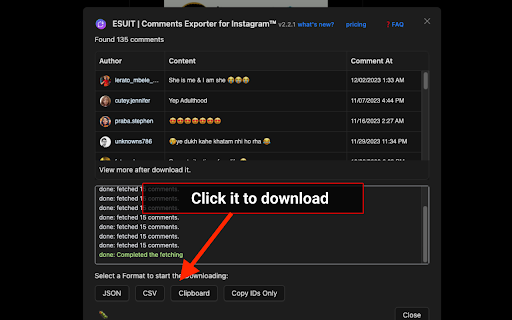

Effortless Instagram comment extractor extension, with nested replies export feature for user convenience. Instagram™ is a trademark of Instagram Inc., registered in the U.S. and other countries. This is an independent project developed by ESUIT. and has no relationship to Instagram™ or Instagram Inc. this extension is not officially developed by Instagram™, The author is ESUIT.DEV Works on: - Any User's post - Any Page's post With ❤️ from esuit.dev Introducing our Instagram Comment Exporter, a browser extension that seamlessly extracts comments, including nested replies, and imports directly to Google Sheets or downloads as CSV/JSON. User-friendly and efficient for data handling. SEO Keywords: Instagram comments, export tool, browser extension, nested replies, Google Sheets integration, CSV download, JSON format, efficient data management, social media analytics. If you need to subscribe to our service, we will collect your email address to verify your subscription status. (We only collect this data from subscribers; if you do not subscribe, we will not collect any of your data.) This is our privacy policy. https://esuit.dev/privacy-policy Notice: this extension has In-App Purchases. This extension includes features that require payment to unlock unlimited usage. Please refer to our pricing page for more details. https://esuit.dev/pricing/comments-exporter-for-instagram Additional Features: In the Popup, we provide the following additional features: Function Description: A brief description accompanied by a video tutorial demonstrating how to use this extension. Login Button: Use when you need to subscribe to premium features or log in with an existing subscription. Relevant-Ext: We provide brief recommendations and introductions to relevant extensions in a small section. Encountering an issue? Report it to us 💪: If you encounter any issues, you can get in touch with us through this link, and we will assist you in fixing it. Got feedback or experiencing any issues? Let us know on Facebook! Your input is important to us and we're here to help. https://www.facebook.com/esuitdev How to Download Facebook Photos in bulk? (2023) How to Save Pictures from Facebook? Before you delete all the photos from Facebook and lose them forever, downloading them first might be a great idea. That way, they will all be in the same folder.

ESUIT | Comments Exporter for Facebook™
ESUIT | CommentsExporter for Facebook™, a powerful browser extension that is completely free. Whether you're a social media marketer, data analyst, or an everyday user, it will greatly assist you. This extension's primary function is to effortlessly export comments from Facebook articles into JSON or CSV file formats. No more copy-pasting or manually organizing comments - with just a few clicks, the exported data will be neatly stored on your computer. ESUIT | CommentsExporter for Facebook™ provides a user-friendly interface, making the process incredibly simple. Whether you're analyzing user feedback, exploring trends in opinions, or preparing comprehensive data reports, this extension efficiently caters to your needs. Our extension not only saves you time but also ensures data accuracy. Each comment includes key information such as the commenter's name, timestamp, and number of likes. Whether you're an individual user or a professional, these insights can provide deeper analytical understanding. The design of ESUIT | CommentsExporter for Facebook™ prioritizes privacy and security. We strictly adhere to Facebook's comment data privacy policies, ensuring that no information is leaked or misused when processing exported data. Download and try ESUIT | CommentsExporter for Facebook™ now to experience the convenience and efficiency of comment exporting. Whether you're showcasing personal insights, evaluating market feedback, or sharing comments with your team, this extension will become your invaluable assistant. If you need to subscribe to our service, we will collect your email address to verify your subscription status. (We only collect this data from subscribers; if you do not subscribe, we will not collect any of your data.) This is our privacy policy. https://esuit.dev/privacy-policy Notice: this extension has In-App Purchases. This extension includes features that require payment to unlock unlimited usage. Please refer to our pricing page for more details. https://esuit.dev/pricing/export-comments-for-facebook Additional Features: In the Popup, we provide the following additional features: Function Description: A brief description accompanied by a video tutorial demonstrating how to use this extension. Login Button: Use when you need to subscribe to premium features or log in with an existing subscription. Relevant-Ext: We provide brief recommendations and introductions to relevant extensions in a small section. Encountering an issue? Report it to us 💪: If you encounter any issues, you can get in touch with us through this link, and we will assist you in fixing it. Warning Facebook™ is a trademark of Facebook Inc., registered in the U.S. and other countries. This is an independent project developed by ESUIT. and has no relationship to Facebook™ or Facebook Inc. this extension is not officially developed by Facebook™, The author is @William Chen Got feedback or experiencing any issues? Let us know on Facebook! Your input is important to us and we're here to help. https://www.facebook.com/esuitdev

IG Exporter & Scraper: Export Instagram Comments data to list
Extract Instagram comments. Pick into CSV and Excel formats. IG Exporter & Scraper is a powerful Google Chrome extension and scraping tool for gathering Instagram comments. Export your data effortlessly into CSV and Excel formats. Perfect for analytics, content management, and social media strategies. Use this best-in-class online service to scrape data from Instagram for free, making it the ideal web scraping tool! ▬▬▬▬▬▬▬ How to Use ▬▬▬▬▬▬▬ 1. Click Ins Tools - Ins Comments Export Tool icon, which is on browser toolbar, then open IGTools popup page via IGTools Net 2. Click "Export Instagram Data" button, an IGTools option page will be opened. 3. Input a valid IG post URL 4. Click "Start export" button, and our IG Tools will run automatically. After this processing is finished, you can download IG comments to CSV or Excel. ▬▬▬▬▬▬▬ Features ▬▬▬▬▬▬▬ ● Export IG comments with one click by extension ● Export up to 50K IG comments ● CSV and Excel formats support ● Handles IG rate limit errors ● Processing in one click via IGTools net ▬▬▬▬▬▬▬▬ Security ▬▬▬▬▬▬ ● The extension neither ask for your IG password, nor any of your data including IG user information, story, visit history, posts, and social relationships. ● IG enforces IG rate limit, i.e. limit on the number of requests. The rate limit is not public information and varies depending on your IP address. ▬▬▬▬▬▬▬▬ How it works in IG Follower Export tool ▬▬▬▬▬▬ ● After every time you get 50 comments the extension goes to Cool down minimum 10 seconds (you can change it in settings tab).

IG Comment Export Tool
Easily export comments from Instagram posts with one click. 🎉 "IG Comment Export Tool" is the perfect tool for Instagram users who want to export comments to Excel (.xlsx) or CSV files. Once installed, you can download comments in bulk with a single click, making it ideal for data analysis, archiving. 💡 Features ✓ Export comments to Excel (.xlsx) files. ✓ Export comments to CSV files. ✓ Exported data includes User ID, User Name, Avatar URL, Profile URL, Comment ID, Comment Text, and Publish Date. ⚙️ Get Started 1. Enter the URL of the Instagram post. 2. Click the 'START EXTRACTING' button. Additionally, we provide you with a variety of powerful tools in "moretools." 🔒 Data Privacy Your data privacy is paramount. All data processing occurs on your local machine; it never transits through our servers, ensuring no one else has access to your collected data. ⚠️ Disclaimer INSTAGRAM and IG are trademarks of Instagram, LLC. IG Comment Export Tool is an independent utility and is not affiliated with, endorsed, sponsored, or otherwise connected to Instagram, LLC, Meta Platforms, Inc., or any of their affiliates or subsidiaries.

Comment Exporter - Export Ins Comments
This extension will help you quickly export instagram comments to Excel xlsx or csv files. CommentExporter is an innovative browser plugin that revolutionizes your Instagram experience. With this powerful tool, you can effortlessly export user information, including publicly available email addresses and phone numbers, of Instagram users who have commented on any post. Whether it's your own posts or posts from other users, CommentExporter allows you to extract valuable data and gain insights into your Instagram community. With one-click export to CSV (Comma-Separated Values) files and the ability to continue tasks from your task history, CommentExporter is the ultimate solution for efficient data management and seamless workflow. CommentExporter extract Instagram comments including emails & phone numbers, Export to CSV with one click. An IG Follower Export Tool to Extract Instagram comments and export to CSV. IGComments - IG Comments Export Tool, automatically scrapes user profiles from Instagram post comments and exports them to CSV files. 1️⃣ Feature ✅ Export comments from Instagram to csv ✅ Extract user profile, including follower and following count, posts count, public Email, public phone number and external URL, etc. ✅ Save extracted data to local storage, download data anytime and support to continue extract anytime. Advanced User Information Export: CommentExporter empowers you to extract detailed user information from Instagram comments. Effortlessly export user data such as email addresses, phone numbers, and more from comments on any post, providing you with valuable insights to enhance your engagement strategies and build meaningful connections. CSV Export Capability: With a simple click, CommentExporter enables you to export the extracted user information to CSV files. Seamlessly manage and analyze your data, integrate it with other tools, and streamline your workflows for efficient marketing, research, and outreach. Task Continuation from History: Never lose track of your progress again. CommentExporter allows you to continue tasks from your task history, ensuring uninterrupted workflow and productivity. Easily retrieve completed or archived tasks and seamlessly pick up where you left off. User-Friendly Interface: CommentExporter features a user-friendly interface that seamlessly integrates into your browser. Navigate effortlessly through its powerful features, export user information, manage tasks, and optimize your Instagram experience with ease. Privacy and Compliance: CommentExporter respects user privacy and operates within the boundaries set by Instagram's terms and conditions. It strictly adheres to ethical practices, ensuring that only publicly available information is extracted and maintaining the privacy and security of user data. Take your Instagram data analysis and task management to new heights with CommentExporter. Download the plugin today and unlock the power of comprehensive user data extraction, seamless task continuation, and streamlined productivity. Simplify data management, enhance your Instagram strategies, and maximize your growth potential with CommentExporter. 2️⃣ How to get started? (1) Enter a link to an Instagram post (Select Include email in Setting if you want to export email, and increase Random Interval between the requests to decrease risk, e.g.12s) (2)On the Settings page, set your preferences, such as request interval (3) Click the Export Button (4) Click to export to CSV when the data extract completes. 3️⃣ FAQ If you have any problems, don't hesitate to contact us at pingappsteam@tailang.top 4️⃣ Data Privacy All the data you process is on your local computer and never passes through our servers. 5️⃣ Statement INSTAGRAM is a trademark of Instagram, LLC. IGComments is not affiliated with, endorsed, sponsored, or otherwise related to INSTAGRAM, Inc. or any of its affiliates or subsidiaries.
