
ldfbacdbackkjhclmhnjabngnppnkagh
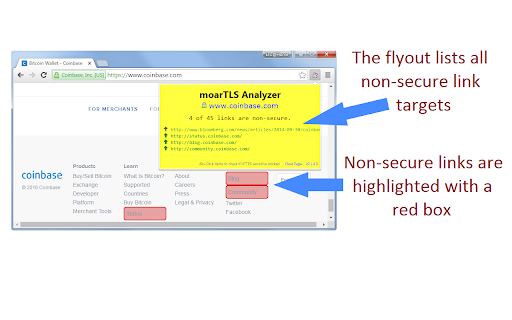

Analyze webpages for non-secure link references. HTTPS only works if you use it! This simple Chrome extension adds a button to Chrome that allows you to easily discover non-secure (e.g. HTTP) links on your pages. Simply click the moarTLS button and non-secure link references in the current page are flagged for review. You can learn more about latent mixed-content vulnerabilities here: https://textslashplain.com/2016/03/17/seek-and-destroy-non-secure-references-using-the-moartls-analyzer/

Threat Analytics Search
Use the Context Menu (right click menu) in the browser to conduct single or group searches for selected text. Threat Analytics Chrome Extension is a tool for Security Analysts, Malware Hunters, and Incident Responders. This extension enables you to use the Context Menu (right click menu) in Chrome to conduct single or group searches for selected text. Most useful scenarios are when you need to search a File Hash, IP Address or Domain across multiple websites at once. The only requirement is that the Website you are searching provides a way to send parameters either using GET or POST requests. This extension supports both mechanisms. Threat Analytics is focused on using information to make decisions during event analysis about assets in your organization. During our work with customers, our analysts often use the same websites repeatedly to gather information about File Hashes, IP Addresses, Domains etc. Also integrates with RSA Security Analytics, NetWitness Investigator, and Carbon Black. Also supports encoding when the website you are using for your research requires Base64 encoded parameters. This extension is fully Open Source under Apache 2 license and developed/maintained on GitHub here https://github.com/AdvancedThreatAnalytics/threat-analytics-search

HypeStat Analyzer
Check any website's traffic and technology used quick and easy with one click. - Daily unique visitor and Monthly visits count - Traffic sources, traffic history - Average visit duration, bounce rate, pages per visit - Technologies used on website - Link to detailed report on hypestat.com

OpenLink Structured Data Sniffer
What is it? The OpenLink Structured Data Sniffer (OSDS) is an extension for Web Extensions compliant browsers (e.g., Google Chrome, Microsoft Edge, Opera, and many others) that discovers Metadata embedded within HTML documents as Structured Data Islands and presents what's discovered using a Property Sheet presentation style. Currently, OSDS supports discovery and processing of Structured Data Islands published using notations such as Microdata, RDFa, JSON-LD, RDF-Turtle, RDF-XML, CSV, and JSON. Why is it important? It simplifies the process of understanding what a given HTML document is about, via its metadata, for both end-users and developers. For instance, it helps Digital Brand Managers, Digital Content Managers, and Semantic Search Engine Optimization (SSEO) practitioners understand what may or may not be affecting Search Engine Results Pages (SERPs) placements. Simply install the extension to your browser and then visit a page of interest. On page arrival, the OSDS icon will be visually activated thereby indicating metadata discovery; once the icon is clicked, you will be presented with a presentation of transformed metadata.

Privacy Settings
Alter the browser's built-in privacy settings in a toolbar popup Privacy Settings extension keeps all the built-in privacy and security related settings in one place. Each setting has a description and you can alter it right from the extension's popup. The extension offers the following modes: 1. Manual: The user alters each setting 2. Enhanced Privacy: Automatically change settings to protect the user's privacy while potential website brokage 3. Full Privacy: Try to protect the user's privacy and security with maximum possible level. 4. Default: Reset all the settings to the default values (factory reset) This extension offers protection on the following categories: 1. network 2. services 3. websites It can protect the user from webRTC leakage to first party isolation. Also, it can alter how cookies work. For the complete list of supported settings please visit: https://add0n.com/privacy-settings.html For technical bug reports use: https://github.com/schomery/privacy-settings/
