
ijadljdlbkfhdoblhaedfgepliodmomj
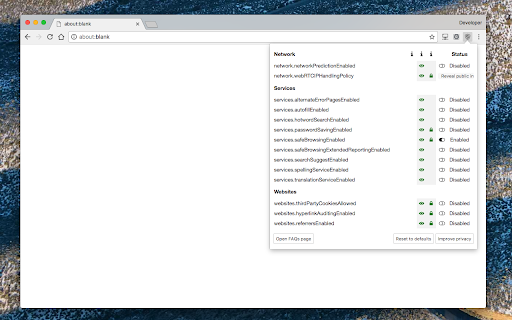
Alter the browser's built-in privacy settings in a toolbar popup Privacy Settings extension keeps all the built-in privacy and security related settings in one place. Each setting has a description and you can alter it right from the extension's popup. The extension offers the following modes: 1. Manual: The user alters each setting 2. Enhanced Privacy: Automatically change settings to protect the user's privacy while potential website brokage 3. Full Privacy: Try to protect the user's privacy and security with maximum possible level. 4. Default: Reset all the settings to the default values (factory reset) This extension offers protection on the following categories: 1. network 2. services 3. websites It can protect the user from webRTC leakage to first party isolation. Also, it can alter how cookies work. For the complete list of supported settings please visit: https://add0n.com/privacy-settings.html For technical bug reports use: https://github.com/schomery/privacy-settings/

Host AdBlocker
The "Host AdBlocker" is an ad-blocking extension that uses host matching instead of RegExp matching to increase blocking performance and reduce memory footprint. How it works: This extension installs a static hostname list to the incoming filter to block advertisement, tracker, and analytic sources. If a hostname matches, the request gets blocked. If not, the request gets processed as usual. Extensions like "uBlock Origin" or "AdBlock Plus" use the RegExp matching method. Although this method is more powerful, it is computationally expensive. Features: 1. You can extend the default filtering list by adding your custom domain names in the backlist hostnames on the options page. 2. To completely ignore a hostname, add it to the whitelist 3. This extension runs on manifest v3. This means that blocking performance is native. 4. You can toggle the extension on and off with a single click on the action button.

Canvas Blocker - Fingerprint Protect
This browser extension safeguards user privacy by preventing malicious scripts from using the HTML canvas element for user fingerprinting. It introduces slight changes to the data generated by the canvas element when specific methods are invoked, rendering it unusable for fingerprinting. In comparison to similar extensions, this one is lighter and employs a more efficient method to obstruct fingerprinting across all frame elements (top and subframes). The extension operates in three modes: 1. Random noise 2. Random noise (per page) to maintain a consistent identity within the current page session 3. Fixed noise to sustain a constant yet unique identity continuously Key Features: 1. Minimal footprint fingerprint defender 2. Ability to block or disable fingerprinting on specific hostnames 3. Notification when canvas fingerprinting is detected 4. Option to disable notification for select or all hostnames 5. Compatibility with cross-origin (CORS) and sandboxed iframes (such as Disqus and Hangouts) Notes: This extension doesn't entirely block the canvas element. Instead, it modifies two methods to prevent the JavaScript engine from creating a unique identification key from this element. What is Canvas Fingerprinting: Canvas fingerprinting is a method among several browser fingerprinting techniques used for tracking online users. It enables websites to identify and monitor visitors by leveraging the HTML5 canvas element rather than browser cookies or similar means. This technique functions by exploiting the HTML5 canvas element. When a user visits a webpage, the fingerprinting script initially writes text using the preferred font and size and adds background colors. Subsequently, the script calls the Canvas API's ToDataURL method to retrieve canvas pixel data in dataURL format, essentially a Base64 encoded representation of binary pixel data. Lastly, the script hashes the text-encoded pixel data, creating a unique fingerprint.

Privacy Manager
Manage privacy settings, browsing data deletion, quickly access page in incognito mode, manage cookies and monitor network traffic Privacy Manager is completely free and open source chrome extension for data transparency and control. Privacy Manager can help you with: * Privacy Management * Cookie Management * Browsing data deletion on browser start * Network monitoring Privacy Management - Extension provides ability to manage current privacy settings (Enable/Disable): * Blocks third-party sites from setting cookies. * Hyperlink auditing management. * Manage whether chrome must allow sending referrer headers with requests. * Show alternate error pages or not. * Automatically fill in forms settings management. * Enable or disable 'OK, Google' to start a voice search * Enable or disable password saving * Enable safe browsing in case if the option is disabled by another extension (if safe - --- - browsing is enabled Chrome does its best to protect you from phishing and malware). * Enable or disable safe browsing reporting * Search suggestion management. * Enable or disable correct spelling service. * Translate service switch. * Network prediction management. * Web RTC IP handling Cookie Management - is a tool for managing cookies (to use the tool you need to allow optional host permissions inside of the extension): * View cookies attached to domains * Filter cookies by domain * Add/create cookie * Modify cookie * Delete single cookie * Delete cookies from specific domain * Delete All cookies Network monitoring - User also can manage network traffic in popup window - collect http headers and also block user agent data to be sent via request, to use that feature you need to allow optional host permissions. Github: https://github.com/Privacy-Managers/Privacy-Manager Releases: https://github.com/Privacy-Managers/Privacy-Manager/releases Issues and feature requests: https://github.com/Privacy-Managers/Privacy-Manager#reporting-bugs-suggestions-and-questions Help me translate: https://github.com/Privacy-Managers/Privacy-Manager#translations

Smart HTTPS
Automatically changes HTTP protocol to HTTPS, and if loading encounters error, reverts it back to HTTP. Smart HTTPS is an extension that helps you always use the secure HTTPS protocol if it is supported by the site's server. It automatically changes the HTTP protocol to the secure HTTPS, and if loading errors occur, the extension will revert to the original HTTP protocol. Key features a. Automatically change all HTTP requests to the secure HTTPS. b. All websites (addresses) that do not support HTTPS are remembered to speed up the protocol-check process. Note that you can see and delete these items from the extension's Options page. c. The toolbar button serves as the extension's ON|OFF switch. Blue indicates ON and Gray is OFF. d. Add desired websites to the whitelist (see Options page). Note: to report bugs, please visit the extension homepage (https://mybrowseraddon.com/smart-https.html) and find the bug report form.
