
nomnklagbgmgghhjidfhnoelnjfndfpd
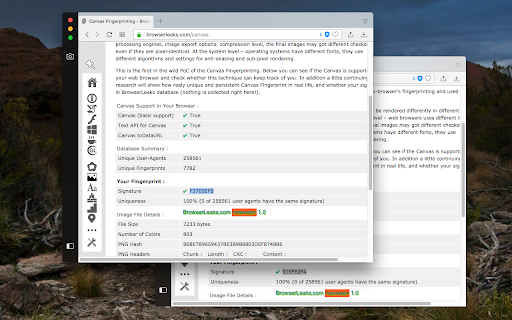
This browser extension safeguards user privacy by preventing malicious scripts from using the HTML canvas element for user fingerprinting. It introduces slight changes to the data generated by the canvas element when specific methods are invoked, rendering it unusable for fingerprinting. In comparison to similar extensions, this one is lighter and employs a more efficient method to obstruct fingerprinting across all frame elements (top and subframes). The extension operates in three modes: 1. Random noise 2. Random noise (per page) to maintain a consistent identity within the current page session 3. Fixed noise to sustain a constant yet unique identity continuously Key Features: 1. Minimal footprint fingerprint defender 2. Ability to block or disable fingerprinting on specific hostnames 3. Notification when canvas fingerprinting is detected 4. Option to disable notification for select or all hostnames 5. Compatibility with cross-origin (CORS) and sandboxed iframes (such as Disqus and Hangouts) Notes: This extension doesn't entirely block the canvas element. Instead, it modifies two methods to prevent the JavaScript engine from creating a unique identification key from this element. What is Canvas Fingerprinting: Canvas fingerprinting is a method among several browser fingerprinting techniques used for tracking online users. It enables websites to identify and monitor visitors by leveraging the HTML5 canvas element rather than browser cookies or similar means. This technique functions by exploiting the HTML5 canvas element. When a user visits a webpage, the fingerprinting script initially writes text using the preferred font and size and adds background colors. Subsequently, the script calls the Canvas API's ToDataURL method to retrieve canvas pixel data in dataURL format, essentially a Base64 encoded representation of binary pixel data. Lastly, the script hashes the text-encoded pixel data, creating a unique fingerprint.

WebGPU Fingerprint Defender
WebGPU Fingerprint Defender is a browser extension that lets you easily hide your real WebGPU fingerprint by reporting a random fake value. This add-on adds a small noise to the actual fingerprint and renews it every time you visit a website or reload a page. With the browser's WebGPU API, in general, two types of fingerprints can be generated. One with WebGPU specs (constant metrics) and the other with an image that is rendered with the WebGPU API on a canvas. This extension can spoof both values at the same time. To disable this add-on, please visit the extensions page in your browser and then click on the disable button. Please note that this add-on does not have any options page. This extension is made in collaboration with the author of "WebGL Fingerprint Defender": https://chromewebstore.google.com/detail/olnbjpaejebpnokblkepbphhembdicik If you have a feature request or found a bug to report, please fill out the bug report form on the add-on's homepage (https://mybrowseraddon.com/webgpu-defender.html).

Font Fingerprint Defender
Font Fingerprint Defender is a lite extension that let you easily hide your real font fingerprint by reporting a random fake value and protect your privacy. This add-on does NOT block the fingerprint, instead, it simply adds a small noise to the actual fingerprint and "renews" it every time you visit a website or reload a page. It is important to note that, this add-on does not have any settings or options to adjust. Simply add it to your browser and start surfacing the internet. If you want to test this add-on, please visit a website that show your fingerprint (i.e. webbrowsertools.com/font-fingerprint/). Every time you reload the page, you will see a new fake fingerprint. This extension is made in collaboration with the author of "Canvas Fingerprint Defender": https://chrome.google.com/webstore/detail/canvas-fingerprint-defend/lanfdkkpgfjfdikkncbnojekcppdebfp Note 1: depending on your browser and platform, you may need to (Shift+Refresh) a web page to renew Font fingerprint. Note 2: To report bugs, please visit addon's homepage (https://mybrowseraddon.com/font-defender.html) and fill the bug report form.

JShelter
Extension for increasing security and privacy level of the user. JShelter is a browser extension to give back control over what your browser is doing. A JavaScript-enabled web page can access much of the browser's functionality, with little control over this process available to the user: malicious websites can uniquely identify you through fingerprinting and use other tactics for tracking your activity. JShelter aims to improve the privacy and security of your web browsing. Like a firewall that controls network connections, JShelter controls the APIs provided by the browser, restricting the data that they gather and send out to websites. JShelter adds a safety layer that allows the user to choose if a certain action should be forbidden on a site, or if it should be allowed with restrictions, such as reducing the precision of geolocation to the city area. This layer can also aid as a countermeasure against attacks targeting the browser, operating system or hardware. Please see the FAQ (https://jshelter.org/faq/) and our blog (https://jshelter.org/blog/) for more information about the extension. What is the threat model? Can I read a paper about the extension? Note that JShelter can also be used to learn the origin of the calls for JavaScript APIs that are often misused for browser fingerprinting with Fingerprint Detector report. The detected calls in a web page can be exported as JSON.

WebGL Fingerprint Defender
WebGL Fingerprint Defender is a browser extension that let you easily hide your real WebGL fingerprint by reporting a random fake value. According to many tech blogs, completely blocking WebGL API is not a good idea, therefore reporting a fake fingerprint could be the best solution to better protect your privacy. This add-on simply adds a small noise to the actual fingerprint and renews it every time you visit a website or reload a page. With the browser's WebGL API, in general, two types of fingerprints can be generated. One with WebGL constants and the other with an image that is rendered with the WebGL API. This add-on can spoof both values at the same time. To disable this add-on, please visit the extensions page in your browser and then click on the disable button. Please note that this add-on does not have any toolbar icon/button. This extension is made in collaboration with the author of "Canvas Fingerprint Defender": https://chrome.google.com/webstore/detail/canvas-fingerprint-defend/lanfdkkpgfjfdikkncbnojekcppdebfp If you have a feature request or found a bug to report, please fill out the bug report form on the add-on's homepage (https://mybrowseraddon.com/webgl-defender.html).
