
egdaiaihbdoiibopledjahjaihbmjhdj

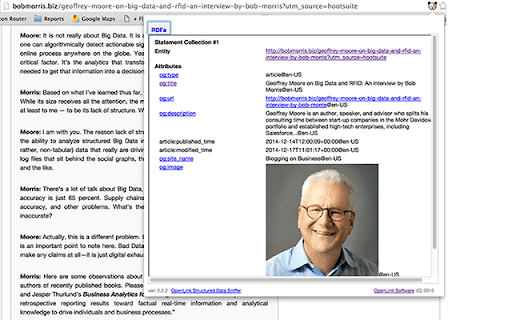


What is it? The OpenLink Structured Data Sniffer (OSDS) is an extension for Web Extensions compliant browsers (e.g., Google Chrome, Microsoft Edge, Opera, and many others) that discovers Metadata embedded within HTML documents as Structured Data Islands and presents what's discovered using a Property Sheet presentation style. Currently, OSDS supports discovery and processing of Structured Data Islands published using notations such as Microdata, RDFa, JSON-LD, RDF-Turtle, RDF-XML, CSV, and JSON. Why is it important? It simplifies the process of understanding what a given HTML document is about, via its metadata, for both end-users and developers. For instance, it helps Digital Brand Managers, Digital Content Managers, and Semantic Search Engine Optimization (SSEO) practitioners understand what may or may not be affecting Search Engine Results Pages (SERPs) placements. Simply install the extension to your browser and then visit a page of interest. On page arrival, the OSDS icon will be visually activated thereby indicating metadata discovery; once the icon is clicked, you will be presented with a presentation of transformed metadata.

View Rendered Source
View source is dead. See how the browser renders a page, not just what the server sends. A lightweight Chrome Extension that shows you how the browser has constructed (rendered) a page's original HTML into a functioning DOM, including modifications made by JavaScript. An essential tool for web developers using JavaScript frameworks like Angular, ReactJS and Vue.js, and for SEOs to understand how search engines see your pages, especially considering Google's dynamic serving workaround. Differences between raw and rendered versions are highlighted line-by-line showing how JavaScript has modified a page at render time. * Raw: The source code sent from the server to the browser before the DOM is rendered. The same as you'll see with traditional 'View Source' in the browser (after minor formatting tweaks) * Rendered: The rendered page after the source has been interpreted into a DOM, including any modifications made by Javascript * Difference: The difference between the rendered source and the raw source. Differences occur when JavaScript has modified the DOM. Adaptive website? If you serve different source code to mobile devices, emulate this easily with a mobile user-agent checkbox. Dynamic serving for Google? (More info: https://developers.google.com/search/docs/guides/dynamic-rendering) Using Google's dynamic rendering workaround designed for Javascript-heavy sites? Just request the raw source as Googlebot and ensure perfect technical SEO. Works with GatsbyJS and Prerender. DM the developer: https://twitter.com/ItsHogg

Schema Builder for Structured Data
Easily build validated json-ld structured data markup for any webpage. Based on schema.org specification Generating structured data markup for your webpages doesn't have to be hard! No more having to learn each Schema type, which elements are required vs. recommended or worrying about errors and issues. Schema.dev's Schema Builder makes it as simple as point and click to generate the perfect JSON-LD structured data for dozens of Google supported Schema types! and all for FREE! ============================================= Be sure to view the initial training video for fastest time to value. https://videos.seoclarity.net/video/kazj73n005plxgv61 ============================================= Simply enable the plugin, choose the schema markup you'd like to add and then populate the form using the point and click capabilities or manual input. Already have schema markup on your webpages? The built-in Schema testing tool helps validate your schema markup and shows errors and warnings. Key Features - Updated March 2nd, 2025 ================================== + NEW! Support for Vehicle Listing Markup + Support for 20+ Schema types - including ALL Google supported markups + Automatic detection of existing structured data + Point-and-click ease to populate schema fields + Intuitive UI that guides you through required, recommended and optional elements for each schema + Structured Data Testing capabilities built in for any schema markup generated + Intuitive UI to guide through required, recommended and optional elements NOTE: The plugin is in actively development - Join the forums at https://support.schema.dev for feedback, bugs and tips.

Link Redirect Trace
The all-in-one redirect path analyzer. It also analyzes protocol headers, REL-canonicals, robots.txt, backlink power, and trust! Perform advanced, comprehensive, and correct analysis of redirects and REL-canonicals. Get the complete picture on every redirect. Use this extension for your SEO analysis, On page SEO, Off-page SEO, competitor analysis, and more. - if robots.txt blocks crawlers from a redirect (checked via robots.txt for or X-Robots-Tags in HTTP header); - which URL drops cookies; - the LRT Power and LRT Trust of each URL; - supports NOINDEX/NOFOLLOW tags on every redirect step; - check for other technical issues like Bot-specific blocking. Full Description: https://smart.linkresearchtools.com/seo-tools/link-redirect-trace-extension

Core SERP Vitals
Show the Core Web Vitals data from the Chrome User Experience Report in the Google Search Results. Show real world Core Web Vital data from the Chrome User Experience Report in the Google Search Results. Displays LCP, FID, CLS (and the experimental INP and TTFB) metrics underneath the page links in the Google SERP where data is available in the CrUX report. * Note: Requires a free API key for the Chrome UX Report API. * https://developers.google.com/web/tools/chrome-user-experience-report/api/guides/getting-started Updates: Version 1.3.0 - Now displays the experimental INP and TTFB metrics.
