
lccpadlcbfphjdlckfnlahjhikmgglak

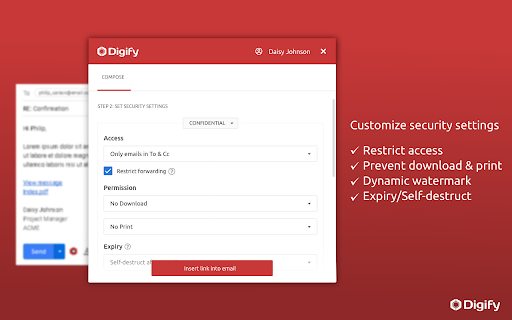
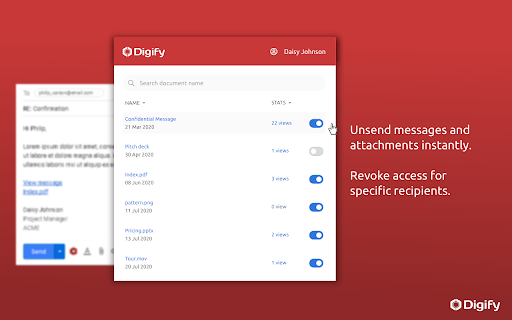

Automatically encrypt messages & attachments, track file views & opens and revoke access even after sending. As seen on Venture Beat, Product Hunt, Netted by the Webbys - Webby Awards: Stay in control of your confidential messages and documents with Digify for Gmail, a free-to-install Chrome extension. - Protect your emails and files with advanced encryption and security - Control who can access your message/file and restrict downloading or printing - Add a dynamic watermark that includes the recipient’s email address - Set an expiry date or a self-destruct timer for your message/file - Digify automatically encrypts your composed message and file attachments Find out if your message and attachments were viewed by the right people - View statistics to know who has viewed your message and attachment, how many times and for how long - Track documents views, prints and downloads Unsend your attachments and revoke access anytime - Whether you’ve changed your mind or sent a file by mistake, you can easily revoke a message or a document from all recipients. To get started, install Digify for Gmail and sign up for a free Digify trial account. For feedback or questions, please contact us at support@digify.com

Rename Email Subject by cloudHQ
Rename email subjects for Gmail. This extension lets you rename the subject lines of your emails directly in Gmail, helping you stay organized and productive. How It Works: 1. Select the email you want to rename. 2. Click on the "Rename" button icon. 3. Enter a new subject line that better fits your needs. Why Use This Extension? 1. Organize Your Inbox: Rename unclear or irrelevant subject lines to make emails easier to find later. 2. Keep Conversations Focused: Break up long email threads by renaming them with specific topics. 3. Personal Productivity: Add meaningful labels to emails that reflect your thoughts or ideas when you first received them. Additional Benefits: 4. The original sender won’t know you’ve changed the subject line (unless you reply with the new subject). 5. Perfect for professionals managing client communications, projects, or personal workflows. Simple and intuitive—rename emails with just a few clicks! Stay organized and take control of your Gmail inbox with Rename Email Subject by cloudHQ. cloudHQ. Helping your productivity, 1 click at a time. App website: https://www.rename-email.com/ cloudHQ website: https://www.cloudhq.net Pricing: https://www.rename-email.com/pricing Support page: https://support.cloudhq.net/category/browser-extensions/gmail_rename_email Blog: https://blog.cloudhq.net Gmail, Google Calendar, and Google Workspace are trademarks of Google LLC. Use of these trademarks is subject to Google Permissions.

FlowCrypt: Encrypt Gmail with PGP
Simple end-to-end encryption to secure email and attachments on Google. 🟢 A simple end-to-end encryption to secure your emails and attachments on Google, including Google Workspace, Business, and Enterprise using OpenPGP. 🟢 FlowCrypt lets you use PGP encryption by generating a private and public key. It uses the recipient’s public key to encrypt the email, and only the recipient’s private key can decrypt the message and reveal its content. 🟢 Adds a Secure Compose button to Gmail, allowing you to send private PGP-encrypted emails when you choose to. 🟢 We update the extension regularly (see the "Updated" field to the right). FlowCrypt allows you to: ✔ Set up the extension in just a few clicks. ✔ Generate private keys using the ECC and RSA (up to 4096-bit) algorithms. ✔ Use FlowCrypt’s own Attester public key server. ✔ Send and receive encrypted emails and attachments (up to 25MB, with previewing functionality) to anyone. ✔ Send and receive encrypted emails directly or through Encrypted Contact Page. ✔ Send password-protected emails to the recipient who doesn’t have any OpenPGP software (as well as receive such emails). ✔ Sign encrypted emails to let your recipients verify that the message is from you and that the content hasn’t been modified. 📩 Looking forward to your feedback! Please email us at human@flowcrypt.com.

Email Tracker by cloudHQ
Know when your emails are opened in real-time Now you can find out when your emails are read! This email tracker software is extremely easy to use, and gives you all of the following features where you'll have: ✔️ An email tracking dashboard ✔️ Mobile text, desktop, and email notifications when your email is read ✔️ Reminders if your email goes unopened after 48 hours ✔️ Link tracking ✔️ Email tracking removal options for personal emails you don't want tracked You'll also get a Gmail label to show you: - Tracked emails that you sent, and were opened - Tracked emails that you sent, and were opened, with links that were clicked on (how many times, and which links were clicked on) - A list of all opened but unanswered emails where people need to respond back to you - A list all opened, but unanswered emails where you need to respond back - A list all unopened emails where people need to respond back to you - A list all unopened emails that are awaiting your reply ✔️ As an upgrade: You can export all of your tracked emails to Google Sheets for an up-to-date report on open rates, link clicks and more. This is ideal for salespeople, customer service reps, head hunters, and more! cloudHQ. Helping your productivity, 1 click at a time. NOTE: For easy access to your settings and other cloudHQ apps, look for the cloudHQ icon in the top right corner of your Gmail inbox. Click on it to get started! cloudHQ website: https://www.cloudhq.net/ cloudHQ app list: https://www.cloudhq.net/apps App website: https://www.mail-tracker.com/ Pricing: https://www.mail-tracker.com/pricing Support page: https://support.cloudhq.net/category/browser-extensions/email-tracker/ Blog: https://blog.cloudhq.net

ActiveInbox: Organize Gmail™ tasks
Overwhelmed by too many to-dos in your inbox? Turn Gmail into an effortless task manager to never forget anything. Turn Gmail into a task manager, and take control of all your conversations. Our mission is simple really... we want to give all of us the tools to achieve meaningful happiness. Our business supports this by making elegant software, infused with proven psychology, to help us all absorb the shocks of life and become truly effective. DESIGNED FOR EXECS, MANAGERS & FOUNDERS ActiveInbox has a free trial to get a taster of being in control. It's "A 'must try' if you want to easily keep yourself on track in an undoubtedly busy world" - Richard Gaspar ActiveInbox works where you already do: in Gmail and on mobile. There's no need to adopt a new tool to accomplish... Stop emails sinking into the inbox swamp by turning them into tasks with due dates and adding them to projects. Don't 'send and pray' emails you spent precious time writing. Deliver at the time they'll be read and let ActiveInbox track them to completion. Achieve inbox zero, then glide through your day, by having just one place to focus on emails and tasks, and breaking your Today list into digestible chunks. Oh, and we're the original Gmail plugin - ActiveInbox has been supporting customers since 2006.
