
lblnbldblpeiikndppnekobccdocccho

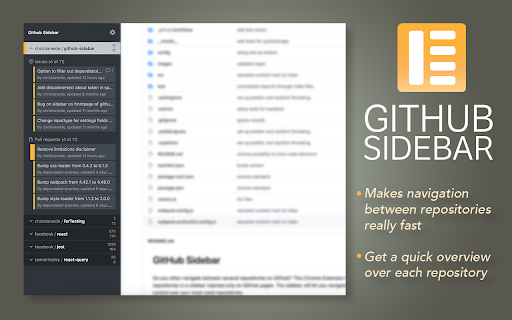


Make shortcuts to repositories you frequently use on Github. Faster navigation and better control over your repositories. Do you often navigate between several repositories on GitHub? This Chrome Extension lets you bookmark repositories in a sidebar injected only on GitHub.com pages. The sidebar will let you navigate faster and give you better control over your most used repositories. - Easy to bookmark and navigate repositories - Overview over active Pull requests or Issues for your repos - Periodically checks for new or updated items - Optional to show badge in GitHub favicon if new items - Works across multiple tabs - Color coding of items based on status (Approved, Changes Requested) - Hide or show the panel whenever you like Simply navigate to any Github repository you would like to add a shortcut to and press the button for *Add current repository*. You can sort the order of repositories by simply drag&drop. For all features of this extension to work, you will need to provide an access token from Github. This is not a requirement, but it will make the extension load data about issues and pull requests from your repositories. Please create an access token here https://github.com/settings/tokens/new?scopes=repo&description=Github%20sidebar%20browser%20extension to allow this extension to fetch necessary data from Github. The necessary scopes for the token is already selected if you follow the link above. All you need is to press "Generate Token", and copy/paste the token into the extension. Note: The token is only saved to your browsers local *chrome.storage.local* and only used to communicate with Githubs API.

Dashboard filter for GitHub
This adds an activity filter menu to GitHub.com dashboard page so user can choose to see only the activities they care about.

Gitd Download Manager
Download at Github,Bitbucket,Gitlab,Gitea,Gitee repo selected files,folders as a zip file with a single click, without api token. Gitd Download Manager, allows you to download only the files/folders you want without having to download all of the public repository. Github.com, Bitbucket.org, Gitlab.com, Gitea.com, Gitlee.com provides all of the public repos in git services to download selected files and folders as a zip files with a single click, without the need for any API key or token. If you see "Gitd Start" button, It is ready for use on every screen you see. You have to to click (checkboxes appears) and can starting to select files. ## Features - Support only Github.com, Bitbucket.org, Gitlab.com, Gitea.com, Gitlee.com public repositories page - Not neeeded ApiKey/ApiToken - Support single or multiple files download - Download selected contents as a zip file with one click - Support all branches - Maximum Selection Limit: 10 - Maximum Download Files: 10000 ## Next Features - Support Gitea.com service (near future) - No limitations for selection and downloading files count - Support branch names with includes slash - Support Bitbucket.org commitId url (Maybe) - fixed Gitlab new css selector for file name > Note: Gitd Download Manager browser extension creates download lists using Gitdownloadmanager.com api service.

Lovely forks
An extension to help you notice notable forks of GitHub projects. Sometimes on GitHub, projects are abandoned by the original authors and the development continues on a fork. However, the original repository is often not updated to let new-comers see that. I have many times wasted effort on making a pull-request or installing old buggy versions of projects when the community had already moved to a fork. To make matters worse, the old projects usually have higher search-engine traffic and a lot more stars than the forks. This makes the forks even harder to find. This extension tries to remedy that by adding a subscript under the name of the repository on the Github page of all projects with a link to the most notable fork (i.e. the fork with the most stars), if such a fork exists.

Gitako - GitHub file tree
File tree for GitHub, and more than that. Features - 📂 File tree for repository, commits, and pull requests - 🔎 Instant file search and navigation - 🕶️ Support private repositories - 🧩 Support GitHub enterprise, Gitea, Gitee, and more - 🏎 Always performant, even in gigantic projects - ⌨️ Intuitive keyboard navigation - 📋 Copy snippets and file content - 🎨 Various icons and official themes support - 🗂 Support git submodule - 📏 Fold source code NO BS POLICY: Gitako doesn't share about your privacy data at all. GitHub access tokens are required only when you access private repositories or exceed GitHub API rate limit. Gitako stores access tokens in your chrome extension storage (not the LocalStorage) and uses them only when authenticate with GitHub.
