
giljefjcheohhamkjphiebfjnlphnokk


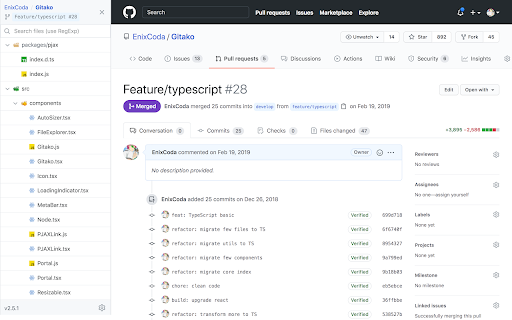

File tree for GitHub, and more than that. Features - 📂 File tree for repository, commits, and pull requests - 🔎 Instant file search and navigation - 🕶️ Support private repositories - 🧩 Support GitHub enterprise, Gitea, Gitee, and more - 🏎 Always performant, even in gigantic projects - ⌨️ Intuitive keyboard navigation - 📋 Copy snippets and file content - 🎨 Various icons and official themes support - 🗂 Support git submodule - 📏 Fold source code NO BS POLICY: Gitako doesn't share about your privacy data at all. GitHub access tokens are required only when you access private repositories or exceed GitHub API rate limit. Gitako stores access tokens in your chrome extension storage (not the LocalStorage) and uses them only when authenticate with GitHub.

GitZip for github
It can make the sub-directories and files of github repository as zip and download it Why GitZip: - You DO NOT have to download the whole project just for those few files/folders you need. Usage: 1. Browse any Github repository page. 2. Two ways to download: 2.1. Choose the items: 2.1.1. In default, you can double click on items or check the checkbox on the front of items. 2.1.2. Click download button at the bottom-right of the page. 2.2. In context menu: 2.2.1. Click "GitZip Download" > "Whole Repository" or "Current Folder". 2.2.2. Move the mouse cursor on the item and click "GitZip Download" > "Selected Folder/File". 2.2.3. Click "GitZip Download" > "Checked Items" after doing 2-1-1. 3. See the progress dashboard and wait for browser trigger download. 4. Get the ZIP file. Options: "How to select" for item selecting behaviour and "theme" for dark or light themes. Get Token: - If you see the "Rate Limit" warning message on progress dashboard, you should get the Github API access token for upgrade rate limit. GitZip provide a convenient way for it: 1. Click GitZip Extension icon on your browser. 2. Click "Normal" or "Private" link beside "Get Token". 3. Authorize GitZip permission on Github auth page. 4. Back to repo page automatically. 5. Continue to use. 1.0.2: 1. Compatible with new UI (In feature preview called: New Code Search and Code View) 2. Fix a bug about saving personal token. 1.0.1: 1. Enhance popstate detection. 2. Deprecate ".repository-content" selector for items detection. 1.0.0: 1. More download ways in context menu. 2. Can change settings in options page for item selecting behaviour and theme. 3. Can use checkbox to select item. 4. Migrate to Manifest V3 spec.

Material Icons for GitHub
Material icons for the file browser of popular websites like GitHub, Azure, Bitbucket etc. Replace GitHub's default icons with icons from Visual Studio Code's Material Icon Theme icons. Use the same icons on your code editor and on github.com, and quickly identify file types, configuration files and project scaffolding at a glance. This extension pull icons and replacement lists directly from the open source vscode extension https://github.com/material-extensions/vscode-material-icon-theme. This extension can replace icons on many other leading source control platforms. For bug reports, please open Issues on the extensions repository at https://github.com/material-extensions/material-icons-browser-extension Don't forget to star the github repository if you like the extension.

Gloc
Gives approximate LOC from repo page (private and public)

GitHub Better Line Counts
Lots of code is generated nowadays and GitHub's line counts are not representative of a PR's true size. This extension subtracts generated files from the total line counts, giving you a better idea of how big a PR really is. That's it. Generated files are detected from the branch's root .gitattributes file. See GitHub's docs to learn how to mark a file as generated: https://docs.github.com/en/repositories/working-with-files/managing-files/customizing-how-changed-files-appear-on-github For a simple example, checkout this extension's .gitattributes file! https://github.com/aklinker1/github-better-line-counts/blob/main/.gitattributes The extension is open source: https://github.com/aklinker1/github-better-line-counts
