
lbiejgglfaclajppckngjfpnfpinknen
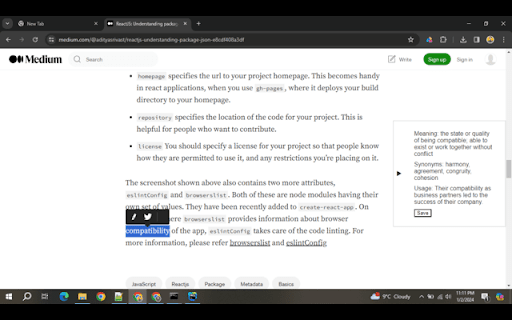


ChatGPT-powered insights, provide dictionary for language exploration, and effortlessly build and downloads personalized vocabulary In the digital age, where information is abundant, tools that enhance our reading experience and comprehension are invaluable. The Ai-Dict Chrome extension stands out as a powerful and intuitive dictionary companion, designed to provide readers with seamless access to ChatGPT-powered insights. This innovative extension offers meanings, synonyms, and usage examples of selected words, all within a sleek popup, revolutionizing the way users explore language while browsing. With a focus on user-friendly design and privacy-conscious features, Ai-Dict not only simplifies word searches but also empowers users to build and enhance their vocabulary effortlessly. Streamlining Language Exploration The Ai-Dict Chrome extension is a user-friendly dictionary designed to cater to the needs of avid readers, students, and professionals alike. It streamlines the process of looking up words, offering instant access to a wealth of linguistic information with just a few clicks. Its integration of ChatGPT-powered insights ensures accurate and contextually relevant details, making it a reliable source for language exploration. Key Features 1. ChatGPT-Powered Insights: Ai-Dict leverages the language generation capabilities of ChatGPT to provide users with robust and accurate information about selected words. Users can trust the extension to deliver meaningful and contextually relevant details, enhancing their understanding of language nuances. 2. Context Menu Integration: Ai-Dict seamlessly integrates into the context menu, allowing users to access language insights without interrupting their reading flow. With a simple right-click on a selected word, users can choose "Search Ai-Dict" and unveil a wealth of linguistic information in a sleek popup. 3. Meanings, Synonyms, and Usage Examples: Ai-Dict offers a comprehensive understanding of a word by providing not only its definition but also synonyms for variety and usage examples for context. This multifaceted approach ensures that users grasp the full spectrum of a word's meaning and application. 4. Sleek Popup Design: The extension's popup design is sleek and unobtrusive, presenting information in a clear and organized manner. Users can absorb linguistic insights without leaving their current browsing window, maintaining a seamless and efficient exploration process. 5. Privacy-Conscious Tool: Ai-Dict prioritizes user privacy, ensuring that language exploration remains a secure and personal experience. Users can enjoy the benefits of a sophisticated language tool without compromising their data. 6. Vocabulary Building and Customization: One standout feature of Ai-Dict is its ability to help users build and customize their vocabulary. Users can save words along with their synonyms, creating a personalized vocabulary list for future reference. This feature is particularly beneficial for students and language enthusiasts looking to expand and reinforce their word repertoire. Catering to Varied Audiences: Ai-Dict Chrome extension caters to a diverse audience with different linguistic needs and preferences: Students and Academic Enthusiasts: Students can benefit from Ai-Dict during research, reading assignments, or when encountering unfamiliar terms in academic texts. The extension facilitates a deeper understanding of subject matter and encourages the development of a rich and nuanced vocabulary. Professional Readers: Professionals, whether in content creation, editing, or any knowledge-intensive field, can use Ai-Dict to ensure precise and effective communication. Quick access to meanings and synonyms saves time and enhances the quality of written content. Casual Readers: For those who enjoy reading online articles, blogs, or novels, Ai-Dict makes the exploration of language more engaging and informative. Casual readers can effortlessly expand their vocabulary while enjoying their favorite content.

MetaPrompt - AI Prompt Engineer & Optimizer for ChatGPT & Claude
Transform unclear questions into expert prompts. Get better AI responses from ChatGPT and Claude with one click. Metaprompt: Your AI Whisperer Transform how you interact with AI MetaPrompt transforms your ChatGPT and Claude experience by intelligently enhancing your prompts. Powered by advanced GPT 4.1 models, our Chrome extension analyzes your questions and refines them to generate clearer, more precise AI responses - saving you time and frustration. Simple, Powerful Workflow 1. Type your question as you normally would 2. Click the MetaPrompt button to apply expert prompt engineering 3. Watch as your request transform into an optimized prompt that gets real results What Sets MetaPrompt Apart - Instant Optimization: Turn unclear questions into structured prompts that deliver exactly what you need - Seamless Integration: Works naturally within ChatGPT's and Claude's interface with zero learning curve - Universal Compatibility: Use our popup anywhere you interact with AI tools Choose Your Perfect Plan MetaPrompt Pro ($5.99/month) - 5000 monthly prompt enhancements - Access to larger, more powerful models for even better results Who Needs MetaPrompt? - Students seeking deeper explanations and research assistance - Professionals requiring accurate information for critical tasks - Writers looking for better creative input - Developers needing precise code solutions - Researchers formulating complex queries - Anyone tired of wasting time on unhelpful AI responses Stop struggling with AI miscommunications. Download MetaPrompt today and start getting the quality responses you deserve.

AIChatOne : AI ChatGPT Copilot (ChatHub tools)
Your AI Copilot powered by ChatGPT. Answers complex questions. Writes emails, reads articles, searches smartly. Usable everywhere. Your AI Copilot powered by GPT-5 offering you use all popular Chat LLMs with enhanced features like fast response, Integrated with Google web search, Chat search, AI characters, Prompt library, etc. You can chat with Multiple LLMs at the same time to get the best answer, and you can ask AI anything in the sidebar, Supports webapp, OpenRouter, Azure and API 🔥 AIChatOne is your all-in-one GPT-5 AI assistant. Hit Cmd/Ctrl+B to open sidebar or Cmd/Ctrl+M to open full chat page, and you're in with AIChatOne. AIChatOne offers assistance in various tasks including searching, reading, writing, translating, and more. 💪 The Key Features: 👉 Chat with AI ✔️ Multi chatbots support: chat with the different LLM models such as GPT-4, Gemini, Claude3, Perplexity etc all in one place and compare their results side by side. ✔️ Custom AI Characters: Built-in AI characters and Create your own custom AI Characters that perform a specific task ✔️ Prompt Library: a prompt base that offers a large number of prompts; just hit '/' to quickly access your saved prompts. ✔️ Real-Time Web Access: AIChatOne can answer with the latest internet info. ✔️ Voice Input and Output Support: using microphone button to communicate with the AI in multiple languages. ✔️ Chat Folders: Stay organized by creating your own Chat folders 👉 Chat and Summary ✔️ Chat with doc: Instantly feed the AI important context by uploading a doc file right into the chat and quickly grasp the core highlight. ✔️ Chat with Image: take a screenshot or upload an image and ask questions based on the content of the image, powered by GPT-4V. ✔️ Webpage Summary: get accurate summaries without having to read entire webpage articles or information. ✔️ YouTube Summary: generate a concise and accurate summary for your convenience in seconds. 📝 Writing Assistant: ✔️ Social writer: for Twitter、Reddit. Your best assistant, using AI when editing posts or replying ✔️ Write agent: just provide a topic, and AIChatOne can automatically draft outlines for you, expanding the content with references. Use it in any editbox on a webpage(Coming soon!) ✔️ Email reply: in Gmail、Outlook, AIChatOne analyzes emails content and suggests reply options, enabling you to send appropriate responses with just a click, no typing needed. (Coming soon!) 👉 Search ✔️ Powerful search and filter so you can find any of your previous chats instantly ✔️ Get AI search results in the sidebar when use google , bing , duckduckgo etc 👉 Powerful Sidebar ✔️ Ask AI anything in the sidebar 👉 Customizable ✔️ Dark Mode: Toggle between light and dark mode. ✔️ Adjusting response “temperature”. ✔️ Theme. 👉 Secure & Respect Your Privacy ✔️ Api keys encrypted and stored locally. No in-app analytics. No middle servers. Your prompts are sent directly to OpenAI 💻 How to use AIChatOne: 🔸 Click the ""Add to Chrome"" button in the upper right corner and pin it to the toolbar for easy access. 🔸 Simply hit Cmd/Ctrl+B to open sidebar or Cmd/Ctrl+M to open full chat page ,then start chatting with her. ❓ Frequently Asked Questions: 📌 What search engines are supported by AIChatOne? Currently, AIChatOne supports Google, Bing, DuckDuckGo and more search engines will be supported in the future. 📌 Do I need a ChatGPT/OpenAI account? Yes, we do not provide an OpenAI API key. 📌Is AIChatOne free to use? Yes, most features of AIChatOne is free to use, and we also have premium plans. 📪 Contact us: Any questions or suggestions? Please contact us at 💌 product@aichatone.com. Try AIChatOne now and experience the powerful features of ChatGPT-driven AI assistants! 🚀 The Ultimate All-in-One Extension for Unprecedented Productivity: AIChatOne AI Assistant Embark on a quantum leap in productivity with AIChatOne AI Assistant, a revolutionary tool that amalgamates an extensive suite of features comparable to some of the most prominent AI platforms and tools available today. This powerhouse integrates cutting-edge technology and up-to-date data, harnessing the capabilities of renowned models such as OpenAI, and Gemini AI. Picture the synergy of Bing Chat, the all-encompassing functions of Merlin and Monica, the chat with all LLMs power of ChatHub, the AI capabilities akin to Jasper.ai, and the versatility of Sider's toolkit—all seamlessly rolled into one.

ChatPDF - ChatGPT for PDF
Use ChatPDF: AI summarizer to chat with PDF, extract insights, and get AI summary. Simplify your pdf reading! ⚡ Introducing ChatPDF, the revolutionary Google Chrome extension and powerful AI tool that transforms the way you interact with PDF files (powered by ChatGPT models). ⭐ With ChatPDF, you can now upload file and ask your pdf about its content using AI chat technology. ⭐ This innovative tool is perfect for students, professionals, and anyone looking to streamline their document analysis process. Chat PDF allows you to chat with PDF in a way that feels natural and intuitive. Just upload your file, and you can start asking questions about its contents (like in ChatGPT). The AI understands the context and provides you with precise answers, making information retrieval a breeze. Imagine being able to dive deep into any document without the hassle of manual searching! ✨ 1️⃣ Upload and Ask ChatPDF With Chat to pdf (powered by ChatGPT), you can easily upload any file and ask anything. Want to know specific details? Just type your question, and watch as the AI provides instant answers. 2️⃣ Conversations Our advanced Pdf ai chat capability allows you to engage in meaningful dialogues about the document. Whether you need a quick summary or detailed explanations, AI technology has you covered. 3️⃣ Smart Document Summarization Use the AI summarizer feature to generate concise summaries of your documents. This AI summarizer quickly distills the essential points, helping you grasp the main ideas without spending hours reading. 4️⃣ Versatile Use Cases of ChatPDF Our extension is designed to meet a variety of needs. Here are some practical applications: ▪️ Research Assistance: Quickly extract relevant information from research papers. ▪️ Study Aid: Use AI (ChatGPT) Pdf summarizer notes to aid in exam preparation. ▪️ Contract Review: Get clarity on legal terms in contracts with a simple question. ▪️ Report Analysis: Analyze complex reports effortlessly by asking ChatPDF targeted questions. ▪️ User Manuals: Navigate through user manuals and find instructions with ease. ️ 5️⃣ Engaging With the pdf chat feature, you can transform any document into an interactive experience. Imagine discussing the contents of a textbook or a business report as if you were talking to a knowledgeable friend! 💬 📍 Step 1: Install the extension from the Chrome Web Store. 📍 Step 2: Upload your desired file directly through the extension. 📍 Step 3: Start asking questions about the document. Use prompts like: ➤ What are the main arguments in this paper? ➤ Can you summarize the conclusion? ➤ What statistics are mentioned? 🔍 📃 Time-Saving: No more tedious reading. Get straight to the answers you need. 📃 Convenience: Access ChatPDF free of charge and elevate your document-reading experience. 📃 Enhanced Learning: Great for students who want to maximize their study efficiency. 📃 Accessibility: Perfect for anyone looking to extract information from PDFs without hassle. 💪 The Power of AI Harness the power of AI summary for your needs with ChatGPT. With Doc reading AI capabilities, chat to pdf ai offers a unique blend of efficiency and ease of use. This AI not only helps in summarizing content but also facilitates discussions about the material, making it an indispensable tool for anyone working with documents regularly. 💡 Choosing ChatPDF means opting for a smarter way to handle your documents. Experience the benefits of: 💡 AI tool capabilities for enhanced interaction. 💡 The ability to Chat with any document and get tailored responses. 💡 Comprehensive pdf features that allow for effective learning and information retention. In today's fast-paced world, efficient document management is crucial. ChatPDF provides a groundbreaking solution for anyone looking to optimize their file interactions. Whether you're preparing for exams, conducting research, or managing business documents, Chat PDF is your go-to extension. Upload your files, engage in insightful discussions, and unlock the full potential of your documents today! Start your journey towards more effective text handling and enjoy the seamless integration of AI in your reading experience. Get ready to transform the way you handle documents forever! 🚀

AI Grammar Analyzer - By YourDailyGerman
Select a sentence or phrase on a website and get a detailed grammar analysis based on ChatGPT. The AI sentence analyzer helps you analyze sentences you read while browsing the web in the language you're learning. Just mark a sentence and click "analyze" and you'll get a word for word breakdown with relevant grammatical information, along with a translation and some notes about what's interesting about this sentence. The extension uses GPT4 for the analysis, so it is not always 100 perfect, and it fails for very complex, rare structures, but it's a nice tool to get a quick orientation.
