
dbekogoohigpdgepedgkbhekpmknhdfd

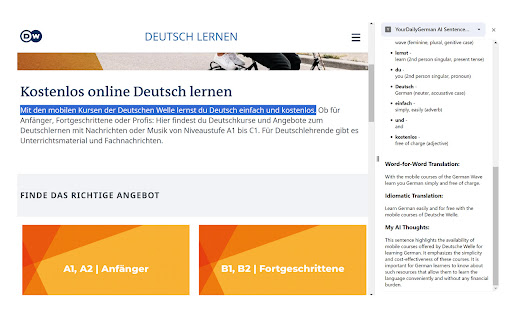
Select a sentence or phrase on a website and get a detailed grammar analysis based on ChatGPT. The AI sentence analyzer helps you analyze sentences you read while browsing the web in the language you're learning. Just mark a sentence and click "analyze" and you'll get a word for word breakdown with relevant grammatical information, along with a translation and some notes about what's interesting about this sentence. The extension uses GPT4 for the analysis, so it is not always 100 perfect, and it fails for very complex, rare structures, but it's a nice tool to get a quick orientation.

GrammFix: AI Writer Helper
GrammFix includes grammar correction, style improvements, translations, and more. Works on all sites. Free to use. Write emails, correct grammar, enhance writing, and much more. With one click, access powerful AI-driven tools designed to improve your writing instantly. ✔️ No Login Required – Just Download and Use ✔️ Free to Use with Unlimited Access to the Free ChatGPT Model ✔️ Option to Upgrade to the Latest ChatGPT Model for Unlimited Access ✔️ Advanced Grammar & Spelling Correction ✔️ Contextual Fixes for Clearer, More Polished Text ✔️ Multi-Language Support, Including Right-to-Left Languages ✔️ Polished Writing in Seconds ✔️ Text-to-Speech Integration ✔️ Lightweight & Fast (

BearGPT - Chatgpt Enhancer
a better experience in chatgpt with table of questions, customize content width and so on Take your ChatGPT experience to the next level! BearGPT is a powerful enhancement tool designed for ChatGPT power users. It solves the pain points of navigating long conversations, limited content display area, and non-visual technical diagrams. Key Features: 📑 Question Navigation Sidebar Automatically extracts all your questions from the conversation into a clean sidebar One-click jump to any question — no more endless scrolling Shows total question count to track conversation progress Collapsible design with auto-saved state 📏 Custom Content Width Break free from ChatGPT's narrow default content area Adjust width from 10% to 100% — make the most of your widescreen display Settings persist automatically across page refreshes 📊 Live Mermaid Diagram Rendering Automatically detects Mermaid code blocks and renders them into visual diagrams instantly Supports 15+ diagram types: flowcharts, sequence diagrams, class diagrams, Gantt charts, state diagrams, ER diagrams, mind maps, and more Built-in toolbar: zoom in/out, drag to pan, fullscreen mode, toggle between code and diagram Perfect dark mode support Perfect For: ✅ Long technical discussions where you need to quickly revisit specific questions ✅ Widescreen users who want ChatGPT content to fill more screen space ✅ Viewing flowcharts, architecture diagrams, and sequence diagrams generated by ChatGPT — see the visual output, not just code ✅ Developers, product managers, and technical writers who want to boost productivity Why BearGPT? 🔒 Privacy First - Runs entirely locally, no data collection ⚡ Lightweight - Zero latency, no impact on page performance 🎨 Native Look - Seamlessly blends with ChatGPT's UI, auto light/dark mode 🔄 Remember Settings - All preferences auto-saved

Quicksense - Ultimate YouTube Summary Tool using AI
YouTube Summary Tool using AI. Take notes of lectures, Podcast or any other videos and gain insights instantly. Quicksense - The Ultimate YouTube Summary Tool for Effortless Note-Taking and Insight Generation Revolutionize the way you learn and consume content on YouTube with Quicksense, the most powerful AI-driven YouTube video summarizer available as a Chrome extension. Our cutting-edge tool harnesses the power of artificial intelligence to generate concise, high-quality summaries directly within the YouTube interface, saving you time and elevating your learning experience. 🚀 Instant YouTube Summaries: Grasp the core message of any YouTube video in seconds, enabling you to quickly absorb the main points and ideas without watching the entire video. 🎯 AI-Powered Key Insights Extraction: Our advanced AI algorithms identify and highlight the most crucial information from the video, ensuring you never miss important concepts or takeaways. 🧩 Seamless YouTube Integration: Access summaries effortlessly without leaving YouTube, thanks to our intuitive and user-friendly extension design that blends perfectly with the platform. ⚡ Lightning-Fast Processing: With an average summary generation time of just 5 to 10 seconds, depending on the length of the video, you can quickly digest even the longest videos and take notes using AI. 💬 Interactive Video Chat: Engage in meaningful conversations with the video content, asking questions and receiving AI-generated responses for a more immersive learning experience. 🔗 Enhanced Sharing Options: Discover new ways to share your learnings from videos, making it easier to collaborate with others and showcase your knowledge. Perfect for: - Students and lifelong learners seeking to expand their knowledge efficiently by taking notes using AI-generated YouTube summaries - Professionals looking to stay up-to-date with industry trends and best practices through concise video insights - Content creators and researchers analyzing video content for inspiration and extracting key information quickly - Busy individuals who want to make the most of their time while consuming informative content on YouTube - Anyone looking to enhance their learning and productivity on the world's largest video platform Powered by fine-tuned AI models specifically crafted for summarizing different categories of videos, Quicksense delivers unparalleled accuracy and reliability in YouTube video summarization. Our extension is designed to cater to a wide range of topics and genres, making it the ultimate tool for anyone seeking to unlock the full potential of YouTube as a learning and personal growth platform. Experience the future of content consumption with Quicksense, the best YouTube summary extension for effortless note-taking and insight generation. Download our Chrome extension today and take your YouTube learning experience to new heights!

German Nouns Highlighter
An extension that highlights German nouns in the current webpage according to the gender of the noun. Enables learners to quickly recognise and revise the genders of German nouns visually while reading, eliminating the need to interrupt the flow of reading by consulting a dictionary.
