
gdojaklebiimihgaggfmkpflepmehbfb

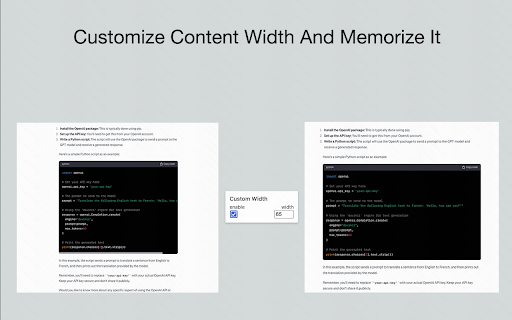
a better experience in chatgpt with table of questions, customize content width and so on Take your ChatGPT experience to the next level! BearGPT is a powerful enhancement tool designed for ChatGPT power users. It solves the pain points of navigating long conversations, limited content display area, and non-visual technical diagrams. Key Features: 📑 Question Navigation Sidebar Automatically extracts all your questions from the conversation into a clean sidebar One-click jump to any question — no more endless scrolling Shows total question count to track conversation progress Collapsible design with auto-saved state 📏 Custom Content Width Break free from ChatGPT's narrow default content area Adjust width from 10% to 100% — make the most of your widescreen display Settings persist automatically across page refreshes 📊 Live Mermaid Diagram Rendering Automatically detects Mermaid code blocks and renders them into visual diagrams instantly Supports 15+ diagram types: flowcharts, sequence diagrams, class diagrams, Gantt charts, state diagrams, ER diagrams, mind maps, and more Built-in toolbar: zoom in/out, drag to pan, fullscreen mode, toggle between code and diagram Perfect dark mode support Perfect For: ✅ Long technical discussions where you need to quickly revisit specific questions ✅ Widescreen users who want ChatGPT content to fill more screen space ✅ Viewing flowcharts, architecture diagrams, and sequence diagrams generated by ChatGPT — see the visual output, not just code ✅ Developers, product managers, and technical writers who want to boost productivity Why BearGPT? 🔒 Privacy First - Runs entirely locally, no data collection ⚡ Lightweight - Zero latency, no impact on page performance 🎨 Native Look - Seamlessly blends with ChatGPT's UI, auto light/dark mode 🔄 Remember Settings - All preferences auto-saved

ChatGPT Batch Tasks Bulk Work flow Excel
This Chrome extension helps you run unlimited ChatGPT tasks in bulk. Just enter the content you want ChatGPT to generate or process, fill in the prompt, click "Run," and you're done! It's ideal for professionals and students who need to handle a large amount of ChatGPT output. - Content Creation: Automatically generate blog posts, press releases, social media posts, or academic papers. - Educational Assistance: Provide automated learning materials for students, such as auto-generated study guides or practice questions. - Language Translation and Processing: Batch process text translation or language processing tasks. - Technical Documentation Writing: Automatically generate or update software documentation, user manuals, and FAQs. - Advertising and Marketing Creativity: Batch generate ad copies, marketing strategies, and brand promotion content. - Human Resources Management: Assist in writing job ads, employee training materials, and employee handbooks. - Data Analysis: Use ChatGPT to interpret complex datasets or generate reports. - Legal Document Production: Batch generate or review contracts, legal documents, and other law-related documents. - Market Research: Automate the generation of market trend reports or competitive analyses. - Creative Writing Assistance: Batch generate short stories, novel concepts, or screenplay drafts. - Email and Communication Management: Automatically compose and format business emails, newsletters, or invitations. - Social Media Management: Generate social media strategy reports, or batch create social media content plans. - Customer Feedback Analysis: Analyze large volumes of customer feedback, categorize as positive or negative, and generate summary reports and improvement suggestions.

ChatGPT Recall Prompts
"ChatGPT Recall Prompts" is an extension that allows you to quickly recall your previous inputs in the textbox by pressing the "up" keyboard button without copying and pasting. It saves you time and effort when composing messages. Try it out to experience fast text input recall with just a button press! Tip 1: If nothing shows in the textbox, try to press F5 key or send your first prompt to reload prompts. Tip 2: If you don't see the full text when recalling prompts, try to type any text or press space key to show full text in the textbox. Tip 3: If pressing "Enter" doesn't send your message, try editing the text box first. Simply type or delete something to enable the "Enter" key functionality. "No data is saved or used by any third party, all prompts are removed every time the page is reloaded."

V2EX Polish
专为 V2EX 用户设计,提供了丰富的扩展功能。 为原网站添加了众多便捷的功能,让你的 V2EX 页面焕然一新 ! ―――――― ◉ 扩展功能 🪄 界面美化 UI 设计更现代化,为你带来愉悦的视觉体验。 📥 评论回复嵌套层级 主题下的评论回复支持层级展示,更轻松地跟踪和回复其他用户的评论。 🔥 热门回复展示 自动筛选出最受欢迎的回复,第一时间了解热评。 😀 表情回复支持 评论输入框可以选择表情,让回复更加生动和有趣。 📃 长回复优化 智能折叠长篇回复,一键展开查看完整内容。 📰 内置主题列表 无需打开网页,插件内即可快速获取最热、最新的主题列表和消息通知。 更多实用功能: ⊙ 便捷回复操作:上传图片、预览回复内容、文字转 Base64。 ⊙ 添加用户信息卡片,快捷查看用户信息。 ⊙ 右键菜单扩展:支持解析页面中 Base64 编码内容。 ⊙ 在主题列表中即可预览内容,无需再进入主题页面。 ⊙ 自动领取每日签到奖励。 ⊙ 用户标签设置,快速标记各类用户。 ⊙ 支持备份个人配置,方便跨设备、跨脚本同步配。 ⊙ 支持自动跟随系统切换浅色/深色主题。 ⊙ 支持预加载多页回复,让嵌套回复更完美。 ⊙ “稍后阅读”功能:添加感兴趣的主题,方便日后浏览。 ⊙ 支持水平分区展示主题内容。 ―――――― ◉ 更多信息 ⊙ 代码开源,在 GitHub 中查看:https://github.com/coolpace/V2EX_Polish ⊙ 任何想法、新功能需求?在此反馈:https://github.com/coolpace/V2EX_Polish/discussions/1 ⊙ 浏览我们的主页,发现更多:👉 https://v2p.leoku.dev 👈 ―――――― 喜欢我们的扩展吗?请在应用商店给我们好评!🥰

GPTEnhancer
Provides you the feature to upload files to ChatGPT and make it more user specific UPDATE: 1. New UI 2. Now users can provide 100 word long custom prompt which can be written in the text box before submitting a file. ----------------------- Boost your interaction with ChatGPT using GPT-Enhancer, the ultimate companion extension designed to enhance your AI conversation journey. With GPT-Enhancer, you can seamlessly integrate any file type into your ChatGPT context/history, empowering the AI model to provide more accurate and contextually aware responses. Perfect for developers, our extension has the ability to read programming files, providing assistance in debugging, test writing, and more. But GPT-Enhancer isn't just for coders - it's for anyone looking to elevate their ChatGPT experience. The best part? We're just getting started. GPT-Enhancer is committed to continuous improvement, with an exciting roadmap of features set to roll out. On the horizon, you can look forward to Smart Highlighting for key information, Conversation Summaries for quick recaps, and Chat Bookmarking for easy referencing. Your input matters to us. We welcome feature requests and feedback to help shape the future development of GPT-Enhancer. Experience the future of AI conversations with GPT-Enhancer. Download today. --------------------- Please follow the steps below to upload a file: 1. Click the "Submit" button to initiate the file upload process. 2. Specify the desired delay between chunks in seconds. By default, the delay is set to 8 seconds. #Optional: Now you can provide a 100 word long custom prompt before submitting the file. Directly type your prompt in the text box at the bottom of the page. 3. Select the file you wish to upload and click the "Submit" button. 4. Once the file is being uploaded, the button will turn 'Yellow' and the text will be automatically divided into manageable chunks with appropriate formatting and numbering. 5. It is important to press the "Stop Generating" button as soon as the GPT starts providing answers for the given prompt. This step allows the extension to work efficiently and input the chunks accurately. Failure to perform this step may result in errors. 6. When the entire text has been successfully uploaded, the "Submit" button will turn 'Green' to indicate completion. -------Privacy-------- We prioritize your privacy and ensure that we do not collect any files or data from you, so you can enjoy our services without any concerns.
