
ejlkdnjeljojepglcdjifkedjbfdakbb
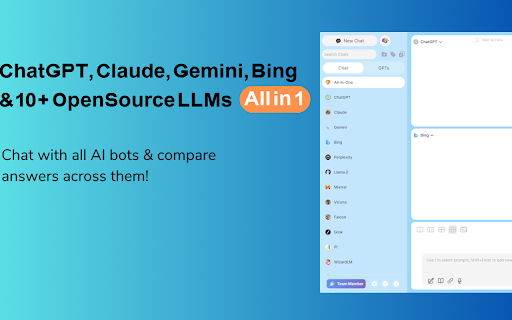
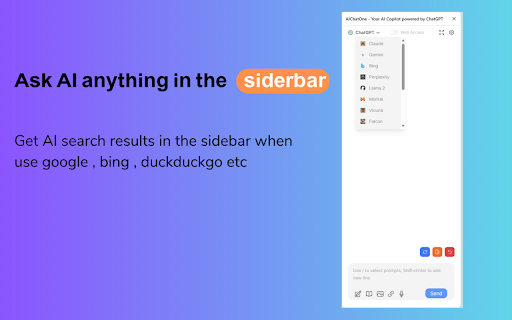
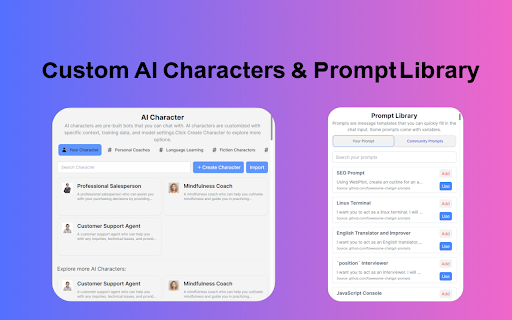
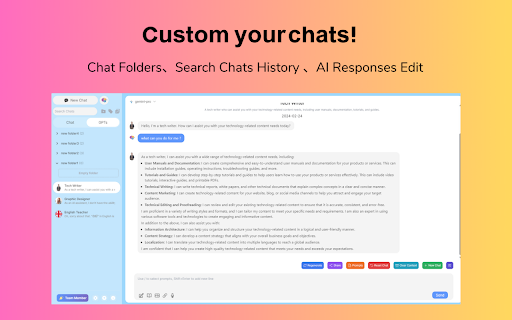

Your AI Copilot powered by ChatGPT. Answers complex questions. Writes emails, reads articles, searches smartly. Usable everywhere. Your AI Copilot powered by GPT-5 offering you use all popular Chat LLMs with enhanced features like fast response, Integrated with Google web search, Chat search, AI characters, Prompt library, etc. You can chat with Multiple LLMs at the same time to get the best answer, and you can ask AI anything in the sidebar, Supports webapp, OpenRouter, Azure and API 🔥 AIChatOne is your all-in-one GPT-5 AI assistant. Hit Cmd/Ctrl+B to open sidebar or Cmd/Ctrl+M to open full chat page, and you're in with AIChatOne. AIChatOne offers assistance in various tasks including searching, reading, writing, translating, and more. 💪 The Key Features: 👉 Chat with AI ✔️ Multi chatbots support: chat with the different LLM models such as GPT-4, Gemini, Claude3, Perplexity etc all in one place and compare their results side by side. ✔️ Custom AI Characters: Built-in AI characters and Create your own custom AI Characters that perform a specific task ✔️ Prompt Library: a prompt base that offers a large number of prompts; just hit '/' to quickly access your saved prompts. ✔️ Real-Time Web Access: AIChatOne can answer with the latest internet info. ✔️ Voice Input and Output Support: using microphone button to communicate with the AI in multiple languages. ✔️ Chat Folders: Stay organized by creating your own Chat folders 👉 Chat and Summary ✔️ Chat with doc: Instantly feed the AI important context by uploading a doc file right into the chat and quickly grasp the core highlight. ✔️ Chat with Image: take a screenshot or upload an image and ask questions based on the content of the image, powered by GPT-4V. ✔️ Webpage Summary: get accurate summaries without having to read entire webpage articles or information. ✔️ YouTube Summary: generate a concise and accurate summary for your convenience in seconds. 📝 Writing Assistant: ✔️ Social writer: for Twitter、Reddit. Your best assistant, using AI when editing posts or replying ✔️ Write agent: just provide a topic, and AIChatOne can automatically draft outlines for you, expanding the content with references. Use it in any editbox on a webpage(Coming soon!) ✔️ Email reply: in Gmail、Outlook, AIChatOne analyzes emails content and suggests reply options, enabling you to send appropriate responses with just a click, no typing needed. (Coming soon!) 👉 Search ✔️ Powerful search and filter so you can find any of your previous chats instantly ✔️ Get AI search results in the sidebar when use google , bing , duckduckgo etc 👉 Powerful Sidebar ✔️ Ask AI anything in the sidebar 👉 Customizable ✔️ Dark Mode: Toggle between light and dark mode. ✔️ Adjusting response “temperature”. ✔️ Theme. 👉 Secure & Respect Your Privacy ✔️ Api keys encrypted and stored locally. No in-app analytics. No middle servers. Your prompts are sent directly to OpenAI 💻 How to use AIChatOne: 🔸 Click the ""Add to Chrome"" button in the upper right corner and pin it to the toolbar for easy access. 🔸 Simply hit Cmd/Ctrl+B to open sidebar or Cmd/Ctrl+M to open full chat page ,then start chatting with her. ❓ Frequently Asked Questions: 📌 What search engines are supported by AIChatOne? Currently, AIChatOne supports Google, Bing, DuckDuckGo and more search engines will be supported in the future. 📌 Do I need a ChatGPT/OpenAI account? Yes, we do not provide an OpenAI API key. 📌Is AIChatOne free to use? Yes, most features of AIChatOne is free to use, and we also have premium plans. 📪 Contact us: Any questions or suggestions? Please contact us at 💌 product@aichatone.com. Try AIChatOne now and experience the powerful features of ChatGPT-driven AI assistants! 🚀 The Ultimate All-in-One Extension for Unprecedented Productivity: AIChatOne AI Assistant Embark on a quantum leap in productivity with AIChatOne AI Assistant, a revolutionary tool that amalgamates an extensive suite of features comparable to some of the most prominent AI platforms and tools available today. This powerhouse integrates cutting-edge technology and up-to-date data, harnessing the capabilities of renowned models such as OpenAI, and Gemini AI. Picture the synergy of Bing Chat, the all-encompassing functions of Merlin and Monica, the chat with all LLMs power of ChatHub, the AI capabilities akin to Jasper.ai, and the versatility of Sider's toolkit—all seamlessly rolled into one.

ChatX - Your AI Copilot for Web
An AI copilot available for all websites. It can answer any complex questions, also capability to auto-summarize and translate. Do you want to use ChatGPT directly in your browser without needing to create an additional ChatGPT account? Do you want ChatGPT/GPT-4 to assist you while browsing web pages? Do you want to use artificial intelligence to gain a deeper understanding of browsing knowledge? All of this can be achieved with ChatX AI Copilot! Whether the content is lengthy or difficult, ChatX AI Copilot will help you quickly find satisfactory answers based on your needs. Simply select the content while browsing the web and click on the shortcut button on ChatX AI Copilot! Or engage in conversations with multiple AI models in the browser sidebar, send your questions, and receive real-time AI feedback. Hope that ChatX AI Copilot can become your on-the-go intelligent advisor! - ChatX has achieved integration with mainstream large language models (LLMs), allowing you to choose your preferred model as your default productivity tool. - Currently supported models include GPT 3.5, GPT 4, Google Gemini Pro, Claude Instant, Claude 2 and Claude 3, among others. - You can utilize the power of AI for translation, summarization, or even to ask for more information about the content you are reading. - Quickly translate or understand selected content using the context menu. - Quick ask questions about selected content and receive real-time answers. - Create and save custom prompts for reuse when needed. - How to use it? ⬇️ - Simply drag your mouse to select the content you want to understand and click on the ChatX toolbar icon to perform the desired action. - Alternatively, you can use the ChatX menu in the browser's right-click menu to perform full-text translate/summarize on the current webpage. - Engage in conversation with designated models, answer any questions or generate various creative texts based on your needs. - Upload images and ask questions utilizing the exceptional visual recognition capabilities of GPT-4V and Gemini Pro Vision. - Chat with multiple models at the same time and compare their answers in real-time. - Immersive paragraph and full-text translation, generating translated results compared to the original text. - Summarize webpage content by paragraphs to enhance reading efficiency. - Enhanced search engine results for improved search effectiveness. ChatX AI Copilot currently aggregates various mainstream LLMs. With our AI Copilot, you can translate, summarize, or gain a deeper understanding of the content you are reading. ChatX AI Copilot will help you find more accurate and higher-quality information, saving you time and effort. ChatX can be used on any webpage, and its built-in chat assistant can answer any complex questions. This allows you to have deeper insights into the content you are browsing by discussing with the AI assistant accompanying you everywhere. ➕ How to use in your browser? We currently offer extensions for Chrome and Edge. Simply download and log in to our extension to use AI and ChatGPT on any website without needing to create additional accounts. 📪 How to get support? If you have any questions or feedback, feel free to contact us at contact@chatx.im. 🔏 Privacy Policy We have updated our privacy policy to ensure it includes detailed information about user data collection, processing, storage, and sharing. You can view it at https://chatx.im/privacy.

Simple Chat Hub
A browser extension aggregating numerous mainstream AI chat model platforms, supporting synchronous multi-platform chat. Features: - One-click message sending to multiple platforms and synchronous receipt of replies, facilitating cross-referencing and comparison between platforms. - Supports multiple popular AI model chat platforms and allows custom configuration. - Integrates platform official websites, no need to provide API Key. - Customizable number and order of platform windows displayed on the screen. - Can independently operate chat sessions in each platform window. - Custom prompt library, retrieve prompts with one click. - Supports prompt intelligent optimization. - Screenshot sharing, supports long screenshots. - Supports light/dark theme switching. Supports international language switching. - The extension does not require registration and is free to use. Instructions for Use - Please ensure that your network can access the official websites of AI model chat platforms normally. - For platforms that require login, please complete the login operation first before opening them from the extension.

Viinyx - AI Assistant (ChatGPT, GPT-4.5, Claude 4, DeepSeek)
Powerful all-in-one AI copilot to increase your productivity. Use generative AI (ChatGPT, Claude, Gemini) to write & paint anywhere. Do more with AI – compose and revise 10x faster with Viinyx. Powerful all-in-one AI copilot to increase your productivity. Use generative AI to write and paint anywhere on the web. Works seamlessly on Gmail, Google Docs, LinkedIn, and many other sites. Access GPT-4, Gemini, Claude 4, and DeepSeek models ✍️ With only a short prompt, command AI to draft emails, write blog posts, create marketing copy, brainstorm ideas, translate text, review essays, etc. Access ChatGPT, Claude AI, Gemini and Llama, among others to generate text. 🎨 Generate images for social media posts, images to use on your website, logo designs for your company, illustrations for your book, or images for numerous other purposes. Use DALL·E, FLUX, Stable Diffusion and various other providers for generating images. 💬 Hit Options (⌥) / Alt + V to start chatting with AI ▶︎ Enter ‘/‘ into the Viinyx chatbox to view your library of saved prompts. ▶︎ Enable page awareness, web access, or academic search for more relevant, factual and up-to-date responses. ▶︎ Viinyx saves your chat history locally and syncs it across each tab in real time. ▶︎ Talk to images or alter them using AI. ▶︎ Talk to multiple PDF documents at once ✨ Type // to generate text and images – Unobtrusive AI writing assistant. ▶︎ Compose any kind of text content using your preferred AI providers (API connection to OpenAI, Claude, OpenRouter, etc.) ▶︎ Generate images on Google Docs, Medium, and everywhere else. ▶︎ Generate a quick contextually aware reply to a post, comment, comment reply, or message. ▶︎ Let AI continue where you left off, finishing your draft, with similar tone and style. 🔎 Summarise search results ▶︎ Summarise your search results or get an AI-generated answer to your search query – integrated with Google, Bing, Yahoo and most other major search engines. With this feature, you'll spend less time deciphering complex search results, making your online research a breeze. 🎞️ Summarise a video on any website ▶︎ Get quick summaries of videos of any length on any website. Viinyx is the perfect study companion for YouTube, Udemy, Coursera and more. 🪄 Highlight and modify text in one click ▶︎ Shorten, lengthen, improve grammar, reword and modify text quickly. 🖼️ Reimagine images on the web ▶︎ Leveraging prominent image-generating models like DALL·E, Google Imagen, and Adobe Firefly, Viinyx steps up to reimagine and regenerate images. Revamp images on the web, paint with AI, or create outstanding logos from just text. With Viinyx, churning out captivating concept art and enticing logos becomes natural. Viinyx is your AI-powered web assistant brilliantly designed to sprout creativity and bolster productivity by making your life significantly easier. An extension that brings together the power of robust AI models like GPT-4 and GPT-4o, Anthropic Claude 3, Google Gemini 2.0, OpenRouter models, and so much more. ➕ Much More Coming Soon ➕ This is still just the beginning. More amazing features are on the horizon to make Viinyx even more integral to your digital journey. 🔐 Privacy All your configurations, API Keys, browsing and session data, stored documents, and chat history are stored inside your device(s) browser. We do not transfer your data to any remote servers, nor do we sell your data to third parties. 📪 Contact Us We appreciate your valuable feedback. Please rate our extension and share your experience. For support, guidance, or any queries, feel free to get in touch with us at support@viinyx.com.

Multi AI Sidebar
Access to all AI apps like OpenAI ChatGPT, Bing AI, Microsoft Copilot, Google Gemini and more in a single Sidebar. Get the best AI. ★★★★★ Access to many Artificial Intelligence Apps and many more in a single Sidebar with OpenAI ChatGPT, Microsoft Bing AI - Copilot or Google Gemini - Bard, xAI Grok, Anthropic Claude 😱 See this link for a full list: https://jitt.wwevents.fun/project/multi-ai-sidebar/ 🚧 This Multi AI Sidebar allows to fast switch between all the AI Apps 🚨 You can enable/disable the AI Apps that you want to be active 🔥 Explore the amazing possibilities of AI, such as generating text, images, music, code and more in real time 🏆 Non-intrusive, by showing the number of active AI Apps in the Sidebar icon on the Browser Toolbar 🥊 FEATURES ★ ChatGPT: Allow to chat with the lastest GPT iteration from OpenAI. ★ Microsoft Copilot: Copilot and Bing AI have can read text and files and provide real-time web serach and information. ★ Google Gemini: Chat with the latest AI from Google that was upgraded from Google Bard to Gemini Nano, Gemini Pro, and Gemini Ultra. ★ xAI Grok: Check the latest AI for X, called Grok. Developed by xAI. It's one of the most advanced in the world. ★ Anthropic Claude: Now available the latest Claude LLM, give it a try! ★ For image and video manipulation the extension also provide easy access to Microsoft Designer, Microsoft Image Creator and Magic Studio. ★ Sidebar shows as a slide-out panel and runs the web versions of the available AI Apps meaning less CPU/RAM/Internet consumption 👑 ★ Your computer will run faster with more resources available without having to sacrifice functionality. ★ Choose your preferred AI App from a wide number of available options 😍 ★ Combine all the cutting-edge AI Apps into one simple panel! ★ Multi AI Sidebar is a wrapper for worldwide AI Apps. It allows you to have access to the official services quickly from a standalone sandboxed panel 🔥 ✔ Best extension for Artificial Intelligence 🔧 You can fast-switch between all AI Apps 🎓 ✔ Clean and simple interface 💻 ✔ Very Low CPU/RAM/Bandwidth consumption. ✔ HTTPS and on official platforms for maximum security 🔑 No share of credentials to third party 🔓 💎 Building Apps and Extensions for Google Chrome and Android 🔥📣 📔 Available on the product page: https://jitt.wwevents.fun/project/multi-ai-sidebar/#changelog Multi AI Sidebar is a trademark of WWEvents. All websites are a trademark of their own company's, registered in the U.S. and other countries. This is an independent project developed by WWEvents and has no relationship to them. By installing this product you agree to our privacy policy & terms of service: https://jitt.wwevents.fun/privacy-policy/ You may consult the list of permissions and the reason why they are required on the product page: https://jitt.wwevents.fun/project/multi-ai-sidebar/#permissions “notifications” – Used to send desktop notification. For example when a new message arrive or App is updated. “contextMenus” – Allow to add more settings when right click in the App icon in the browser toolbar and browser context menu. “storage” – Used to save settings on your local computer. “scripting” – Used to be able to insert JS or CSS on the required host/domains. “system.display” – Used to detect the display size and position the Extension window. “unlimitedStorage” – Storage is limited to 5MB of data that may not be enough to store all configs. “host_permissions” – Permission to access to some hosts/domains that we must modify in order to provide the desired functionality detailed in the functionality. It also allows that you can share content (links or text) from other pages directly to inside the App and send it as a message to a friend for example. Also used to allow intercommunication with other Apps (i.e. Emojis). “activeTab” – Permission to access the window that the extension is running and is show to the user. “all_urls” – Permission required for users be able to take screenshots of the current window – captureVisibleTab. “declarativeNetRequestWithHostAccess” - Used to get the iframe version of the websites. Only impact the Extension Window. “declarativeNetRequestFeedback” - Used to get the iframe version of the website by changing the iframe requests. “alarms” - Used to update App icon badge. This information is also available inside the App: Options -> About
