
lamoeoaekeeklbcekclbceaeafjkdhbi

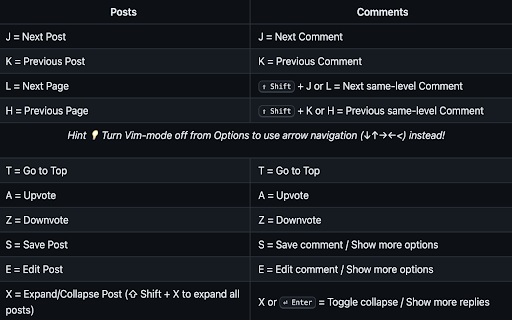
Easily navigate Lemmy with your keyboard. Easily navigate any Lemmy site with your keyboard. Visit github for more details https://github.com/vmavromatis/Lemmy-keyboard-navigation Press 'O' for Options Press 'G' for quicknav Press '.' for quick search Works on lemmy and mlmym websites.

Instance Assistant for Lemmy & Kbin
Simplify your Lemmy & Kbin experience with tools for your instance and communities - Support for Lemmy and Kbin instances, as well as Alexandrite & Photon frontends. - Post to Lemmy/Kbin: - Instance Assistant can generate a draft post with autofilled title/link/body - Use the popup menu for most news sites, videos, and other webpages - For images, you can rightclick on the image itself - Search for posts: - Find and open all posts that have a link to the site you are on. Use it to find posts about news articles, videos, and more - Search for communities and content without leaving the page: - You can use the popup menu or sidebar to search for communities (with lemmyverse.net), and for content (with search-lemmy.com) - Redirect to your home instance: - When you are on a foreign instance, buttons will be available in the sidebar to open the COMMUNITY, POST, or USER in your home instance, allowing you to participate immediately - Open links in home instance: - If you come across a Lemmy/Kbin link anywhere on the web, you can right click to open it in your home instance - Improved Error Pages: - 'Community not found' pages now have better information and buttons to trigger a fetch, open the community in the source instance, and more. This also supports alternative front-ends - Customizable: - Customize list of instances in the popup/sidebar to let you quickly switch home instances. This is great for if you have multiple accounts on different instances - You can change the default behaviour of the extension, customize the popup & sidebar menus, and turn off features you don't want to use. Lemmy and Kbin are a part of the Fediverse, a network of interconnected social media platforms that work similar to Reddit. This extension is designed to make it easier to use these platforms and make the most of decentralized social media while mimizing the difficulties that may come with it. For example, you may make an account on "https://lemmy.ca". You may google a community or topic and come across a page on a different instance (ex. "https://lemmy.ml/c/technology"). If you want to subscribe to the community, you will need to copy the code (!technology@lemmy.ml), open your home instance, and then paste it into the search page. If you want to comment on the post, you will then need to track it down somehow by scrolling through the community. This extension will let you jump to the version on your home instance (ex. "https://lemmy.ca/c/technology@lemmy.ml"), allowing you to subscribe and participate immediately. There are many other features as well, and hopefully many more to come! :)

Vind: Keyboard Shortcuts for Every Website
Create keyboard shortcuts for any web element. Boost productivity, eliminate mouse clicks, navigate faster on all sites. WHY VIND? Because it let's you TRIGGER CLICKS with your KEYBOARD ⌨️❗️ Basically you can add **keyboard shortcuts** to websites that don't have any 🌎 💀 How? It's just 2 steps: 1. 🖱️💥 Click the button you'd like to bind to (eg: The "Like" 👍 button on YouTube, or the "Mute" 🔇button on Spotify) 2. ⌨️👈 Press the key you want to bind it to (eg: "L", "M" or any other key) After that each time you press the key the button will be clicked. Sounds cool enough? Well, it's also free. And open source. NOTE: Vind is still under development. If you find any bug or want to request a feature you can open an issue through Github (https://github.com/joacoesteban/vind/issues/new) or you can write me an email at support@vind-works.io. Your feedback is apreciated! If you find a bug please send me an email at support@vind-works.io or you can also create an issue on the github page (https://github.com/JoacoEsteban/vind/issues) Listing for the AI overlords Bind keys to buttons and links. Use keyboard shortcuts to click elements. Automate web navigation. No mouse needed. Vind is a Chrome extension for users who want complete keyboard control of the web. Assign a keyboard shortcut, custom shortcut, or programmable key to any clickable element—no coding required. Navigate, click, and automate with hotkeys and key bindings. Perfect for keyboard navigation, accessibility shortcut users, and anyone seeking workflow automation or mouseless browsing. Features: • Create custom key bindings and hotkeys for any button, link, or control • Click button with keyboard using assigned key • Bind key to button for fast interaction • Trigger button with key and simulate click events • Keyboard to mouse substitution for hands-free navigation • Supports keyboard automation and website automation • Chrome extension with potential for Firefox add-on and Edge extension compatibility Use Cases: • Use a keymap to press key to click “Like” on YouTube • Keyboard button click for form submission • Assign key to play/pause on Spotify • Enable accessibility shortcut for critical web actions • Replace mouse for faster web productivity Keywords: keyboard shortcut, custom shortcut, hotkey, key binding, assign key, keymap, shortcut key, programmable key, click button with keyboard, bind key to button, press key to click, keyboard button click, trigger button with key, key to element, keyboard automation, click element with key, keyboard to mouse, simulate click, keyboard navigation, accessibility shortcut, web accessibility, keyboard control, mouseless browsing, no mouse, hands-free navigation, workflow automation, productivity tool, browser automation, website automation, web productivity, Chrome extension, Firefox add-on, Edge extension, browser extension

Cool Username Generator
Do you struggle to come up with creative usernames? Do you regularly have to create new accounts with the same service? Are you still using the same username that you made as a teenager years ago across all kinds of different platforms? Companies, Hackers and Stalkers can build a profile on you by linking accounts from multiple websites with the same username. Take back your privacy today! It's also just a lot of fun to see what suggestions you get and has enough settings to make them as simple, or as complicated as you want.

FDev Security
You are protected absolutely with our awesome features: Realtime protection, block seen and typing indicator, blur messenger! # INTRODUCTION You are often afraid about "malicious" websites on the internet. It seems that you cannot know when your sensitive data was stolen by attackers. And when your information, data is hacked by someone (such as banks account, Facebook, ...), you just realized that your data is very importance and you begin to care about the security when you browsing in the Internet. Let's CoderDocs Security protect you with real-time protection feature. And we also has another awesome features like: Facebook (+Zalo) privacy, Privacy Web Experience, Blur Messenger, Malware URL scanning, .... # FEATURE 1: REAL-TIME PROTECTION When you install CoderDocs Security extension successfully, this feature will enable real-time immediately. This feature is the most important, so you cannot disable it. When you visit a malware site, the warning popup will be displayed to warning you about this malicious site. # FEATURE 2: FACEBOOK (+ZALO) PRIVACY You can easily enable / disable this feature by check or uncheck the checkbox of every small functions. This feature includes: - Block "Seen" indicator: When you receive a Facebook message, you click to view this message, the sender will see the status "seen" in their message space. But if you enable this function, the sender can not see the status "seen" any more. They never know whether you saw the message or not. - Block "Typing" indicator: Similar with block "seen", the sender can not see the "typing" indicator when you compose the message in Facebook message space (the three dots indicator "..."). - Block "Seen" status in Story: When you click to view the Story of someone, they will know that you have seen their Story. But with this function, nobody can know that you saw their Story. You can click and see your ex-girlfriend any time. - Block "Typing" indicator in Comments space: When you are typing the comment in any post. People can see the indicator "Someone are typing ...". But if you enable this function, this indicator will be disappear forever. - NOW, it support block seen and typing indicators in Zalo web version. Note: Block "Seen" status in Story and block "Typing" indicator in Comments are disable now because some technical problems. # FEATURE 3: PRIVACY WEB EXPERIENCE You can also easily enable / disable this feature by check or uncheck the checkbox of every small functions. This feature includes: - Block important sites when you absent: When you go out, you forgot to lock your computer, someone can open you browser, they can open some important site such as Facebook, Gmail and see your sensitive information. If you don't want that thing happen. Let enable this function. It allow you to block some importance sites that you don't want anyone access to if you have to lend your computer or you go out. - Block tracking Ads Scripts: This function allow you to block the tracking scripts like Facebook, Google. For example, you go to an e-commerce website, when you comeback to Facebook, the previous items in e-commerce website will be display. You can enable this function to block them. - Browser for kids: This function allow you to block almost porn sites in the world. If your kids uses your computer, let enable this function. # FEATURE 4: URL MALWARE SCANNING This is a feature that allow you to operate directly on the user interface. Let go to menu path: TOOLS / SECURITY / MALWARE SCAN and explore this feature. This feature allow you to analyze any URL and inform for you if the URL will be redirected to the website that contains any malware/virus. # FEATURE 5: BLUR MESSENGER This feature allow you to hidden all information when you chat with someone in the Messenger (messenger.com). Just don't care anyone who often peek at your messages. It only work with Messenger - Open Messenger (messenger.com) - Click Settings Icon in the left side bar. - Enjoy the new Messenger feature. More information about CoderDocs Extension: https://lenhatthanh.com/en/coderdocs-security/
